A personalized first line is the opening sentence after the greeting. Its job is to show the reader why you are writing to them, using one fact about their company or role that you can verify and that connects to what you offer. It works when the fact is specific and relevant. It fails when it is flattery or a merge tag in disguise. And it only matters if the email reaches the inbox, which is why we treat the opener and the sending setup as one system.
This guide covers what a good opener looks like, how to research one in a few minutes, how to keep quality up across thousands of sends, and how to test whether it is paying off.
Key Takeaways
- A strong first line states one verifiable, current fact about the prospect and ties it to a problem their role owns. Praise adds nothing.
- One 10,247-email experiment found that heavy manual research barely beat a well-written template on reply rate. Relevance to a real problem drives replies more than the name-drop does.
- Spend deep research on your top 20 to 30 accounts. Use one template per reason type, with a sourced fact as the variable, for everyone else.
- Let software draft candidate facts and let a person choose and edit the line. Use a short QA checklist before anything goes out.
- Test with two matched groups and measure positive replies per 100 delivered, not opens. Confirm inbox placement first, or you are measuring spam folders.
Table of Contents
- What a first line actually does
- Does heavy personalization really lift replies?
- Four first-line patterns that hold up
- How to research a prospect in five minutes
- A QA checklist before a line goes out
- Scaling first lines without sounding generic
- Examples: weak to strong
- Testing whether your first lines work
- Why the opener depends on the inbox
- Where PlusVibe fits
- Our perspective
- FAQ
- Sources
What a first line actually does
Most cold emails are judged in the preview text, the snippet an inbox shows next to the subject. The first line is often all the reader sees before deciding. It has two jobs: prove this email was written for someone like them, and make the reason for the message obvious.
You will also see it called an opener, an opening line or an icebreaker. They are the same thing. Mailchimp’s guidance on opening lines boils effective ones down to specific knowledge about the recipient, immediate relevance to their needs, and a brief, authentic tone.
That definition rules out three common habits:
- Generic warmth. “I hope this finds you well” fits every inbox on earth.
- Flattery. “I love your incredible growth” claims admiration without any evidence.
- Research theater. A paragraph proving you read their last five LinkedIn posts, with no link to why you are writing.
Compare: “Your careers page lists a data-operations role” is a checked fact. It also points naturally to a problem, such as a team that is hiring because manual work is piling up. The first line works because the next sentence has somewhere to go.
Does heavy personalization really lift replies?
Here is the honest answer, and it should shape how you spend your time. The Backchannel team sent 10,247 cold emails and compared messages built on 15 to 20 minutes of human research each against well-crafted templates. The researched emails reached an 8.1% total reply rate against 7.9% for the templates. Positive replies were 2.8% against 2.6%. That gap is too small to matter.
Their best campaign did not win on research. It used a short email, an opener naming a specific pain, a four-word subject line and a Tuesday morning send. It reached 14.2% total replies and 6.4% positive replies.
The lesson is not “skip personalization.” It is that personalization should carry relevance. A line that names a real problem the prospect probably has beats a line that shows how much you read. For the reader of this article, that gives a practical split:
- Top 20 to 30 accounts: research by hand. The deal size justifies it.
- Everyone else: segment by shared problem and personalize by reason, not by individual trivia.
The same experiment’s authors reach the same conclusion: reserve deep personalization for the highest-value accounts.
Four first-line patterns that hold up
These patterns work because each one rests on something you can point to.
Hiring or role signal
“Your careers page lists a RevOps manager and two SDRs.” This tells the prospect you looked at something current and public. The bridge is obvious: a team scaling outbound is usually thinking about pipeline and tooling.
Public company event
“Congrats on the Series A” is common and usually a throwaway. “You opened a second warehouse in Dallas in the spring” is better, if and only if your next sentence connects it to shipping, staffing or whatever you actually solve.
Tool or stack signal
“You’re running your storefront on Shopify with a separate returns portal.” This is useful when your offer integrates with, replaces or complements that tool. It is useless when the stack has nothing to do with your pitch.
Problem-first opener
The best-performing campaign in the experiment above led with a specific pain. Example: “Agencies running 20+ clients on shared sending domains tend to see one client’s complaint rate drag down the others.” It needs no research on the individual, only on the segment, and it still reads as written for them.
Whatever pattern you choose, keep the line short. Aim for one sentence, ideally under 25 words, with exactly one detail.
How to research a prospect in five minutes
Time-boxing keeps personalization from eating your day. A workable routine for a high-value account:
- Start with the company’s own pages. The careers page, a recent press or blog post, a pricing or product page. These are public, professional and easy to cite.
- Add one role-specific signal. A talk the person gave, a post about their function, a job listing under their team. Stay professional. A family photo or a hometown is not a fact you should use.
- Write down the source link and the date next to the fact. If you cannot link it, you cannot verify it later, and you should not send it.
- Decide what problem the fact points to. If you cannot finish the sentence “which usually means they care about ___,” the fact is trivia. Pick another one.
- Write the line, then the bridge. The opener and the next sentence should read as one thought.
Automating the gathering part is reasonable. Prospect lists, enrichment and scraping can fill your spreadsheet so your five minutes go to choosing and writing. If you want the process written out, our guide to automating prospect research walks through it, and our overview of AI for sales prospecting covers where software helps most.
A QA checklist before a line goes out
A line can be well written and still wrong. Rework’s guidance on personalization at scale suggests an eight-point check that we find easy to apply:
- The fact is true. Open the source and look.
- It is current. Check the date.
- It is the right person at the right company.
- The next sentence bridges to a problem their role owns.
- There are no praise words.
- Nothing claims more than the source says.
- The detail is public, professional and nameable.
- It is not a clone of its neighbors. Read ten lines in a row. If five share the same shape, rewrite the template.
The last check catches the most. Mail-merge openers tend to repeat one sentence skeleton with a swapped noun, and recipients recognize the skeleton.
A simple extra test: swap the prospect’s company name for a competitor’s. If the line still works, it is decoration, not personalization.
Scaling first lines without sounding generic
Sending 200 emails a month, you can write every opener by hand. Sending tens of thousands, you need a system. Rework describes a workflow that matches how we see good outbound teams operate:
- Segment 20 to 50 contacts who share a problem. The segment is the real personalization.
- Store each signal with its source link and date. One column for the fact, one for the link, one for the date.
- Use one template per reason type. The fact is the variable. The reason for writing stays constant within a segment.
- Review by tier. Check every line for Tier 1 accounts. Sample Tier 2 at roughly one in ten.
- Measure positive replies per 100 delivered.
The same source notes that hand-edited emails beat fully automated ones, and that AI is strongest in the slow middle: reading a company page or job post and proposing candidate facts with links, so a person picks the one worth using.
That is the split we recommend. Software drafts and a person decides. If you want a practical look at how AI can surface candidate facts while a human stays responsible for the final line, this AI link prospecting workflow shows the same research-then-select principle in another outreach setting.
Guardrails for AI-drafted lines
If a model drafts your openers, constrain it:
- Give it one prospect record at a time, with fields such as company fact, role and trigger event.
- Require exactly one detail from the record, in a single short sentence.
- Ban praise phrases and filler such as “big fan” or “quick question.”
- Let it return nothing when the record supports no specific line. A blank is better than an invented fact.
- Spot-check for fabricated details. A model can state something plausible that is simply not in the record.
Skipping a prospect with no usable signal is fine. Send them the segment-level problem opener instead.
Examples: weak to strong
| Weak | Why it fails | Stronger |
|---|---|---|
| “I was impressed by your company’s growth.” | Praise with no evidence | “Your careers page lists three SDR roles.” |
| “Saw you’re in logistics.” | True of thousands of firms | “You added a Dallas warehouse this spring.” |
| “Loved your recent LinkedIn post!” | Does not say which one or why it matters | “Your post on carrier delays points to the same bottleneck we see in dispatch handoffs.” |
| “Hope you’re well. Quick question…” | Filler | “Agencies managing many clients on shared domains often see one client’s complaints hurt the rest.” |
Notice that the stronger lines are not longer. They are narrower.
Testing whether your first lines work
Personalization is a hypothesis. Test it like one.
- Check placement first. If the emails land in spam, a test of copy tells you nothing. Run a seed test to see where your real campaign emails land at Gmail, Outlook and other providers before you compare variants.
- Change one thing. Keep subject, body, offer, send time and sending domain constant. Vary only the first line: personalized against a plain, relevant problem opener.
- Split randomly within the same segment. Do not compare a hand-researched top-tier group with a cold list, or the audience difference will swamp the copy difference.
- Use enough volume. The Backchannel experiment’s 0.2-point gap on reply rate shows how easily small differences hide in noise. A few hundred sends per variant is a starting point for large effects, not for small ones.
- Judge on positive replies per 100 delivered. Opens are unreliable, and total replies include “unsubscribe me.”
- Repeat before you roll out. One good week proves little.
If you are also tuning timing and subject lines, our cold email best practices and techniques for boosting B2B responses list the other variables worth testing, one at a time.
Why the opener depends on the inbox
The best first line in the world does nothing if the email lands in spam. Deliverability is decided before you hit send: your domains, mailbox reputation, warm-up and sending volume all matter. Personalization raises the odds that a reader engages. Infrastructure decides whether they ever see it.
This is the problem PlusVibe was built around. On the Agency plan, each client gets its own sending server and dedicated IPs, so one client’s mistake never touches another’s reputation. Mailboxes warm up in a private pool where the peak warm-up bounce rate has never exceeded 0.1%. Our deliverability page explains the setup in more detail.
Where PlusVibe fits
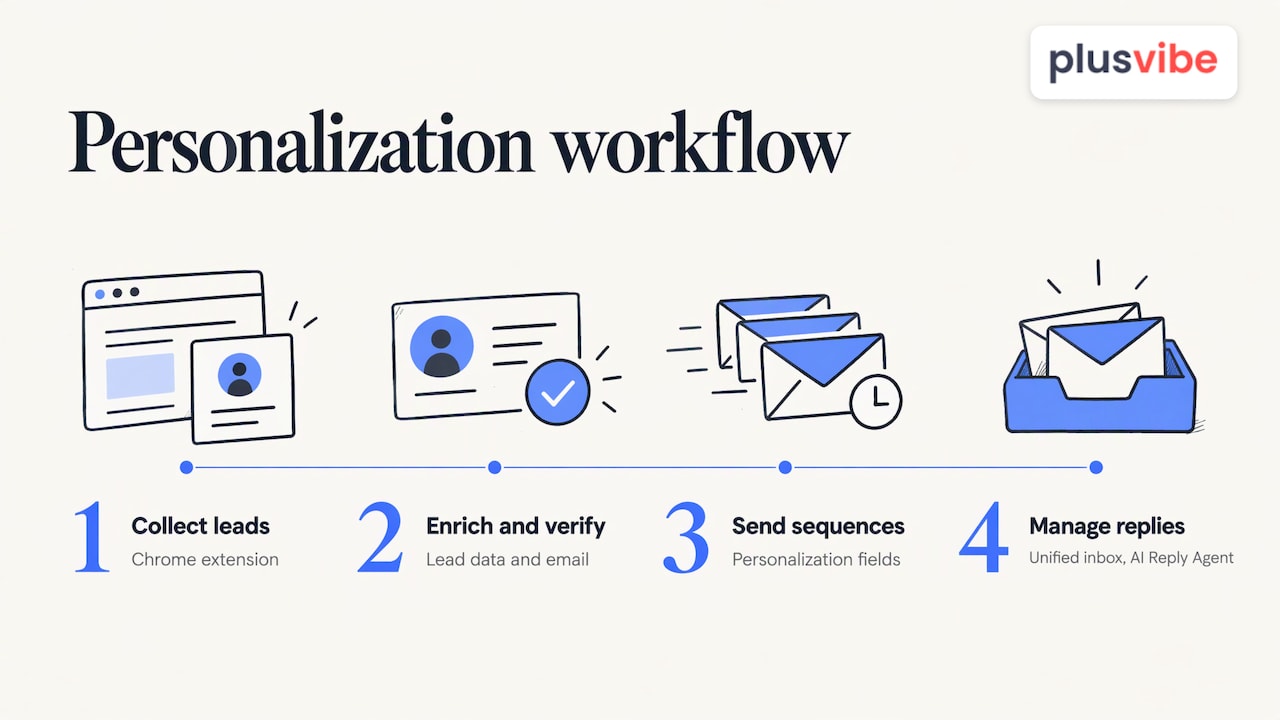
If you are personalizing at volume, you need the whole workflow in one place: prospect collection through our Chrome extension, lead enrichment and email verification, multi-step sequences with personalization fields, and a unified inbox for replies, including an AI Reply Agent. Seed tests show where your real campaigns land, so you can judge a first-line test on trustworthy numbers.
Plans start at $37/month. Business is $77/month for 150,000 emails, and Agency starts at $497/month for 500,000+ emails, with no fee per connected mailbox. You can start a 14-day free trial with no credit card and judge us on placement. See the plans page for the full list.
If you send a couple hundred emails a month, a simpler tool will serve you fine. If your pipeline depends on the inbox, or you run campaigns for many clients, start with PlusVibe.
Our perspective
We believe cold outreach is honest work when it follows a code: relevant, honest, respectful and measured. A first line is where that code shows up first.
The mistake we see people make is treating personalization as a volume of detail. Receipts matter more than vibes. One fact you can cite, tied to a problem the person actually owns, will do more than three lines of research that prove you did homework.
That is also why we built PlusVibe around the inbox rather than around sending more. A well-aimed opener deserves to be seen, so we give each agency client private infrastructure, one closed warm-up pool with no premium tier to upsell, and seed tests that show where your actual emails land. You should be able to check the result instead of trusting a dashboard score.
Write fewer, better lines. Review them. Measure positive replies. Then let the infrastructure do its part.
Yaro
FAQ
What is a good first line for a cold email?
A good first line is one short sentence naming a checkable fact about the prospect, such as a job listing or a product launch, that points to a problem your offer addresses. It carries no praise and no filler. Ideally the next sentence follows from it without a hard turn.
How long should a personalized first line be?
One sentence, and in practice about 25 words or fewer. Longer openers start to read as proof of effort rather than a reason to reply. Brevity is part of what makes an opener sound authentic, as Mailchimp’s guidance on opening lines also stresses.
Should I use AI to write first lines?
Use it to find and draft candidate facts from company pages, with source links, and have a person choose and edit the final line. Fully automated openers tend to be generic or wrong. Give the model one record at a time, require one verifiable detail and let it return nothing when the data is thin.
Is personalizing every email worth the time?
Not always. In one 10,247-email experiment, manual research on each email barely changed reply rates against good templates. Research deeply on your top 20 to 30 accounts and use segment-level problem openers for the rest.
What is the difference between an icebreaker and a first line?
Nothing meaningful. Icebreaker, opener, opening line and first line all describe the sentence after the greeting. The label that matters is the function: it should make the reason for your message clear.
Sources
- How to Write Email Opening Lines That Get Noticed
- We Sent 10,000 Cold Emails and Here’s What Actually Got Replies
- Personalization at Scale: What Moves Cold Email Replies