The List-Unsubscribe header is a line of hidden metadata in your email that tells Gmail, Yahoo, Outlook and Apple Mail where to send an unsubscribe request, so the inbox can show its own unsubscribe button. For one-click unsubscribe in Gmail you also need a second header, List-Unsubscribe-Post, plus a DKIM signature covering both. Getting this right gives unhappy recipients a clean way out instead of the spam button, and that protects the domains your outbound depends on. Below you get what each header does, what Gmail requires, a working example, and a test routine you can run on a real delivered message.
Key Takeaways
- List-Unsubscribe holds an HTTPS URL, a mailto address, or both. It is invisible in the message, but inbox apps use it to show an unsubscribe button.
- One-click unsubscribe needs two headers: List-Unsubscribe with an HTTPS URL, and List-Unsubscribe-Post with the exact value
List-Unsubscribe=One-Click. Both must be covered by your DKIM signature. - Google requires one-click unsubscribe from anyone sending more than 5,000 messages a day to Gmail addresses, for marketing and subscribed mail, along with a visible unsubscribe link in the body.
- Honor requests within 48 hours, and never make the recipient log in, tick boxes or confirm.
- Test the final delivered message by reading its raw source and posting to your endpoint. A green dashboard does not prove the headers are on live mail.
Table of Contents
- What the List-Unsubscribe header does
- List-Unsubscribe vs. List-Unsubscribe-Post
- What Gmail requires from senders
- How one-click works under the hood
- Setting it up, step by step
- How to test it
- Common mistakes
- Where PlusVibe fits
- Our view on unsubscribes
- FAQ
- Sources
What the List-Unsubscribe header does
Every email carries headers: lines of technical information above the visible content, such as the sender, the date and the authentication results. List-Unsubscribe is one of them. Its value contains one or more addresses, each in angle brackets and separated by commas, that tell a mail client how to remove the recipient from your list. The address can be a web URL, a mailto address that triggers an unsubscribe email, or both.
The header is hidden from the reader. What they see is the result: an unsubscribe link next to the sender name at the top of the message, a button on hover in Gmail’s inbox list, or a prominent button in iOS Mail. Litmus explains that this is not automatic. The client only offers the option when it finds mailto or URL instructions in the header.
For a sender, the practical value is simple. A person who wants out will take the easiest exit. If the inbox puts an unsubscribe button in front of them, they use it. If it is buried in a footer, they hit “Report spam,” and spam complaints are what damage a sending domain.
List-Unsubscribe vs. List-Unsubscribe-Post
These two headers are often confused, and the confusion is why many senders believe they are compliant when they are not.
| List-Unsubscribe | List-Unsubscribe-Post | |
|---|---|---|
| Purpose | Tells the inbox where to send an unsubscribe request | Signals that the URL supports one-click unsubscribe |
| Value | One or more URLs or mailto addresses in angle brackets | The fixed pair List-Unsubscribe=One-Click |
| Used alone | The recipient is taken to a link or sends an email | Does nothing without the first header |
| Standard | RFC 2369 (1998) | RFC 8058 (2017) |
The first header on its own produces a link the recipient has to follow. The second one is what converts that link into a true one-click action. RFC 8058 says the List-Unsubscribe header must contain one HTTPS URI, and the List-Unsubscribe-Post header must contain the single key/value pair List-Unsubscribe=One-Click.
Here is what a compliant pair looks like in a message’s raw source:
List-Unsubscribe: <https://example.com/unsub/8f3a9c2e71b4>, <mailto:unsub@example.com?subject=unsubscribe>
List-Unsubscribe-Post: List-Unsubscribe=One-Click
Note that mailto and HTTPS are not competing options. They are two addresses inside the same header. Keep the mailto for clients that can only use email, and make sure the HTTPS address is first and fully working, because that is the one Gmail’s one-click flow uses.
What Gmail requires from senders
Gmail is the reason most teams are reading about this. Google’s sender guidelines, in force since February 1, 2024, set the rules by volume.
Every sender needs SPF or DKIM, valid PTR records, TLS, a spam rate below 0.3% in Postmaster Tools, and properly formatted messages. Senders of more than 5,000 messages a day to Gmail addresses must also use DMARC, and must include both of these in marketing and subscribed messages:
- A
List-Unsubscribeheader and aList-Unsubscribe-Post: List-Unsubscribe=One-Clickheader. - A clearly visible unsubscribe link in the message body.
The request Gmail sends when someone clicks is an HTTPS POST with the body List-Unsubscribe=One-Click. That is why your endpoint has to accept POST requests, not just serve a page.
Who is covered
Google’s FAQ states that one-click unsubscribe applies to marketing and promotional messages. Transactional mail, such as password resets, reservation confirmations and form submission confirmations, is excluded. Google’s subscription guidelines define a subscription message as any email to a mailing list that recipients can unsubscribe from, including promotional mail, marketing mail, newsletters and some notifications. They also ask for unsubscribing with no additional user action and processing within 48 hours.
If you run outbound for yourself or for clients, treat the 5,000-a-day line as a per-sender threshold you can cross faster than you expect. An agency sending for several clients through shared infrastructure can reach it quickly. Our guide to the new Gmail rules for bulk senders walks through the wider picture.
What happens if you skip it
Google says it does not automatically reject or spam-mark non-compliant messages. But non-compliant unwanted messages are more likely to be reported as spam, and only bulk senders that meet all the requirements are eligible for mitigation if a problem occurs. Google also recommends fulfilling unsubscribe requests within 48 hours. In practice, the header is cheap insurance against the one metric Gmail watches most closely.
How one-click works under the hood
The design of RFC 8058 solves a real problem. Spam filters and link scanners fetch links in messages automatically using GET requests. Many senders had responded by putting a confirmation page behind the unsubscribe link, which meant a human had to click again. And a plain GET link that unsubscribes on load can be triggered by a scanner, removing people who never asked.
The POST-based signal fixes both. According to RFC 8058:
- The mail client sends an HTTPS POST to the URL in your header, with
List-Unsubscribe=One-Clickas the body. - The client must not send the POST without the user’s consent.
- The request must not include cookies, authorization or other context, so your endpoint cannot depend on a logged-in session.
- The URL must identify the recipient and the list, and should carry an opaque token that is hard to forge, which the server verifies. This stops attackers from unsubscribing people by guessing URLs.
- The server must not answer with an HTTPS redirect.
- A valid DKIM signature must cover both headers. Without one, the receiver should not offer one-click unsubscribe for that message.
That last point is the one most often missed. If your signing configuration covers From, Subject and Date but not the two list headers, the headers can be present and still ignored.
Setting it up, step by step
The exact settings depend on your sending platform or mail server. The sequence is the same everywhere.
1. Build a one-click endpoint
Create an HTTPS URL that accepts POST requests and unsubscribes the person on the spot. Each URL must be unique per recipient and per list, with a long random token rather than an email address in plain text. Return a simple success response, not a redirect. The most common failure here is reusing the web unsubscribe page, which often expects a GET, shows a confirmation screen or needs a session.
2. Add the two headers to every marketing message
Insert List-Unsubscribe with your HTTPS URL, and a mailto address if you want one, then add List-Unsubscribe-Post: List-Unsubscribe=One-Click exactly as written, with no extra spaces or quotes. Put List-Unsubscribe first. If you can only generate one token-based URL per message, generate it per recipient, not per campaign.
3. Sign both headers with DKIM
Your DKIM signature’s h= tag must list both list-unsubscribe and list-unsubscribe-post. Most platforms and mail servers let you choose which headers are signed, so check that setting rather than assuming.
4. Keep the visible link in the body
Google requires a clearly visible unsubscribe link in the body of marketing and subscribed messages, in addition to the header. Where it sits matters for reply rates too, and our piece on unsubscribe link placement covers that trade-off.
5. Process requests fast
Suppress the address across the whole list the moment the POST arrives. Google’s guidance is 48 hours at most, but there is no reason to wait. Make sure the suppression is shared across every inbox and campaign that could write to that contact, or the same person will get the next email from a different mailbox.
6. Keep a record
Store the time, list and source of each opt-out. When a recipient or a client asks what happened, you can answer in a minute. A broader marketing automation checklist helps you check where subscription handling fits among your other systems.
How to test it
A dashboard saying “enabled” proves very little. Test the message a real inbox receives.
- Send a live message to a Gmail address you control and open the raw source (“Show original” in Gmail). Confirm the HTTPS URL, the exact
List-Unsubscribe=One-Clickvalue and the DKIM signature with both headers inh=. - Check your DNS. SPF, DKIM and DMARC records must be published and passing, since Google requires DMARC at volume.
- POST to the endpoint yourself with a test token. You should see success, the contact suppressed, and a repeat POST handled gracefully without an error.
- Make a GET request to the same URL. It must not unsubscribe anyone.
- Try an unknown or expired token. The response should reveal no data about any recipient.
- Click the button in Gmail on a test message and confirm the address is suppressed.
Repeat after any change to your sending platform, domain or template. Each check proves something the others cannot, and a successful test proves only the path you tested, not every future message.
Common mistakes
- A redirect on the endpoint. The server must not return an HTTPS redirect to the POST.
- A confirmation page. Google’s guidance does not allow login, tick boxes or extra confirmation.
- Headers only on some mail. A header added to the campaign template but not to sequence follow-ups leaves part of your volume non-compliant.
- Unsigned headers. Present but not in
h=means no one-click button. - Treating cold and bulk mail as exempt by default. The rule is tied to marketing and subscribed messages and volume, not to what you call the program.
- Slow suppression. An unsubscribe that takes a week to apply turns into a spam complaint.
The reason to be strict is the complaint rate. Google’s guidelines call for a spam rate below 0.3% in Postmaster Tools, which means three complaints per 1,000 messages. Our Email Deliverability Checklist puts the header alongside the other items that keep you under it, and the cold email compliance checklist covers the rest of the rules your team should follow.
Where PlusVibe fits
Getting headers right is one layer. The other is knowing where your real emails land. PlusVibe is a cold email platform built for deliverability at high volume. Seed tests show where your actual campaign emails land at Gmail, Outlook and other providers, so you can see the effect of your setup instead of trusting a score. Mailboxes warm up in one private pool that mixes Google, Microsoft and quality SMTP inboxes, and its peak warm-up bounce rate has never exceeded 0.1%. On the Agency plan, each client gets its own sending server and dedicated IPs, so one client’s mistake never touches another’s reputation.
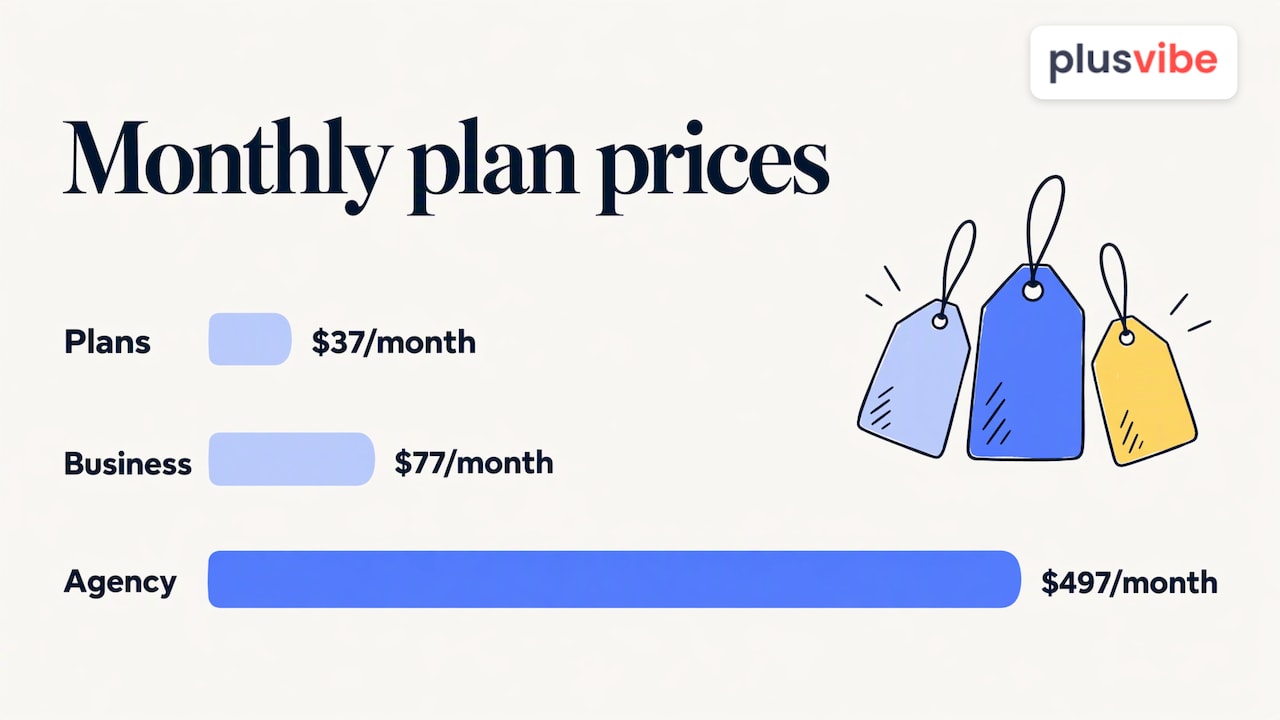
Plans start at $37/month, Business is $77/month for 150,000 emails, and Agency starts at $497/month for 500,000+ emails, with no fee per connected mailbox. You can start a 14-day free trial with no credit card and judge us on placement. See the plans for the details.
If you want to understand the header from the cold outreach side first, we wrote about why the List-Unsubscribe header matters in cold emails.
Our view on unsubscribes
We think of the unsubscribe button as part of your deliverability, not a loss. Every person who leaves through a clean, one-click exit is a person who did not report you as spam. That is why we believe cold outreach is honest work only when it follows a code: relevant, honest, respectful and measured.
Most tools help you send more. We care that it lands, and the inbox decision is made before you hit send: by your infrastructure, your warm-up pool, your authentication and how easy you make it to say no. A sender who hides the exit pays for it in complaints.
Our advice to agencies and high-volume teams is to treat the header as a baseline, verify it on delivered mail, and then measure placement with real campaign emails. Receipts over vibes.
Yaro
FAQ
Is List-Unsubscribe required by Gmail?
For senders of more than 5,000 messages a day to Gmail addresses, yes, for marketing and subscribed messages. Google’s guidelines require both the List-Unsubscribe header and List-Unsubscribe-Post with the one-click value, plus a visible link in the body. Transactional messages are excluded.
Can I use mailto instead of an HTTPS URL?
For one-click in Gmail, no. Google’s one-click request is an HTTPS POST, so you need an HTTPS URL in the header. You can still list a mailto address next to it for clients that use email-based unsubscribes.
Why does Gmail not show an unsubscribe button on my emails?
The client only shows it when it finds valid instructions in the header, and for one-click it expects both headers to be covered by a valid DKIM signature. Open the raw source of a delivered message and check the header values and the signature’s h= tag first.
How fast must I process an unsubscribe?
Google recommends fulfilling requests within 48 hours, and its FAQ ties that to eligibility for mitigation if a problem occurs. Suppressing the contact immediately is the safest approach.
Sources
- Email sender guidelines, Gmail Help
- Email sender guidelines FAQ, Gmail Help
- Email subscription guidelines for senders, Gmail Help
- RFC 8058: Signaling One-Click Functionality for List Email Headers
- The Email Marketers Guide to Using List-Unsubscribe, Litmus