Apollo is the better fit for small and mid-sized teams that want contact data, sequences and a dialer in one workspace at a published price. ZoomInfo is the better fit for larger organizations that want deep company data and intent signals feeding a CRM and a separate engagement stack, and that can sign an annual, sales-quoted contract. Both solve the same problem: finding the right people. Neither decides whether your email lands in the inbox once you send it, and for cold outreach that second problem is where pipeline is won or lost.
This guide compares the two on what matters for a buying decision: what each one is, what each costs, how credits and contracts work, how to judge data quality, and how each fits into a real outbound workflow.
Key Takeaways
- Apollo bundles a contact database with sequencing, a dialer and a CRM-style workspace. ZoomInfo is a sales-led data and go-to-market platform that teams often pair with a separate sequencer.
- Apollo publishes its prices per seat. ZoomInfo quotes every paid plan through sales on an annual basis, so budget is only clear after a conversation.
- Headline accuracy percentages measure different things. Test both against your own target accounts before you commit.
- Data tells you who to email. Private sending infrastructure, warm-up and placement testing decide whether the email is seen.
- Agencies and high-volume senders should price the full stack: data, sending, mailboxes and verification, not only the data subscription.
Table of Contents
- What Apollo and ZoomInfo actually are
- Pricing: published seats versus a sales quote
- Credits, exports and the costs behind the sticker price
- Data accuracy and coverage: how to judge it yourself
- Automation, integrations and workflow
- Which one should you choose?
- What neither tool decides: where your email lands
- A buyer checklist before you sign anything
- Our perspective
- FAQ
- Sources
What Apollo and ZoomInfo actually are
The two tools are often compared as if they were the same product. They overlap, but they start from different places.
Apollo started as a prospecting database and grew into an all-in-one outbound workspace. You search for people, reveal emails and phone numbers, build lists, enroll them in multistep sequences and call them from the same screen. For a team of two to twenty that wants one login, this is the appeal.
ZoomInfo is a data and go-to-market platform sold through sales teams. Its emphasis is contact and company data, account research and intent signals (signs that a company is researching a topic you sell into). It usually feeds a CRM, marketing automation or a dedicated engagement tool rather than replacing them. That fits revenue organizations with defined processes, ops staff and a CRM that needs automated enrichment.
The short version: Apollo is a workspace with data inside it. ZoomInfo is a data layer that plugs into a workspace you already run.
Pricing: published seats versus a sales quote
This is the clearest difference, and the one that decides the shortlist for many small teams.
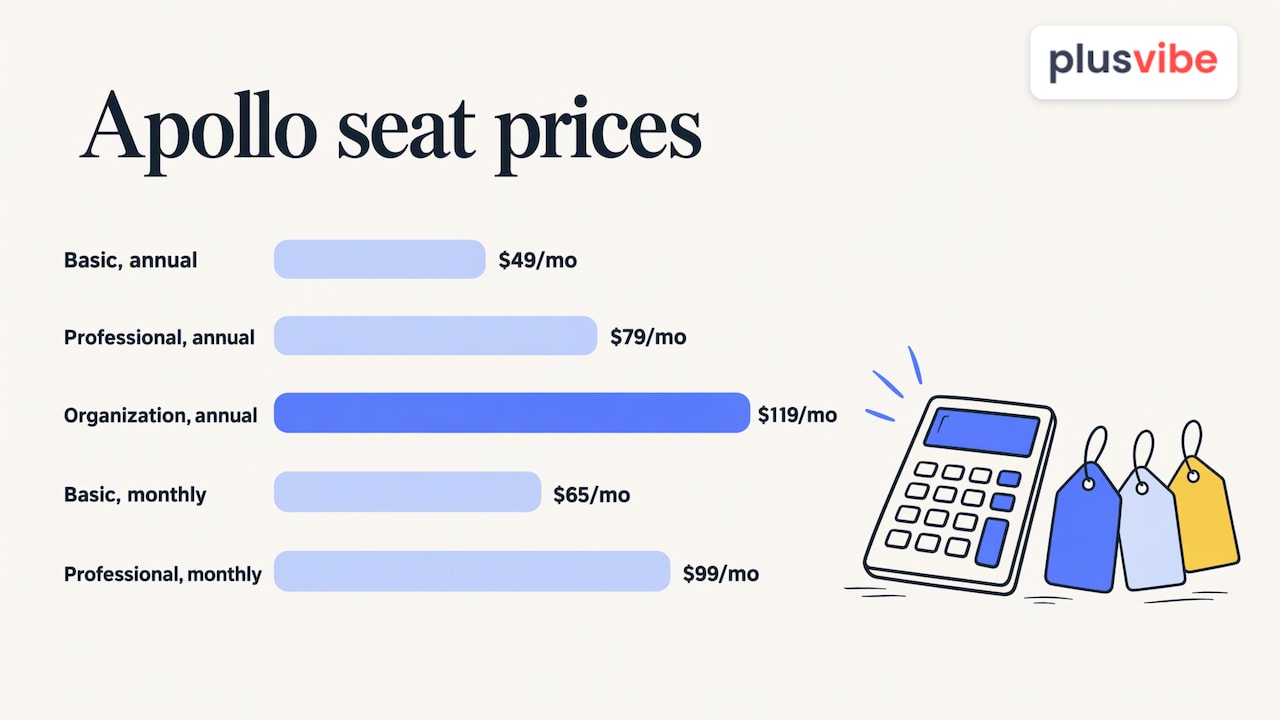
Apollo publishes four tiers, from a free plan up to Organization. Its published per-seat prices on annual billing are $49 (Basic), $79 (Professional) and $119 (Organization) per month, or $65 and $99 per month on monthly billing for Basic and Professional. Organization carries a three-seat minimum and is annual only.
ZoomInfo does not publish a price list. Its paid plans are custom-quoted annually, based on features, licenses and credit usage, and sales engagement is sold as an add-on. Quotes vary by company, so the number you receive will depend on seats, credits and negotiation. For a deeper look at how those quotes tend to be built, see our ZoomInfo pricing guide.
| Apollo | ZoomInfo | |
|---|---|---|
| Pricing model | Published per-seat tiers, including a free plan | Custom quote, annual |
| Entry point | $49 per seat per month, billed annually (Basic) | Set by sales conversation |
| Billing flexibility | Monthly option on Basic and Professional | Payment frequency negotiated |
| Minimums | Three seats on Organization | Set in the quote |
| Sequencing | Built in | Sold as an add-on |
| Best fit | Small to mid-sized teams, founders, agencies | Larger revenue teams with a CRM-centered stack |
The practical lesson: with Apollo you can model cost on a spreadsheet in five minutes. With ZoomInfo you should plan for a procurement process.
Credits, exports and the costs behind the sticker price
Both platforms meter access to contact data, and credits are where budgets drift.
Apollo uses pooled credits. As Apollo publishes it, an email reveal costs one credit and a phone number reveal costs eight. Enrichment runs from one to eight credits depending on what you pull, and dialer use in the US costs one credit per 30 seconds. Unused credits expire at the end of the billing cycle, so a quiet month does not roll forward.
Work a quick example. A rep who wants 500 verified emails and 100 mobile numbers in a month needs roughly 500 credits for emails plus 800 for the phones, 1,300 credits in all. Seeing the phone line item is what changes the math: phone numbers are the expensive part.
With ZoomInfo, credits, exports and add-on modules are part of the quote. A buyer should confirm in writing the quote, included exports, add-on modules, the annual commitment and the renewal pricing. Renewal terms matter most, because the first-year price is rarely the price you pay in year two.
For either tool, ask these before signing:
- What happens to unused credits at the end of the period?
- Which actions burn credits: reveals, enrichment, exports, API calls, dialer minutes?
- What is the renewal price, and how much notice is required to cancel?
- Is sequencing, calling or an API included, or priced separately?
- How many seats does the minimum require?
Data accuracy and coverage: how to judge it yourself
Every vendor publishes accuracy figures, and every comparison article repeats them. Treat them with care. Email deliverability, phone hit rates and database coverage measure different things, and each should be tested against your own market sample instead of taken from a headline percentage.
A fair test takes an afternoon:
- Pull the same 200 target accounts from both tools, matching on your real ideal customer profile (industry, size, region, title).
- Run every email through a verification step and record the share that is valid.
- Check a sample of titles against LinkedIn to see how current they are.
- Count how many direct dials you get and how many connect.
- If you sell outside the US, check international coverage separately, because it often differs sharply from North American coverage.
The result tells you more than any comparison page, including this one. A database that is excellent for US enterprise software buyers may be thin for European manufacturing, and the reverse is also true.
One point holds regardless of the vendor: a verified address today can bounce next quarter. People change jobs and companies change domains. Whichever source you use, run lists through email verification immediately before sending. PlusVibe includes lead enrichment and email verification alongside sequencing, so a list can be checked in the same place it is sent from.
Automation, integrations and workflow
Apollo’s native workflow runs from prospect search and enrichment into multistep sequences, with calling and other outbound actions in the same product. That all-in-one design can reduce integration complexity, which is valuable when there is no operations person to maintain connections between tools.
ZoomInfo more often sits upstream: it feeds CRMs, marketing automation and engagement tools. Complex CRM setups can benefit from field-level mapping, custom objects and automated enrichment. If your reps live in a CRM with strict data rules, that integration depth is a real advantage. Plan for integration and API credit use in the contract.
The handoff matters more than most buyers expect. Finding a lead is step one. Moving that lead through a thoughtful sequence, replying fast and following up is where deals happen, and lead nurturing strategies are what turn a contact record into a conversation. Whatever data tool you pick, decide in advance where sequences will run and who owns replies.
Which one should you choose?
Match the tool to the team, not the other way round.
| Your situation | Likely fit |
|---|---|
| Founder or small team, tight budget, wants data plus sequences in one place | Apollo |
| Agency running outreach for several clients | Apollo for data, with dedicated sending infrastructure per client |
| Mid-market or enterprise revenue team with a CRM and an ops function | ZoomInfo |
| Need intent signals and account research at scale | ZoomInfo |
| Need predictable monthly cost and monthly billing | Apollo |
| Can commit annually and negotiate a multi-seat contract | Either, after a side-by-side test |
If you are still weighing the field, our guides to Apollo alternatives and ZoomInfo alternatives lay out the other types of tools you can build a stack from, and our overview of B2B sales prospecting tools covers the wider market.
What neither tool decides: where your email lands
Here is the part most Apollo vs ZoomInfo comparisons skip. Both products help you find and reach prospects. Neither is built around the question that determines results in cold email: does the message reach the primary inbox, or the spam folder?
Inbox placement is shaped before you press send: the reputation of your sending domains, the servers and IPs behind them, how mailboxes are warmed up, how clean your list is, and how much volume you push through each mailbox. A great contact list sent from a damaged domain produces silence. The data subscription is only one line in the cost of outbound; the sending side is the other.
This is the problem PlusVibe is built for. It is a cold email platform designed around deliverability at high volume, and its main pieces answer the questions above:
- Private infrastructure. On the Agency plan, each client gets its own sending server and dedicated IPs, so one client’s mistake never touches another client’s reputation. Done-for-you Google Workspace, Microsoft 365 and Azure mailboxes are available too.
- A private warm-up pool. One closed pool for every customer, a mix of Google, Microsoft and quality SMTP inboxes, with bad senders removed and inboxes re-checked over time. Its peak warm-up bounce rate has never exceeded 0.1%. There is no premium pool to upsell.
- Placement you can verify. Seed tests show where your real campaign emails land at Gmail, Outlook and other providers, so you are not relying on a dashboard score.
It also covers multistep sequencing, lead enrichment, email verification, a unified reply inbox, an AI Reply Agent, an API, webhooks and an MCP server. That means a list from Apollo, ZoomInfo or any other data source can go into a platform that handles the sending, the replies and the monitoring. Read more about how deliverability works on our platform.
Pricing is published. Personal plans run $37 to $58 per month and Business plans $77 to $220 per month, with Business at $77 per month for 150,000 emails. Agency starts at $497 per month for 500,000+ emails. There is no fee per connected mailbox. Done-for-you Google Workspace mailboxes are $4 per month per inbox and Microsoft 365 mailboxes $4.50 per month per inbox. Standalone Email Placement Test plans start at $19 per month.
The 14-day free trial needs no credit card, so you can judge the platform on placement. See all plans and add-ons.
If you send a couple hundred emails a month, a simpler tool will serve you fine. PlusVibe is built for agencies running many clients, high-volume sales teams and founders whose pipeline depends on the inbox.
A buyer checklist before you sign anything
Use this order, and you will avoid the most common mistakes.
- Define the job. Write down whether you need data only, data plus sequences, or data feeding a CRM. This alone often eliminates one option.
- Run the same-sample test. Use identical target accounts in both tools and measure valid emails, current titles, connected dials and international coverage.
- Get the contract terms in writing. Credits, expiry, exports, add-ons, annual commitment, renewal pricing and cancellation notice.
- Cost the full stack. Add the data subscription, sending platform, mailboxes, domains and verification. Compare on cost per booked meeting, not cost per seat.
- Plan the sending side. Decide how many domains and mailboxes you need for your volume, and how placement will be measured. Our email warm-up page explains how new mailboxes are prepared.
- Set sending rules. Relevant targeting, honest messaging, easy opt-outs and measured volume protect both your reputation and your results.
Our perspective
Most teams pick a data tool and assume the hard part is over. In our experience building PlusVibe, it is the opposite: finding contacts is the easy step. Getting a real conversation started depends on whether the inbox lets you in.
That is why we built around three things: private infrastructure, a private warm-up pool and placement you can verify. We want receipts over vibes. A seed test that shows where your actual campaign landed is worth more than any score on a dashboard.
Whichever data source you prefer, a full-priced contact database sent through a shared, tired domain will underperform a modest list sent from clean, isolated infrastructure. For agencies, isolation matters even more: one client’s mistake should never become another client’s problem.
Cold outreach is honest work when it follows a code: relevant, honest, respectful and measured. Do that, and give it the infrastructure it deserves.
Yaro
FAQ
Is Apollo cheaper than ZoomInfo?
For most small and mid-sized teams, yes. Apollo publishes per-seat prices starting at $49 per month on annual billing and offers a free plan. ZoomInfo is custom-quoted on an annual basis, so the total depends on seats, credits and add-ons. Compare the first-year quote and the renewal price, not only the opening number.
Does ZoomInfo include email sequencing?
Sales engagement is an add-on in ZoomInfo’s quoted packages, and many teams connect a separate engagement or sequencing tool. Apollo includes sequences in the product. If you want the sending side tuned for deliverability, you can pair either data source with a dedicated cold email platform like PlusVibe.
Which has better data quality?
It depends on your market. Vendors report accuracy in different ways, so headline figures are not directly comparable. Pull the same sample of target accounts from both, verify the emails, and compare valid rates, title accuracy and phone connections. Then verify the list again right before sending.
Can I use contacts from either tool in a cold email platform?
Yes. Many teams export a list from a data tool, verify it and load it into a sending platform for sequencing and reply management. Check each vendor’s terms for export limits and permitted use first. PlusVibe includes email verification and lead enrichment so the list can be cleaned before the first send.
How many emails can I send safely from one mailbox?
There is no single number that fits every sender, because safe volume depends on domain age, warm-up, list quality and engagement. The reliable approach is to spread volume across several warmed mailboxes and domains, keep lists verified and watch placement with seed tests rather than guessing.
Sources
- Apollo vs ZoomInfo: Can You Actually Verify Data Quality (Salespeak)
- Lead nurturing explained: Boost conversions with effective strategies