.jpeg)
Deliverability monitoring is recurring, automated checking of inbox placement, authentication, sender reputation, and blocklists, not a one-time test you run and forget. If you send cold email at any volume, confirm SPF, DKIM, and DMARC are configured correctly, then register for Google Postmaster Tools and Microsoft SNDS, and schedule recurring seed tests. The rest of this guide walks through the metrics, tools, cadence, and recovery steps that make that system work.
TL;DR:
- Check Postmaster Tools and Microsoft SNDS weekly, daily during high volume or domain warmup; review campaign bounces and complaints every day.
- Pause sending if spam complaints exceed 0.3% or bounce rates reach 2% to 3%; suppress hard bounces and reverify affected lists.
- Run seed tests two to three times weekly using live subject lines and copy, and repeat them before any template or list change.
Table of Contents
- What Deliverability Monitoring Covers and How It Differs From One-Off Tests
- Key Metrics and Signals to Track
- Monitoring Stack: The Tools and Methods to Run in Parallel
- Step-by-Step: Set Up a Deliverability Monitoring System
- Cadence, Thresholds, and Alerting: How Often to Test and When to Stop
- Troubleshooting and Recovery Playbook When Placement Drops
- A Practical Monitoring Workflow We Run Day to Day
- Why Monitoring Beats Guessing for Professional Cold Outreach
- How PlusVibe Supports Deliverability Monitoring at Scale
- FAQ
- Authoritative Sources and Dashboards to Bookmark
What Deliverability Monitoring Covers and How It Differs From One-Off Tests
A single inbox placement test tells you where one batch of emails landed on one day. Deliverability monitoring tracks the same signals on a schedule so you catch a drop the day it happens instead of noticing it three weeks later in your reply rate. The distinction matters because inbox placement changes day to day, driven by authentication drift, a flagged IP, or a sudden spike in complaints, and a snapshot test simply cannot catch that movement.
Monitoring pulls together several signal types that a one-off test usually skips:
- Placement data: where messages land across major providers, checked repeatedly, not once.
- Authentication status: whether SPF, DKIM, and DMARC are passing consistently, not just on the day you set them up.
- Reputation scores: how mailbox providers rate your sending domain and IP over time.
- Blocklist status: whether your domain or IP has landed on a public or provider-specific blocklist.
- Content and engagement signals: spam-trigger phrases, link density, and how recipients interact with your messages.
A one-off test still has a place. Run one before a new domain goes live, before a major template change, or before ramping send volume. But treat it as a checkpoint, not a substitute for the recurring system that watches these signals continuously and flags authentication drift or a reputation dip before it tanks a live campaign.
Key Metrics and Signals to Track
Not every metric deserves equal attention. A handful of numbers predict deliverability trouble long before your open rate collapses, and knowing the thresholds that matter keeps you from chasing noise.
Authentication pass rates come first. Domains with SPF, DKIM, and DMARC configured correctly typically see pass rates above 95%, and anything meaningfully below that signals a DNS misconfiguration or a forwarding issue worth chasing immediately.
Your complaint rate is the single number most likely to get you blocked. Yahoo expects bulk senders to keep spam complaint rates below 0.3%, and crossing that line repeatedly is one of the fastest routes to the inbox providers’ penalty box.
Bounce rate matters almost as much, and the two bounce types tell different stories. A hard bounce means the address does not exist and should trigger immediate suppression. A soft bounce usually reflects a full mailbox or a temporary server issue, worth watching but not an automatic red flag unless it repeats across sends. Inbox placement and seed-test results round out the picture, with open and reply rates serving as useful (if imperfect) proxies for real-world placement when you lack a dedicated seed list.
| Metric | Healthy range | Action if breached |
|---|---|---|
| SPF/DKIM/DMARC pass rate | Above 95% | Audit DNS records immediately |
| Spam complaint rate | Below 0.3% | Pause sending, review list and content |
| Hard bounce rate | Near 0%, verify before send | Remove and re-verify list |
| Blocklist status | Not listed | File delisting request with evidence |
IP and domain reputation scores, available through dashboards like Google Postmaster Tools and lookup services like SenderScore, give you a running record of how providers view your sending history. Pair that with delivery-error logs from your sending platform, which often surface the exact rejection reason before a reputation score even moves.
Monitoring Stack: The Tools and Methods to Run in Parallel
No single dashboard tells the whole story, which is why a practical monitoring stack layers several sources that each catch what the others miss.
Google Postmaster Tools shows domain reputation, spam rate, authentication status, and delivery errors specifically for Gmail traffic. Check the spam-rate panel first: a sustained rise there is often your earliest warning before Gmail placement drops. The domain reputation panel (classified as high, medium, low, or bad) gives you a trend line worth screenshotting weekly.
Microsoft SNDS and JMRP cover the Outlook and Hotmail side. SNDS reports IP-level reputation and complaint data, while JMRP forwards junk-mail reports tied to your sending IPs. Microsoft documents that senders who fall short on quality or technical compliance, including RFC adherence, a working unsubscribe mechanism, and correct reverse DNS, can be routed into a high-risk delivery pool where normal delivery is no longer guaranteed. That makes SNDS and JMRP essential reading for anyone sending meaningful volume through Microsoft domains.
Recurring inbox-placement or seed tests fill the gap that provider dashboards leave open: actual placement across providers, checked against your real templates. Seed a handful of accounts across Gmail, Outlook, and Yahoo, run your actual campaign template (not a generic test message) through them on a set cadence, and track where each one lands. A free spam checker is a fast way to screen a template for obvious trigger language before it goes into a live seed test.
Round out the stack with:
- DNS and authentication checkers to catch SPF, DKIM, or DMARC drift before it affects live sends.
- Blocklist monitors that alert you the moment your IP or domain appears on a public blocklist.
- Delivery-error logging from your sending platform, which often names the exact rejection reason.
- Platform campaign metrics (opens, replies, bounces) as a daily pulse check between deeper audits.
Pro Tip: Run your seed tests with the exact subject line and body copy you are sending live. A generic test message tells you almost nothing about how your actual campaign is being scored.
Layering these sources matters because each one has blind spots. Postmaster Tools only covers Gmail. SNDS only covers Microsoft IPs. Seed tests only show the providers you seeded. Running all three in parallel, cross-referenced against your platform’s own engagement data, is what keeps a problem on one provider from going unnoticed while you are only watching another.
Step-by-Step: Set Up a Deliverability Monitoring System
Building the system is mostly a sequencing problem. Get the foundation right before you layer on automation.
- Configure SPF, DKIM, DMARC, and MTA-STS on a dedicated sending domain, never your primary corporate domain, so a deliverability problem never touches your main inbox.
- Register the domain with Google Postmaster Tools and verify ownership so reputation and spam-rate data start populating.
- Enroll your sending IPs in Microsoft SNDS and sign up for JMRP to receive junk-mail reports directly.
- Set up a seed list across Gmail, Outlook, Yahoo, and any other provider that matters to your audience, and document which inbox to check for each.
- Schedule recurring seed tests against your live templates, not generic placeholders, so results reflect real campaign conditions.
- Automate alerts for authentication drift, blocklist appearances, and campaign-metric thresholds so you are not manually refreshing dashboards.
- Route alerts into an operational channel (Slack or your ticketing tool) with a named owner and a defined escalation step.
A few setup details are easy to skip and expensive to miss:
- Keep cold outreach on its own subdomain, isolated from transactional or marketing email.
- Document which Postmaster and SNDS panels get checked weekly, and by whom, so monitoring survives a vacation or a handoff.
- Verify your list before every send using a free email verification tool to keep hard bounces near zero.
- Set DNS and blocklist alerts to fire within hours, not days, since authentication drift can silently kill placement for an entire campaign window.
Once alerts are flowing into a shared channel, write down the escalation rule in plain language: who pauses sending, who audits the cause, and who signs off on resuming. A system nobody owns is just a dashboard nobody watches.
Cadence, Thresholds, and Alerting: How Often to Test and When to Stop
Monitoring only works if the checks happen on a schedule you actually keep. Check Postmaster Tools and SNDS dashboards weekly at minimum, daily if you are running high volume or a new domain through its warmup period. Run seed tests on a two-to-three-times-weekly cadence for active campaigns, and before any template or list change. Watch platform campaign metrics (opens, replies, bounces) daily since they are the cheapest early signal you have.
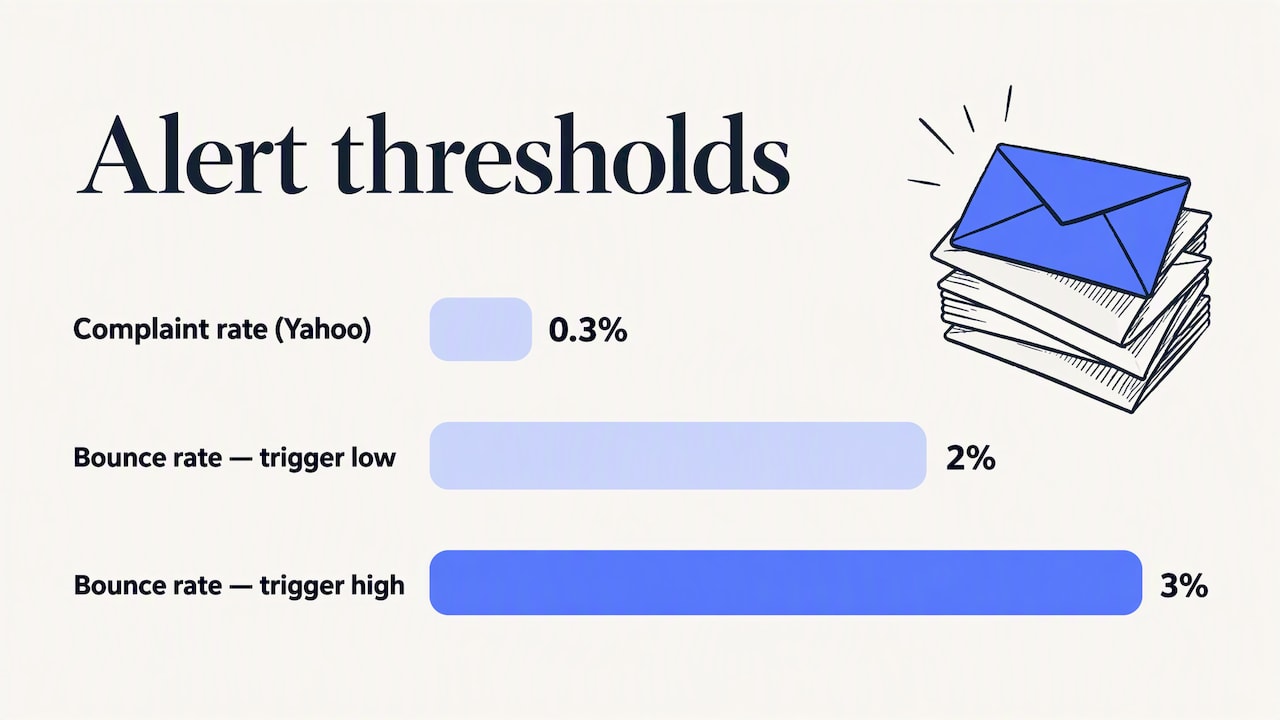
Thresholds turn a dashboard into an alert system. Set hard stops at a spam complaint rate above 0.3%, since that is the line Yahoo uses for bulk-sender penalties, and treat a bounce rate above 2 to 3% as a trigger to pause and re-verify your list.
Build the alert logic around clear ownership:
- Define one person or role as the on-call owner for deliverability alerts, not a shared inbox nobody checks.
- Set an automatic throttle or pause rule tied to complaint-rate or bounce-rate breaches, not a manual judgment call under pressure.
- Require a documented root-cause note before resuming sends, so the same issue does not repeat the following week.
The instinct to keep sending through a bad signal is almost always the wrong one. A short pause costs you a day of outreach. A sustained reputation hit can cost weeks of recovery.
Troubleshooting and Recovery Playbook When Placement Drops
When placement drops, triage order matters more than speed. Jumping straight to a domain re-warm without finding the cause usually means repeating the same mistake on a new domain.
- Check Postmaster and SNDS first for a spike in spam rate or complaint reports tied to a specific date.
- Re-run your seed test to confirm whether the drop is provider-specific (Gmail only, Outlook only) or across the board.
- Pull your bounce and complaint logs for the same window to see if a list segment or a specific send is the trigger.
- Verify authentication status again, since a DNS change elsewhere (a new subdomain, a migrated mail provider) can silently break SPF or DKIM alignment.
- Check content fingerprints, including links, attachments, and phrasing, against a spam score checker to rule out a template-level trigger.
Once you have a likely cause, match it to a fix. List hygiene issues call for a full re-verification pass and immediate suppression of bounced addresses, a step covered in more depth in this bounce-spike diagnostic checklist. DNS and authentication issues need a direct record audit, not a guess. Content-driven flags usually mean rewriting the template entirely rather than tweaking a few words, and a guide to avoiding the spam folder walks through the common triggers. Volume issues call for throttling send rate back to pre-warmup levels.
Recovery itself follows a short, repeatable sequence: pause sending entirely, audit for root cause, re-warm the domain gradually, then reintroduce volume at roughly a quarter of your previous send rate before scaling back up. Short fixes, like a DNS correction, can resolve within days. A genuine reputation rebuild after a sustained complaint spike often takes weeks, so keep a 30 to 90 day lookback window on domain reputation rather than judging recovery by a single good day.
Pro Tip: If your domain lands on a public blocklist, gather your sending logs, authentication records, and recent volume history before filing a delisting request. Most delisting reviews move faster with evidence attached up front.
If a blocklist listing persists, check its status through a blacklist lookup tool and file a delisting request with the specific provider, including the evidence above.
A Practical Monitoring Workflow We Run Day to Day
We recommend structuring monitoring around a short daily check and a deeper weekly audit. Each morning, review campaign-level bounce and complaint rates from the previous day’s sends, alongside any overnight blocklist or authentication alerts. Weekly, review Postmaster Tools and SNDS panels in full, comparing domain reputation trends against the prior week.
A few controls do double duty as monitoring signals, not just setup steps:
- Private warm-up on each new mailbox gives us a built-in early read on reputation before that inbox ever touches a live campaign.
- Inbox rotation spreads volume across multiple sending identities, which limits how much damage one flagged inbox can do to overall campaign performance.
- Verification runs before every list upload, keeping hard bounces near zero and removing one of the most common causes of a reputation dip.
Review seed-test results, Postmaster data, and recent list changes before any inbox goes back into rotation.
Why Monitoring Beats Guessing for Professional Cold Outreach
The biggest mistake I see outreach teams make is treating deliverability as a setup task instead of an ongoing discipline. You configure SPF and DKIM once, run a placement test, and assume the job is done. Reputation is not static. It moves with every send, every complaint, every list you upload.
For teams with limited time, the trade-off I recommend is simple: skip the fancy dashboards if you must, but never skip the weekly Postmaster and SNDS check and the recurring seed test. Those two habits catch the overwhelming majority of problems before they become expensive. Everything else is refinement.
— Yaro
How PlusVibe Supports Deliverability Monitoring at Scale
Deliverability monitoring is most effective when integrated into sending infrastructure rather than added afterward. Private warm-up engines that give every mailbox its own reputation history instead of sharing one with many senders, and inbox rotation that spreads campaign volume, can help prevent one flagged address from dragging down an entire domain.
Verification runs before your list ever reaches a campaign, cutting hard bounces before they hit your sending reputation, and our free cold email spam checker lets you screen a template in seconds before it goes live. For teams that would rather not configure SPF, DKIM, DMARC, and warmup schedules themselves, our Done-for-you Email Setup service handles the technical foundation so monitoring starts from a clean baseline.
If you are weighing infrastructure options, our plans start at $37 to $58 per month for individual senders, scaling to $77 to $220 per month for growing teams, with an agency tier starting from $497 per month for larger sending operations. Every tier includes the deliverability controls described throughout this guide. Start with a free trial and run your first seed test the same week you sign up.
FAQ
What is deliverability monitoring?
Deliverability monitoring is the recurring, automated process of checking inbox placement, authentication status, sender reputation, and blocklist presence over time, rather than checking them once. It combines provider dashboards like Google Postmaster Tools and Microsoft SNDS with scheduled seed tests so you catch problems the day they start.
What is the 30/30/50 rule for writing effective cold emails?
Definitions of this rule vary across the outreach community, and no single authoritative source defines it the same way. A commonly cited version splits effort between list quality, subject line and offer, and the email body itself, but treat it as a general prioritization heuristic rather than a fixed formula.
What is the most hacked email provider?
There is no verified, sourced ranking of which email provider suffers the most account compromises, so making a specific claim here would be speculation. What matters more for deliverability is that any provider, regardless of popularity, penalizes senders whose domains show weak authentication or high complaint rates.
How can you tell if your emails are being monitored?
If you are the sender, you set up that monitoring yourself through tools like Google Postmaster Tools, Microsoft SNDS, and recurring seed tests, so there is no mystery to detect. If you are asking whether a recipient’s provider is evaluating your messages, assume it always is: every major mailbox provider scores incoming mail against reputation, authentication, and complaint signals in real time.
How often should I run inbox placement tests?
Run seed tests two to three times weekly for active campaigns, and always before a major template or list change. Pair that cadence with weekly reviews of Postmaster Tools and SNDS data for a fuller picture.
Authoritative Sources and Dashboards to Bookmark
Bookmark Google Postmaster Tools for domain reputation and spam-rate trends, and check the spam-rate panel first. Register for Microsoft’s outbound sender guidance and SNDS to track IP-level complaints on Outlook and Hotmail traffic. Use SenderScore for a quick third-party reputation and blocklist check between deeper audits.
For campaign ideas that keep engagement signals healthy alongside your technical setup, this roundup of email campaign tactics is worth a read, and teams working on reply-driven engagement can find useful tactics in this guide to reply-aware follow-ups.