.jpeg)
If you use Google Workspace or Microsoft 365, connect your inbox using HubSpot’s native OAuth connector instead of IMAP. Grant OAuth consent, or enter IMAP credentials only if your provider isn’t natively supported, then send one test email and confirm it logs on the contact record. If logging fails or duplicates appear, skip ahead to the troubleshooting steps below.
TL;DR:
- For Microsoft 365, managed tenants may need IT consent, while shared mailboxes require full access rights; send and receive test messages to verify logging.
- Use IMAP only for unsupported providers; verify the server, port, and encryption settings, and use a password generated for apps when multifactor authentication is enabled.
- Set never log rules and excluded domains before connecting, because previously logged messages will remain; test contact, company, and deal associations with sample emails.
- A successful connection does not ensure inbox placement: publish SPF, DKIM, and DMARC records before sending, and increase a new inbox’s volume gradually.
- If logs duplicate, inspect forwarding rules and filters; if they are missing, confirm the recipient address matches the contact record, including aliases.
Table of Contents
- How to connect Gmail to HubSpot step by step
- How to connect Outlook or Microsoft 365 to HubSpot
- IMAP connectors: how they work and their limits
- How HubSpot logs and associates emails automatically
- Common integration errors and how to fix them
- Authentication and deliverability essentials: SPF, DKIM, DMARC
- Rollout checklist and admin best practices
- Syncing HubSpot and PlusVibe for campaign automation and enrichment
- Use cases for agencies and founders managing multiple inboxes
- Security and privacy considerations for connected inboxes
- Configuring integration settings to protect inbox reputation
- Why governance matters as much as the connection itself
- Keeping your sending inboxes healthy after you connect them
- FAQ
- Sources
How to connect Gmail to HubSpot step by step
Before connecting anything, check whether your HubSpot plan has an open seat and whether your Google Workspace admin requires app-level consent for third-party tools. Workspace admins sometimes restrict OAuth access by default, which blocks the connection until it’s approved at the domain level.
- Go to Settings, then Connected Email in your HubSpot account.
- Choose the Google option and sign in with the inbox you want connected.
- Review the requested scopes (send, read, and manage email) and approve them.
- Install the HubSpot Sales Chrome extension if you want in-inbox tracking, templates, and meeting links inside Gmail itself.
- Send a test email to a sample contact and check that it appears logged on that contact’s timeline.
The Chrome extension doesn’t replace the connector. It adds a layer of visibility (open and click tracking, sequences, templates) directly inside Gmail, while the connector handles the actual logging and sync between the two systems.
Pro Tip: Connect a test mailbox first and send yourself a few sample emails before rolling the connector out to your whole sales team.
How to connect Outlook or Microsoft 365 to HubSpot
Microsoft 365 setups split into two separate pieces: the native HubSpot connector for logging and sync, and the Outlook Sales add-in for in-inbox tracking as detailed in What is Microsoft 365? Understanding Its Benefits and Uses. Large organizations typically push the add-in tenant-wide through Microsoft AppSource, which requires a tenant admin to approve it once for everyone, rather than each rep installing it individually.
- In HubSpot, go to Settings, then Connected Email, and choose Office 365 or Outlook.
- Sign in and approve the requested permissions; a personal Microsoft 365 account can usually self-approve, but a managed tenant may need IT to grant consent first.
- If you want the in-inbox add-in, install it from AppSource either per user or as an org-wide deployment.
- For shared mailboxes, confirm the connecting user has full access rights, not just “send as” permission, or the connector may fail silently.
- Send and receive a test message, then confirm both directions log correctly on the contact record.
Shared mailboxes are the most common failure point here: partial permissions let a message send but not log.
IMAP connectors: how they work and their limits
IMAP is the fallback option for mailboxes HubSpot doesn’t natively support, such as older hosted email systems or certain regional providers. It works by connecting directly to your mail server using credentials and a specified port rather than through OAuth, which means it depends on your provider’s exact server settings being entered correctly.
- Enable IMAP access in your provider’s settings before attempting to connect.
- Confirm you have the correct server address, port, and SSL/TLS encryption setting from your provider’s documentation.
- Use an app-specific password if your account has multi-factor authentication enabled, since standard passwords typically fail.
- Expect looser contact association logic than native connectors, since IMAP has less context about your CRM structure.
Choose IMAP only when Gmail or Microsoft 365 native connectors aren’t an option. It’s more fragile, requires manual upkeep when passwords rotate, and doesn’t benefit from the same improvements Google and Microsoft push to their own OAuth integrations.
How HubSpot logs and associates emails automatically
Once connected, HubSpot auto-logs emails by matching the recipient’s address to an existing contact record. If no contact exists, HubSpot can create one depending on your settings, then associates that email upward: contact first, then the related company, then any open deal tied to that contact.
- Auto-associate controls whether new contacts are created automatically from logged emails.
- Exclude domains lets you block internal or personal addresses from ever being logged.
- Include attachments determines whether files sent in the email get pulled into the record.
- Never-log settings let specific addresses or domains bypass logging entirely, useful for legal, HR, or personal correspondence.
Test this behavior with two or three sample contacts before a full rollout: send one email, then check the contact record to confirm it associated with the right company and deal.
Pro Tip: Set your never-log list before connecting any inbox, not after, since already-logged emails won’t retroactively disappear.
Common integration errors and how to fix them
Most integration problems fall into three categories: authentication failures, IMAP misconfiguration, or duplicate and missing logs. HubSpot’s connector status page shows which category you’re dealing with, so start there before changing any settings.
- Check the connector status under Settings, then Connected Email, for an error code or warning icon.
- For OAuth failures, disconnect and reconnect the inbox to trigger a fresh consent screen; for organizational accounts, confirm IT hasn’t revoked admin consent.
- For IMAP failures, recheck the port number, SSL/TLS setting, and whether your provider requires an app password instead of your regular one.
- For duplicate logs, check for server-side forwarding rules or Gmail filters that route a copy of the message elsewhere, since forwarded copies can register as separate messages, a pattern documented in HubSpot’s community troubleshooting threads.
- For missing logs, confirm the recipient’s address matches an existing contact exactly, including any alias variations.
Community threads remain a useful second opinion when official docs don’t cover an edge case specific to your email provider.
Authentication and deliverability essentials: SPF, DKIM, DMARC
A working connector doesn’t guarantee your emails land in the inbox. Deliverability depends on domain authentication, which HubSpot cannot configure for you since it requires changes to your DNS records, something only your domain registrar or IT team can edit.
- SPF tells receiving servers which sources are allowed to send mail on your domain’s behalf.
- DKIM signs outgoing mail cryptographically so receivers can confirm it wasn’t altered in transit.
- DMARC tells receiving servers what to do when SPF or DKIM checks fail, and gives you reporting visibility.
Missing or misconfigured SPF, DKIM, or DMARC records are a leading cause of deliverability problems for connected domains, according to a practical domain authentication guide, since receiving servers may flag unauthenticated mail as suspicious regardless of how clean the connector setup looks. Loop in whoever manages your DNS early, since this step often takes longer than the connector setup itself.
Rollout checklist and admin best practices
A smooth rollout starts with deciding who connects what, rather than letting every rep self-serve without a policy. Centralize decisions about which inboxes get connected and who owns never-log exceptions before opening it up company-wide.
- Assign one admin to own the connector policy and seat assignments.
- Connect a single test user first and verify logging, association, and send behavior.
- Set a recurring cadence (weekly during rollout, monthly after) to check connector status and review deliverability.
- Document never-log categories and share a short setup guide with reps before they connect their own inboxes.
Pro Tip: Run your test phase for at least a full week before expanding, since some sync issues only surface after a few days of normal sending volume.
Syncing HubSpot and PlusVibe for campaign automation and enrichment
HubSpot handles CRM record-keeping and relationship history well, but it isn’t built for high-volume cold outreach sequencing or inbox-level deliverability management. Pairing it with a dedicated outreach platform lets each tool do what it’s built for: HubSpot stores the relationship data, while the outreach platform manages sending volume and inbox health.
Our integration syncs campaign activity, such as opens, replies, and bounces, back into HubSpot contact records, so your CRM stays current without manual data entry. On the enrichment side, prospects collected and verified on our platform (through our AI-powered enrichment and lead scraping tools) flow into HubSpot as complete contact records instead of bare email addresses, which means your sales team sees enriched profiles the moment a lead responds.
This two-way flow matters most for teams running outbound at scale: your HubSpot CRM edit don’t duplicate effort in a separate spreadsheet, and your outreach sequencing doesn’t lose visibility into which contacts already have an open deal. For agencies managing outreach on behalf of clients, this sync also means client-facing HubSpot portals reflect outreach activity automatically, which cuts down on manual reporting. We built this connection specifically for teams that treat cold email as a structured pipeline rather than a one-off blast, where every reply needs to land in the right place without someone copying it over by hand.
Use cases for agencies and founders managing multiple inboxes
Agencies running outreach for several clients at once face a different problem than a single sales rep: they’re managing dozens of sending inboxes, each with its own domain, reputation, and client-specific CRM instance. A single misconfigured inbox can drag down deliverability for an entire client campaign, so visibility across every inbox matters more than it does for a solo user.
A founder running their own outbound motion faces a related but smaller-scale version of the same challenge: one or two sending domains, limited time to babysit deliverability, and a need for the CRM side to stay accurate without manual upkeep.
For agencies, connecting each client’s HubSpot portal to a shared outreach platform means account managers can monitor inbox health and campaign performance from one dashboard instead of logging into separate systems per client. Inbox rotation across multiple sending addresses also reduces the load on any single domain, which matters when running outreach at volume for several clients simultaneously.
For founders managing their own list, the same connector setup means less time spent manually logging replies into HubSpot and more time on the conversations that convert. Isolated sending infrastructure and dedicated IPs, rather than shared sending pools, keep one client’s bad sending habits from affecting another’s inbox placement, something agencies in particular need to watch closely when managing multiple domains under one roof.
Security and privacy considerations for connected inboxes
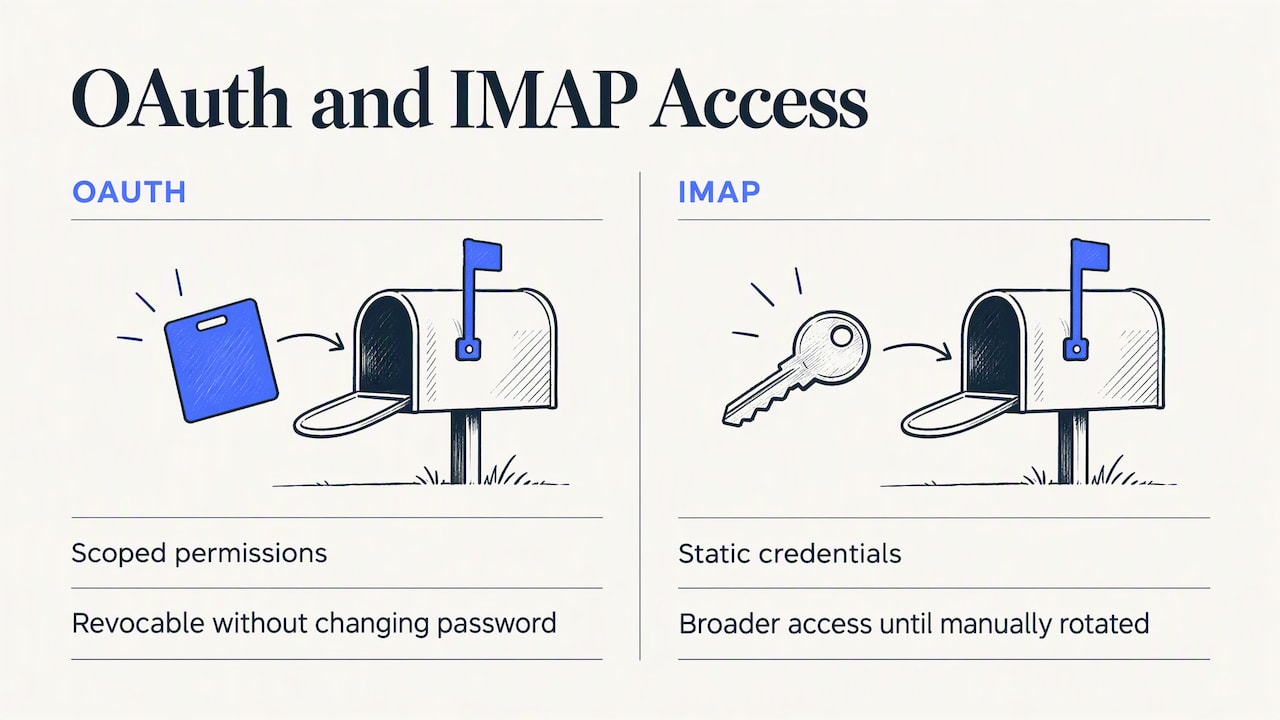
Connecting an email account to HubSpot grants a third-party platform read and send access to that mailbox, which means access scope and account ownership deserve real attention before you click approve. OAuth connections are generally safer than IMAP here, since OAuth grants scoped permissions you can revoke at any time without changing your password, while IMAP relies on a static credential that, if leaked, grants broader access until manually rotated.
For sales teams specifically, never-log policies aren’t just a logging preference, they’re a privacy control. Personal correspondence, HR matters, or legal discussions that happen to pass through a connected inbox shouldn’t end up logged on a CRM record visible to the wider team. Setting exclude-domain and never-log rules before connecting an inbox prevents sensitive content from being captured in the first place.
Account ownership also matters more than it first appears: when a rep leaves the company, their connected inbox and its OAuth tokens need to be revoked promptly, not left active under a departed employee’s credentials. Admins should treat connector access reviews as part of offboarding, not an afterthought.
Finally, any outreach platform you connect to HubSpot should offer similarly scoped, revocable access rather than requesting broad, static credentials. When evaluating a sync partner, ask how they store authentication tokens and whether access can be limited to specific functions rather than full mailbox control.
Configuring integration settings to protect inbox reputation
Connector settings and sending reputation are more connected than most admins assume. A misconfigured integration, left unchecked, can quietly increase your spam placement rate even when the connection itself shows as healthy.
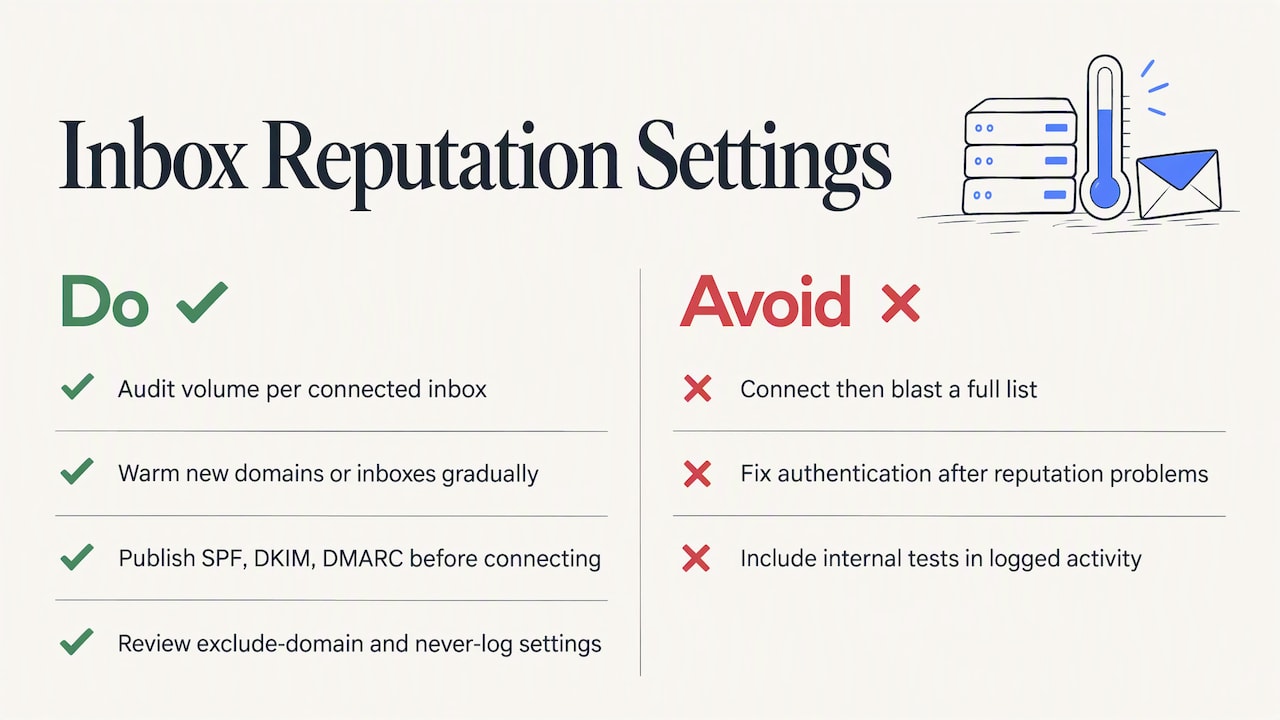
Start by auditing your sending volume per connected inbox. A newly connected inbox that suddenly sends high volumes of near-identical outreach messages looks suspicious to mail providers, regardless of how clean your HubSpot setup is. Warming up a new domain or inbox gradually, rather than connecting it and immediately blasting a full list, protects reputation from day one, a process covered in more detail in our email deliverability checklist.
Next, confirm your SPF, DKIM, and DMARC records are correctly published before connecting a new sending domain, not after problems appear, since retroactively fixing authentication after a reputation hit takes far longer than preventing it. Our guide to SPF, DKIM, and DMARC walks through each record type for readers setting this up for the first time.
Finally, review your exclude-domain and never-log settings alongside your sending cadence settings, if your connector supports them. Keeping internal test sends and bounce-handling addresses out of your logged activity prevents noisy data from skewing your deliverability monitoring and keeps your contact records focused on real prospect activity.
Why governance matters as much as the connection itself
Native OAuth connectors beat IMAP on reliability almost every time, and that’s not a close call. But the bigger risk isn’t which connector you pick, it’s skipping the governance work: never-log policies, domain authentication, and a test phase before full rollout. As HubSpot and Microsoft continue rolling out AI-assisted signal and association features through 2026, the admins who already have clean logging rules in place will benefit immediately; the ones who don’t will just get faster, messier data.
— Yaro
Keeping your sending inboxes healthy after you connect them
Connecting your inbox to HubSpot solves logging and visibility, but it doesn’t solve deliverability, and that gap is where outreach campaigns quietly fail even when the CRM side looks perfect.
We built our platform to support deliverability management through infrastructure designed to build sender reputation gradually, monitoring to flag spam placement issues early, and an integration that syncs campaign activity and contact data back into your CRM automatically.
If managing warm-up and authentication yourself feels like more than your team has bandwidth for, our Done-for-you Email Setup handles the technical setup end to end. Otherwise, compare our plans and start a trial to see how connected inboxes perform once deliverability is handled for you.
FAQ
Is HubSpot replacing Salesforce?
No, HubSpot and Salesforce remain separate CRM platforms, though HubSpot has been improving its Salesforce integration, including a v2 migration noted in 2026 that improves sync performance and selective object sync. Many organizations run both platforms together rather than replacing one with the other.
Does HubSpot have an email marketing tool?
Yes, HubSpot includes native email marketing features for building and sending campaigns alongside its CRM and sales tools. These sit separately from the inbox connector features covered in this guide, which handle one-to-one email logging rather than bulk campaign sends.
Does HubSpot have a Teams integration?
Yes, HubSpot offers a Microsoft Teams integration that supports meeting sync, call transcripts, and notifications inside Teams. Some of these features require a paid HubSpot subscription tier to unlock fully.
What should I check before connecting an inbox to HubSpot?
Confirm you have an open seat, know whether your organization requires admin consent for OAuth apps, and have your never-log and exclude-domain preferences decided in advance. Testing with one inbox before a full rollout catches most configuration issues early.
Why do duplicate emails sometimes appear in HubSpot logs?
Duplicate logging is usually caused by server-side forwarding rules or filters that route a copy of a message to another address, which HubSpot can register as a separate message. Checking your provider’s forwarding and alias settings typically resolves it.
Sources
- Domain authentication with HubSpot: DKIM, SPF, DMARC (practical guide)
- Microsoft Teams - Sales Enablement App for HubSpot | HubSpot
- Email integration — linking conversations to a contact (HubSpot Community)