.jpeg)
List hygiene means keeping only valid, consenting, engaged addresses on your sending list and removing everything else before it damages your reputation. The single most urgent action is to run verification on your current list, suppress hard bounces, and sunset long-term unengaged contacts now, in line with Gmail’s sender guidelines and the Federal Trade Commission’s CAN-SPAM Act.
TL;DR:
- Remove hard bounces after one failure, retry soft bounces for up to three sends, and process suppressions within 24 hours.
- For contacts inactive for 90 days, send a reengagement email, follow up after seven days, then stop sending if they remain silent 14 days later.
- Keep spam complaints below 0.1%; reaching 0.3% can remove mitigation eligibility, while a hard bounce rate above 2% calls for cleaning before another send.
- Configure aligned SPF, DKIM, and DMARC, and add a one click unsubscribe header if you send over 5,000 messages daily; honor requests within 48 hours.
- Deduplicate every import by normalized email address before verification; names and company fields vary too much to identify matching contacts reliably.
Table of Contents
- Quick checklist: 8 actionable list-hygiene steps
- Verify and clean: email verification, bounces, and catch-all domains
- Segment and re-engage: engagement-first hygiene and sunset campaigns
- Technical hygiene: authentication, headers, and message formatting
- Monitor and measure: the metrics, thresholds, and tools to watch
- Operational SOP: weekly and monthly hygiene routine
- Methods to identify and remove duplicate entries
- Best practices for data collection and consent management to ensure list quality and compliance
- Strategies for handling email address syntax errors and formatting issues
- Impact of list hygiene on sender reputation and inbox placement explained in depth
- Author perspective: why maintaining hygiene is worth the lift
- How PlusVibe.ai can automate your list-hygiene SOP
- FAQ
- Sources
Quick checklist: 8 actionable list-hygiene steps
Before you launch another campaign, work through these steps in order. Each one builds on the last, so skipping ahead usually means redoing work later.
- Export your full list and run it through an email verification tool to flag invalid, disposable, and catch-all addresses.
- Remove every hard bounce from your last three sends immediately.
- Strip role-based addresses like info or sales unless you have a specific reason to keep them.
- De-duplicate entries using email as the matching key, not name or company.
- Fix obvious syntax errors (missing @ symbols, trailing spaces, wrong domains) or delete unfixable ones.
- Segment remaining contacts by engagement recency.
- Launch a short re-engagement sequence for anyone inactive for several months or more.
- Set up weekly bounce processing and monthly list audits as a recurring task.
Pro Tip: A smaller, engaged list consistently outperforms a larger, stale one. Inbox providers reward engagement, not volume.
Verify and clean: email verification, bounces, and catch-all domains
Email verification checks syntax, confirms the domain has a valid MX record, probes the mail server over SMTP, and flags disposable or catch-all domains that accept any address without confirming it exists. This matters because a catch-all domain can silently absorb your mail without ever delivering it to a real inbox, as Google Workspace’s own catch-all setup documentation makes clear when it describes catch-all routing capturing messages sent to addresses that do not actually exist.
Bounces split into two categories that require different handling:
- Hard bounces: permanent failures (invalid address, nonexistent domain). Remove immediately after a single hard bounce.
- Soft bounces: temporary issues (full inbox, server timeout). Retry up to three sends before suppressing.
- Catch-all flagged addresses: treat as unverified risk. Send cautiously or exclude from cold outreach entirely.
Bounce codes carry diagnostic detail that can point to a blocklist issue, a server problem, or a genuinely dead address, and tools like Sender Score’s bounce lookup help you read those codes correctly instead of guessing. Build this into three checkpoints: verify before you import a new list, monitor bounce rates during a send, and process suppressions within 24 hours after.
Segment and re-engage: engagement-first hygiene and sunset campaigns
A valid address that never opens or clicks is still a liability. Inbox providers weigh recent engagement more heavily than raw deliverability, which is why list hygiene guidance from WordFly treats disengagement, not just invalid addresses, as the core hygiene problem.
Run this sequence for contacts inactive for 90 days:
- Send a direct re-engagement email asking if they still want to hear from you.
- Wait seven days, then send a second message with a lower-friction ask (a one-click confirmation).
- If there is still no response after 14 days, move them to a sunset list and stop sending.
Treat partial engagement (opens with no clicks over several sends) as a yellow flag rather than a reason to suppress right away. Give those contacts one more relevant send before deciding.
Pro Tip: Track re-engagement open rate separately from your main campaign metrics. A falling re-engagement rate is an early warning sign, not just a sunset trigger.
Technical hygiene: authentication, headers, and message formatting
Your list can be perfectly clean and still land in spam if your technical setup is wrong. Gmail’s sender guidelines call for SPF, DKIM, and DMARC configured and aligned, message formatting that follows RFC 5322, TLS encryption on the connection, and valid reverse DNS.
- Set up SPF, DKIM, and DMARC on every sending domain, and confirm alignment between the DKIM signature and your From domain.
- Add a List-Unsubscribe header following RFC 8058 so recipients can opt out in one click. Gmail requires this for anyone sending more than 5,000 messages a day, and unsubscribe requests must be honored within 48 hours.
- Use TLS for the sending connection and confirm your sending IP has valid reverse DNS.
- Test authentication results after any domain or infrastructure change, not just at setup.
One-click unsubscribe headers do more than satisfy a rule: they measurably reduce spam complaints and are a gating requirement for bulk senders who want to stay eligible for mitigation support from major inbox providers. Run a test send to a few accounts you control and check the raw headers for pass results on all three protocols before scaling volume. Our deliverability best practices guide walks through the full technical checklist in more depth.
Monitor and measure: the metrics, thresholds, and tools to watch
Three numbers tell you most of what you need to know: spam complaint rate, hard bounce rate, and engagement trend over the last 30 days.
- Spam complaint rate: Gmail recommends keeping this under 0.1%, and warns that reaching 0.3% can make mitigation support unavailable entirely.
- Hard bounce rate: anything above 2% on a single send suggests your list needs cleaning before you send again.
- Soft bounce trend: a rising trend over consecutive sends usually signals infrastructure or reputation problems, not bad luck.
- Engagement rate: track opens and clicks by cohort, not just in aggregate, so a disengaged segment doesn’t hide inside a healthy overall number.
Google’s Postmaster Tools and Sender Score’s bounce lookup are the two most practical free tools for this. Our email deliverability checklist covers the diagnostic steps in more detail.
Operational SOP: weekly and monthly hygiene routine
Build hygiene into a recurring routine instead of a one-time cleanup.
- Weekly: verify every newly imported contact before the first send, process all bounces from the past week, and check spam complaint rate against your 0.1% target.
- Weekly: scan for role-based and disposable addresses added since the last check and suppress them.
- Monthly: segment the full list by engagement, run re-engagement sequences on anyone past 90 days inactive, and sunset non-responders.
- Monthly: audit SPF, DKIM, and DMARC alignment across all sending domains and review warm-up status on any new inbox.
Automate what you can: route verification through an API check on import, sync suppressions directly to your CRM, and monitor warm-up progress rather than checking it manually. Private warm-up, built-in verification, and deliverability monitoring map directly onto these weekly and monthly steps, which is largely why teams build this routine around a single platform instead of stitching tools together.
Pro Tip: Assign one person ownership of the weekly bounce check. Hygiene tasks that have no clear owner get skipped within a month.
Methods to identify and remove duplicate entries
Duplicate entries inflate your list size, skew engagement metrics, and risk sending the same contact multiple messages in one campaign, which is one of the fastest ways to trigger a spam complaint.
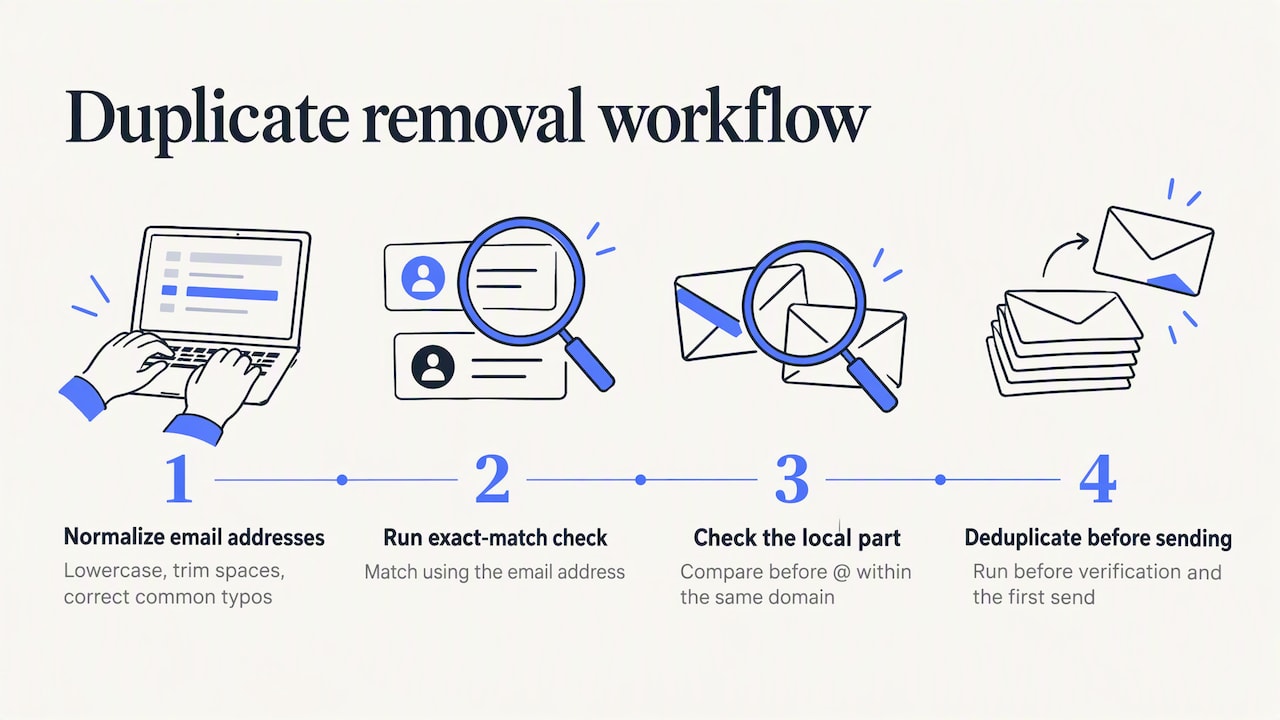
Email address is the only reliable matching key. Name and company fields vary too much between data sources (nicknames, abbreviations, formatting differences) to catch duplicates consistently. Normalize every address before matching: convert to lowercase, strip leading or trailing spaces, and standardize common typos in major domains (gmial.com, gmai.com) to their correct form.
Most CRM and email platforms include a built-in deduplication function that runs on exact-match email addresses, which catches the majority of duplicates from merged imports. For a more thorough pass, run a secondary check on the local part of the address (everything before the @ symbol) against the same domain, since some contacts appear twice with different capitalization or a trailing period that a strict exact-match rule misses.
Set deduplication as a required step every time you import a new list, not just during periodic cleanups. Run it before verification, since removing duplicates first reduces the number of addresses you need to verify and lowers your verification cost. When merging two lists from different sources (a purchased list and an organic signup list, for example), always deduplicate the combined set before the first send, never after.
Best practices for data collection and consent management to ensure list quality and compliance
Clean lists start with how you collect addresses, not just how you clean them later. A double opt-in process, where a new subscriber confirms their email through a confirmation link, produces a cleaner list from day one than single opt-in forms, because it filters out typos, fake addresses, and bots before they ever reach your sending list.
Every commercial email needs a clear, working opt-out method, and the CAN-SPAM Act requires businesses to honor those opt-out requests. This obligation applies even to people who signed up as subscribers or members and holds even when a third-party vendor sends the mail on your behalf.
Capture consent context alongside the email address itself: when someone signed up, where (a specific form or landing page), and what they agreed to receive. This record matters if a complaint or compliance question ever comes up, and it also helps you segment new contacts correctly from the start.
Avoid list sources that cannot show clear consent. A purchased list, scraped from an unrelated context, almost always carries higher bounce rates and complaint risk than a list built through direct signups, because the people on it never asked to hear from you specifically.
Strategies for handling email address syntax errors and formatting issues
A syntax error is any address that cannot technically route mail: a missing @ symbol, a double period, an incomplete domain, or stray whitespace captured from a copy-paste error. These are the easiest hygiene problems to catch because basic pattern-matching rules identify most of them without needing to query a mail server.
Run a syntax check as the first filter in any verification process, before the more resource-intensive MX lookup and SMTP probe steps. This order saves time and verification cost, since there is no reason to probe a mail server for an address that is malformed on its face.
Common fixable patterns include trailing spaces, accidental capitalization inconsistencies in the domain, and common domain typos (yahooo.com, hotmial.com). Some verification tools can auto-correct these with reasonable confidence, but for anything you cannot correct with certainty, remove the entry rather than guess. A wrong guess sends mail to an address you do not control, which carries its own risk.
Addresses with unusual but technically valid formatting, like plus-addressing (name+tag@domain.com) used for inbox filtering, should pass through syntax checks without being flagged as errors. Treating valid-but-unusual formats as errors removes real, reachable contacts from your list for no good reason.
Impact of list hygiene on sender reputation and inbox placement explained in depth
Inbox providers build a reputation score for every sending domain and IP based on how recipients interact with your mail. Hygiene problems, high bounce rates, spam complaints, and low engagement directly lower that score, and a lower score means a growing share of your mail lands in spam instead of the inbox, regardless of how well-written the message itself is.
Gmail’s sender guidelines make the connection explicit: senders who keep spam complaint rates under 0.1% remain eligible for mitigation support, while those who reach 0.3% can lose that eligibility entirely. Once mitigation becomes unavailable, recovering sender reputation takes considerably longer and often means a period of significantly reduced sending volume while trust rebuilds.
Hard bounces compound this problem because they signal to inbox providers that a sender is not maintaining their list, which reads as a risk signal independent of content quality. A list with a high proportion of unverified or purchased addresses tends to show both effects at once: more bounces and more complaints, since recipients who never opted in are more likely to mark mail as spam.
The fix is not a one-time cleanup but the ongoing combination covered throughout this guide: verification on import, prompt bounce suppression, engagement-based segmentation, and authentication that passes consistently. Each piece reinforces the others, and skipping any one of them leaves a gap that eventually shows up as a reputation problem.

Author perspective: why maintaining hygiene is worth the lift
Hygiene work is unglamorous, which is exactly why so many teams skip it until deliverability drops and the fix becomes urgent instead of routine. Treating spam complaint rate and bounce rate as KPIs, tracked weekly alongside open and reply rates, catches problems while they are still small and cheap to fix.
The teams that stay out of spam folders are rarely the ones with the cleverest subject lines. They are the ones who verify before they send and sunset before they are forced to.
— Yaro
How PlusVibe.ai can automate your list-hygiene SOP
We built our platform around a routine that includes warm-up infrastructure to support your sender reputation while you clean and grow your list, built-in email verification for invalid, disposable, and catch-all addresses, deliverability monitoring to flag rising bounce or complaint rates, and integrations with tools like HubSpot and Zapier to help sync suppressions automatically.
- Run your list through our free email verification tool before your next send.
- Explore our verification product for ongoing, automated list checks.
- Compare Personal, Business, and Agency plans to find the setup that matches your sending volume.
If you are also working on growing your list the right way, this guide to proven list-growth strategies pairs well with the hygiene routine above.
FAQ
What counts as good list hygiene for a sending list?
Good list hygiene means every address on your list is verified as valid, has given consent to receive your mail, and shows recent engagement. It also means hard bounces, role-based addresses, and duplicates are removed on an ongoing basis rather than during occasional cleanups.
How do I stop getting hundreds of unwanted emails?
Unsubscribe directly through the link in each message rather than marking every one as spam, since consistent unsubscribe use trains your inbox filters more effectively. For persistent unwanted senders, set up a filter rule in your email client to automatically archive or delete future messages from that address.
What is a reasonable sending cadence to avoid overwhelming a list?
There is no single universal rule, but a common guideline is to send only as often as your audience consistently opens and clicks, pulling back frequency when engagement drops rather than pushing through it. Watching your own open and complaint trends over several sends tells you more than any fixed schedule.
What does a catch-all domain mean for my list?
A catch-all domain accepts mail sent to any address at that domain, even ones that do not actually exist, which means standard verification cannot fully confirm deliverability for addresses on it. The safest approach is to flag catch-all addresses as higher risk and send to them cautiously or exclude them from cold outreach.
How often should I run list hygiene checks?
Verify new contacts at import and process bounces weekly, then run a full engagement segmentation and re-engagement campaign monthly. This weekly-and-monthly rhythm catches problems while they are small and keeps your sender reputation stable over time.
Sources
- Email sender guidelines - Gmail Help
- CAN-SPAM Act: A Compliance Guide for Business | Federal Trade Commission
- Bounce Lookup - Sender Score