Back to Blogs

Slack Email Notifications: How They Work and How to Control Them

Learn when Slack sends email notifications, how to change or stop them, fix ones that don't arrive, and route lead emails into Slack for your sales team.
Yaro Y., PlusVibe founder
Yaro Y.
Published:
October 24, 2026
Updated on:
October 24, 2026
min read
meaningful stories

Slack Email Notifications: How They Work and How to Control Them

Yaro Y.
Updated On
October 24, 2026

Slack sends email notifications only when you are away from Slack, and it bundles them so your inbox does not fill up. You choose how often they arrive, what triggers them, and whether you get them at all. This guide covers all of that: the rules behind the emails, how to change them, what to check when they don’t show up, and how a sales team can go the other direction and push incoming email into Slack.

Plusvibe
Keep Sales Replies Moving
PlusVibe connects campaign data with Slack, helping sales teams manage replies without relying on Slack email notifications.

Key takeaways

  • Slack emails you about messages only when you are inactive on the desktop app or browser, and they are bundled and capped at once every 15 minutes or once an hour, depending on your preference.
  • Notification emails and “news and updates” emails are two separate settings. Turning off one does not turn off the other.
  • Missing emails usually come from a wrong address on your account, spam filtering, or a workspace-level restriction, not from a Slack bug.
  • Phantom badges are almost always a sync problem or several open sessions. Shift+Esc on desktop marks everything as read.
  • For lead and reply alerts, a workflow that starts outside Slack is a better route than relying on notification emails.

Table of Contents

When Slack actually sends you an email

Slack treats email as the last stop in a chain. According to Slack’s guide to notifications, you get desktop notifications while you work on your computer. When you step away, notifications move to the mobile app or to email.

That design explains most of the confusion people have. If you sit in Slack all day, you will never see a notification email, because Slack assumes you have already seen the message. If you close your laptop and leave the browser tab idle, an email follows.

Three rules are worth remembering:

  1. Presence matters. Emails are sent only when you are inactive on the desktop app or in the browser.
  2. Emails are bundled. Slack groups unread messages into a single email instead of sending one per message.
  3. Frequency is capped. Per Slack’s documentation, bundles go out every 15 minutes or once an hour, based on the option you pick.

So a Slack email is never instant. If you need to know about something within seconds, email is the wrong channel. Use mobile push or a channel alert instead (more on that below).

Why you might not get an email even when you expect one

The most common reason is that you were still “active.” A Slack tab left open on a second monitor can keep you marked as present, so the email never fires. The second most common reason is that the message did not match your notification rules. If you set a channel to notify you only for mentions, ordinary chatter will not trigger an email.

How to change your email notification settings

Slack puts desktop, mobile and email notifications in one place. Its help page on how to configure your Slack notifications walks through the steps for each device. The menu labels shift now and then as Slack updates its interface, so treat the outline below as a map and follow the help page for the exact clicks.

Choose what triggers a notification

Start with the notification preferences in your profile. Here you decide whether you want alerts for all new messages, only direct messages, mentions and keywords, or nothing. Email follows the same logic as your other alerts, so a tighter trigger means fewer emails.

Then go channel by channel. Busy channels are where notification fatigue starts. Muting a channel, or setting it to mentions only, removes it from the email bundle without touching the rest of your setup.

Set how often emails arrive

In the email section you can pick the delivery rhythm. The two options are every 15 minutes or once an hour, and Slack describes the emails as bundled. If you only want a safety net for things you missed overnight, the hourly option is the quieter one.

Stop notification emails entirely

If the goal is zero emails from Slack, there are two steps, because there are two kinds of email:

  • Message notification emails. Turn these off in your notification preferences by disabling the email option for unread messages.
  • News and updates emails. These cover Slack features, feedback requests and tips. Slack says you can manage them from the Notifications tab in your account settings, at my.slack.com/account/notifications. Uncheck the boxes for the types you don’t want.

One limit applies. Even if you opt out of every listed type, Slack says it will still send important administrative emails, such as password resets. You can’t switch those off, and you wouldn’t want to.

Use mobile alerts only when you’re away from your desk

Slack lets you delay mobile notifications until you are inactive on desktop. This avoids the double buzz of a message hitting your laptop and your phone at once. Many people who ask how to “stop Slack emails” actually want this setting, because it removes the duplicates that make Slack feel noisy.

A quick reference table

What you want What to adjust
Fewer emails from busy channels Set those channels to mentions only or mute them
Slower, quieter bundles Choose the hourly email option
No message emails at all Disable email for unread messages in notification preferences
No promotional or product emails Uncheck the email types under account notification settings
No double alerts on phone and laptop Send mobile notifications only when inactive on desktop
Instant alerts for important events Use mobile push or a channel alert, not email

Slack email notifications not working: a checklist

When the emails you expect never show up, work through this list in order. It follows the logic of Slack’s page on trouble receiving emails from Slack.

  1. Confirm your email address. The first step Slack suggests is making sure the address on your account is current. A typo or an old work address explains many cases.
  2. Check spam and filters. Look in junk, promotions tabs, and any mail rules that might route Slack messages elsewhere. Company mail servers sometimes quarantine automated mail.
  3. Ask whether you were active. Remember that Slack suppresses emails while you are active on desktop or in the browser.
  4. Review your trigger settings. If a channel is muted or set to mentions only, ordinary messages won’t generate email.
  5. Ask a workspace admin. Some restrictions are set at the workspace level and you can’t see or change them as a member.

Fixing phantom notifications and stuck badges

The other half of the search demand is the reverse problem: Slack insists you have notifications and you can’t find them.

Slack’s troubleshooting page points to synchronization as the usual cause. If a badge shows unread messages you have already read, press Shift+Esc in the desktop app. That marks everything as read and clears the unread state across the workspace.

If it keeps returning, check for multiple sessions. A browser tab, the desktop app and a phone can each hold a slightly different view of what is read. Close the extra sessions, then clear the cache in Slack’s preferences. That is the standard first-aid step for persistent badge errors.

Notifications not showing on a Mac

On macOS, the culprit is often the operating system rather than Slack. Slack’s help center says to confirm that Do Not Disturb is off in Control Center and that Slack has notification permission in System Settings, with the alert style set to Banners or Alerts. If the style is set to None, Slack can send the alert and you will never see it.

Notifications on an iPhone

The same two-layer logic applies. Slack needs permission to send alerts in your phone’s system settings, and the Slack app needs mobile notifications enabled in your preferences. If both are on and you still get nothing, check whether you are marked active on desktop and whether you set mobile alerts to wait until you are inactive.

Can Slack send notifications by DM instead of email?

This is a question that tops the results, and the answer from Slack’s own community has been no: there is no built-in option to swap the email notification for a Slack DM. The reasoning is simple. Slack email exists for people who are not in Slack at that moment, so a DM would defeat the purpose.

What you can do is build your own alert. Slack workflows can start outside of Slack: an external service sends an HTTP POST to a webhook, Slack receives it, and a step posts a message to a channel or person. The Slack workflow documentation explains the setup. To post to a channel, you need posting permission there, and if you lack it, an owner or admin has to grant it.

Can Slack send notifications by DM instead of email? — overview diagram

The reverse direction: getting email into Slack

Most teams searching this topic have a second need. They don’t want Slack to email them. They want their email to show up in Slack, so that nobody waits on a shared inbox.

Slack supports this. Its page on managing incoming emails says sending email to Slack keeps work communication in one place. On Business+ and Enterprise plans, owners and admins can enable or disable incoming emails for the workspace. Before you plan a setup around it, check which plan your workspace is on and whether an admin has switched the feature on.

There is also an Outlook add-in for sending email to Slack, which lets you move a message and its context out of a personal inbox and into a channel where colleagues can discuss it.
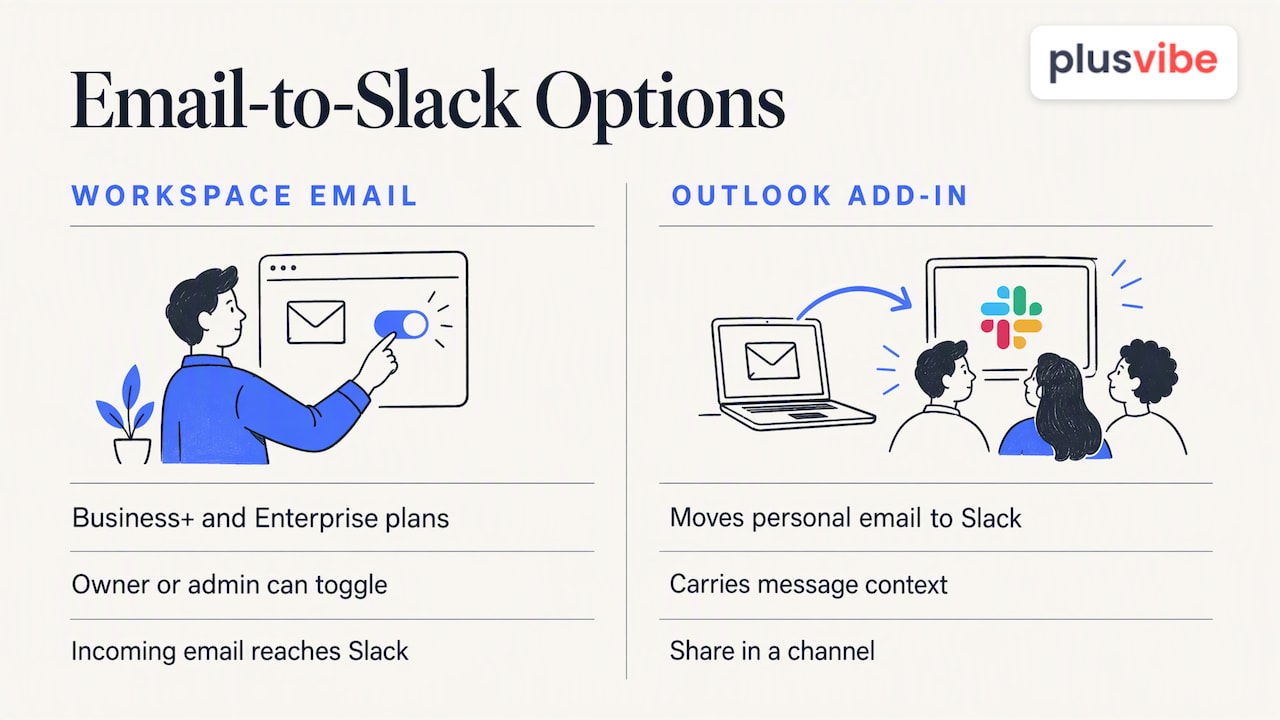
The reverse direction: getting email into Slack — overview diagram

What this means for outbound sales teams

For a team running cold outreach, the emails that matter are replies. A positive reply from a prospect is worth acting on within minutes, and a Slack email bundle that arrives up to an hour later is too slow. Teams solve this in a few ways:

  • A dedicated channel for replies. Positive replies post to one channel, with the prospect’s name, company and the message. Everyone sees it, and one person claims it.
  • Mentions for hot leads. A mention can trigger a mobile push, which is faster than email.
  • Clear routing rules. Decide who owns which reply before the volume grows. Our piece on unified inbox triage rules for sales teams covers how to do it.

One caution: don’t pipe every automated email into one channel. Out-of-office replies, bounces and unsubscribes will bury the leads. Filter before you notify.

Our perspective: alerts should follow the lead, not the inbox

We build software for people who send a lot of cold email, so we see what happens on the other side of notification settings. Teams rarely lose deals because Slack was quiet. They lose them because a good reply sat in a mailbox nobody was watching, or because the alert about it was one of two hundred that day.

Our view is that notification design is a routing problem. Decide what counts as urgent, send only that to a fast channel, and let everything else wait for a daily review. Slack’s bundling and presence rules are built for that thinking: quiet when you are present, a digest when you are away.

The second point is about what sits upstream. A Slack alert is only as good as the reply behind it, and replies depend on whether your emails reached the inbox. That is why we put so much work into private warm-up, isolated sending infrastructure and deliverability monitoring. PlusVibe connects with Slack, among other tools, so campaign activity can reach the place your team already works. Notifications fix what happens after a reply. Deliverability decides whether there is a reply at all.

If you take one habit from this guide, make it this: review your notification rules every quarter. Teams grow, channels multiply, and rules that made sense for five people create noise for fifteen.

— Yaro

Putting reply alerts to work with PlusVibe

If your Slack notification question comes from running outbound campaigns, our platform is built for that workflow. PlusVibe handles sequencing, campaign automation, follow-ups and a placement test that shows where your emails land, and it connects to Slack, HubSpot, Zapier, Gmail and Outlook.

Plans are published on the plans page: Personal runs $37-$58 per month, Business $77-$220 per month, and Agency starts from $497 per month. There is a free trial, so you can connect Slack and see how reply alerts behave with your own campaigns before you pay.

Practical rules for quieter, faster notifications

A few habits make the biggest difference, whether you use Slack for general work or for sales alerts:

  • Separate urgent from informational. Use one or two channels with mention alerts for urgent items. Mute the rest.
  • Pick the hourly email bundle if email is only a backup. Fifteen-minute bundles suit people who truly need the safety net.
  • Set quiet hours. Mobile alerts at night teach people to ignore them.
  • Close duplicate sessions. Fewer open tabs mean fewer phantom badges.
  • Write alert messages that stand alone. Include who, what and the next action, so people can respond without opening three tools.
  • Test the path. Send yourself a test message while inactive and confirm which channel it reaches and how long it takes.

FAQ

Why does Slack say I have notifications when I don’t?

This is usually a sync problem or a second session holding a different read state. Press Shift+Esc in the desktop app to mark everything as read. If badges keep returning, close extra browser tabs and clear the cache in Slack’s preferences.

How do I get Slack to stop sending emails?

Turn off email for unread messages in your notification preferences, then open the Notifications tab in your account settings and uncheck the news and updates types. Slack will still send essential administrative emails such as password resets. You can also keep the emails and make them rarer by choosing the hourly option.

Why are Slack notifications not showing up on my Mac?

Check that Do Not Disturb is off in Control Center and that Slack has permission in System Settings. Make sure the alert style is Banners or Alerts, not None. If the alerts still don’t appear, check whether Slack’s own notification preferences are set to mentions only.

How do I get Slack notifications on my iPhone?

Allow Slack to send notifications in your iPhone settings, then enable mobile notifications in the Slack app preferences. Slack may hold mobile alerts while you are active on desktop, if you chose that option. Once you are inactive on your computer, the push should arrive.

Can I get a Slack DM instead of an email?

Not as a built-in swap. Slack email is meant for when you are away from Slack. If you want alerts inside Slack, build a workflow or integration that posts a message to a channel or person when an event happens.

Sources

Tell meaningful stories

Read similar blogs

Feature icon
Related Articles

Over 1500+ marketers already growing with Plusvibe!

Decorative shape
Message icon
Our wall of love

What high volume senders are saying

Decorative shape
From agencies who send at scale:
5-star rating
We've been using plusbive.ai for over 3 months after switching from a provider that cost 6 times more. So far, we've contacted over 1 million unique prospects across 73 different clients and are achieving an impressive 4-5% reply rate — with almost no spam issues!
Valeri Vulchev
Valeri Vulchev
Campaign Strategy Director
Hypergen logo
5-star rating
123 leads in 37 days with a 58% positive response rate — thanks to plusvibe.ai's rock-solid sending infrastructure. Zero spam issues, just results.For every 50 prospects contacted, we landed 1 solid sales opportunity.Highly recommend it for scaling outreach!
Leonardo Sdraulig
Leonardo Sdraulig
Director of Outbound
Beanstalk logo
5-star rating
PlusVibe outperforms tools like Smartlead and Instantly with consistent deliverability and AI-driven warmup. We've sent over 1M emails and scaled outbound to thousands leads daily —landing right in the inbox.
More appointments, happier team, insane ROI!
Walter Winn
Walter Winn
Director of Demand Generation
Benchmark logo
5-star rating
What I love:The price, well yes, it's not expensive ;)The DNS modification recommendations that really help avoid ending up in spam.The text recommendations to avoid ending up in spam. Easy to use. Simple and clear UX.Top-notch customer service, they respond very quickly, even via chat.
Randy B.
Randy B.
Facebook Ads Media Buyer
5-star rating
User-friendly. Using PlusVibe has made it so much easier to manage my content planning, track audience engagement, and stay consistent across platforms without the usual overwhelm. The intuitive interface helps me quickly schedule posts while keeping everything aligned with my goals and brand vibe.
What I appreciate most is how PlusVibe.ai doesn’t just automate tasks; it helps me work smarter and frees up my mental space for creative strategy.
Highly recommend it if you want to elevate your workflow and keep your content aligned with your brand without burning out.
Brylle G
Brylle G
Resource and Content Manager
5-star rating
PlusVibe.ai has been a game-changer for my lead gen agency. It’s super easy to use—no tech headaches, just smooth automation that works. But the real star is their customer support. Any time I’ve had a question, they’ve been quick, helpful, and actually care.
If you’re looking for a solid outreach tool that just works (and a team that’s got your back), this is it. Couldn’t recomend it more!
AR
Adam R.
Founder
5-star rating
PlusVibe.ai has transformed my cold email outreach campaigns. The email warm-up feature is a standout, ensuring my emails are consistently delivered and avoiding spam filters. It's also great to see that the replies from clients end up in the inbox, rather than being buried in the junk folder. The platform truly boosts email deliverability, and I’ve seen significant engagement improvements. It's reliable, efficient, and helps me reach my audience without worrying about deliverability issues.
KK
Kartikey K.
Agency Founder
5-star rating
I'd like to appreciate Yaro and the entire PlusVibe.ai team for the thoughtfulness, care and attention behind the creation of the platform. It's been truly a game changer for our business. The team is super hands-on and responsive. Looking forward to the continued relationship for many years to come.
Abayomi A.
Abayomi A.
Deal Partner
5-star rating
I've used all the tools out there, and PlusVibe is by far the best.
Everything runs smoothly, and it’s made a huge impact on my lead gen agency. If you're serious about cold email, don’t hesitate —PlusVibe is the way to go!
Byron Papageorgiou
Byron Papageorgiou
Lead Gen Agency Owner
BP logo
5-star rating
We've been using PlusVibe.ai for our outreach campaigns, and the results have been consistently impressive. From the get-go, the platform stood out for its clean UI, intuitive workflow, and powerful automation capabilities. I love the built-in warmup, email copy optimization and email verification features. Also, Support has also been top-notch. Any questions we've had were quickly resolved by their responsive team. It’s clear that the product is built with users in mind, and it’s continually evolving based on feedback.
AS
Aman S.
Founder
5-star rating
We've been using PlusVibe to manage our clients' B2B lead generation campaigns. Not only have we saved 63% compared to the previous platform we were using, but PlusVibe has also helped us generate hundreds of warm leads for sales teams in B2B companies.
Damien E.
Damien E.
Founder & CEO
Clck logo
5-star rating
It is one of the most affordable apps in the email sender space and includes email warmup, email rotations, email validation, etc all out of the box -- the only of those requiring in-tool credits are the validations. The team has been really quick to respond; they say <2 min customer support wait times, but in practice it's been more like 15-30 seconds.
I've only been using it for a few days now, but holy S### is it a breath of fresh air compared to apps like apollo.
EC
Evan C
Director
5-star rating
We have been using PlusVibe for over a year and are very enthusiastic about this software and the service the team provides. For cold mailing it is definitely one of the best tools you can use!
Leon E.
Leon E.
Founder of Instant Lead
Leon E. company logo
5-star rating
The core functionality is top notch. While Smartlead and Instantly are in an arms race to roll out as many bells and whistles as possible, PlusVibe.ai delivers with consistent and reliable warmup & deliverability. AI warmup copy based on industry, schedules that emulate real human behavior, and absolute rockstar support. I have sent over 1 million emails through LemList, Instantly, & Smartlead - and I can honestly say PlusVibe is currently best in class when it comes to core functionality.
Walter W.
Walter W.
Director of Demand Generation
Financial Services
5-star rating
Easy to use UI. I was able to get the system up and running in less than an hour. There are constant resources provided and updated ot help the community with the process of cold emailing. The team is super responsive to any suggestions.
P
Pavan P
Managing Partner
5-star rating
I have recenlty started playing with PlusVibe. what i really like is the team and their focus on shipping features they are committing. for a startup in this very competitive cold email space, thats very commendable. i like the fact that they listen to the early adopters and incorporate features and fucntionalities. I'm currently running test campaigns and I look forward to scaling them soon.
Pavan P.
Pavan P.
Director and Co-founder
5-star rating
Plusvibe.ai excels in streamlining cold email campaigns with its AI-driven automation. The platform offers unlimited email warm-up, built-in email verification, and seamless integration with platforms like LinkedIn and websites for data enrichment. Its intuitive interface and smart personalization features make crafting effective email sequences effortless, even for beginners. Moreover, the responsive customer support and active community enhance the overall user experience.
John M.
John M.
Digital Marketing Manager
5-star rating
It's a brilliant platform, great capabilities at a very competitive price, plus extremely friendly support, always online to help!
Levan K.
Levan K.
CEO and Founder
5-star rating
What I love:The price, well yes, it's not expensive ;)The DNS modification recommendations that really help avoid ending up in spam.The text recommendations to avoid ending up in spam. Easy to use. Simple and clear UX.Top-notch customer service, they respond very quickly, even via chat.
Alain G.
Alain G.
CEO
5-star rating
plusvibe is very user friendly and provides even beginners of cold email creation a wealth of knowledge and templates on how to create a good cold email. as well as this, it was very easy to integrate my emails within the platform as I was provided with videos and step by step instructions on how to do so. customer support is amazing, there is a slack channel where you can ask questions and get feedback and suggest features to the founder himself. it literally also tells you what the result of the email response is by tagging it and categorising it so you its more cleaner and you don't waste time reading emails that you already know the outcome of.
AH
Abdullah H
Founder
5-star rating
I'm still in the beginning stages of PlusVibe. I've run into a few obstacles (self-inflicted) on my onboarding, and PlusVibe's team has been so responsive and helpful. I'm really impressed they have the bandwidth and go above and beyond to make sure I'm taken care of.
SL
Stephen L.
Head of Sales
5-star rating
In a competitive field, PlusVibe stands out for their excellent customer service and quality, encompassing solution. Cold outreach through PlusVibe has given our business new life.
Chauncey S.
Chauncey S.
Agency Founder
5-star rating
Their AI system is incredibly effective in enhancing lead enrichment through advanced personalization. The cold email software works seamlessly, and their instant support is exceptional. Highly recommend!
MT
Mahir T.
CEO
5-star rating
I am one of the earlier PlusVibe.ai lifetime adapters. They are offering unlimited inbox with 250K monthly sending limits, which is a really good number in the price. :) Also their pricing is good. I am lucky that I am one of them who bought their lifetime deal in the early stage. Their UI is very easy and clean. Any new user who never used any outreach tool, even can understand it in 5-10 minutes. I have already started using it for my cold outreach campaign, and I have started to get results. A few days ago they introduced Google integration, it's really saving my time.
Mizanur Rahman M.
Mizanur Rahman M.
CEO
5-star rating
We've been using plusbive.ai for over 3 months after switching from a provider that cost 6 times more. So far, we've contacted over 1 million unique prospects across 73 different clients and are achieving an impressive 4-5% reply rate — with almost no spam issues!
Valeri Vulchev
Valeri Vulchev
Campaign Strategy Director
Hypergen logo
5-star rating
123 leads in 37 days with a 58% positive response rate — thanks to plusvibe.ai's rock-solid sending infrastructure. Zero spam issues, just results.For every 50 prospects contacted, we landed 1 solid sales opportunity.Highly recommend it for scaling outreach!
Leonardo Sdraulig
Leonardo Sdraulig
Director of Outbound
Beanstalk logo
5-star rating
Liron Bercovich
Liron Bercovich
CEO @ Marlink
Marlink logo
5-star rating
PlusVibe outperforms tools like Smartlead and Instantly with consistent deliverability and AI-driven warmup. We've sent over 1M emails and scaled outbound to thousands leads daily —landing right in the inbox.
More appointments, happier team, insane ROI!
Walter Winn
Walter Winn
Director of Demand Generation
Benchmark logo
5-star rating
I've used all the tools out there, and PlusVibe is by far the best.
Everything runs smoothly, and it’s made a huge impact on my lead gen agency. If you're serious about cold email, don’t hesitate —PlusVibe is the way to go!
Byron Papageorgiou
Byron Papageorgiou
Lead Gen Agency Owner
BP logo
5-star rating
We've been using PlusVibe to manage our clients' B2B lead generation campaigns. Not only have we saved 63% compared to the previous platform we were using, but PlusVibe has also helped us generate hundreds of warm leads for sales teams in B2B companies.
Damien E.
Damien E.
Founder & CEO
Clck logo
5-star rating
Valeri Vulchev
Valeri Vulchev
Campaign Strategy Director
Hypergen logo
5-star rating
We have been using PlusVibe for over a year and are very enthusiastic about this software and the service the team provides. For cold mailing it is definitely one of the best tools you can use!
Leon E.
Leon E.
Founder of Instant Lead
Leon E. company logo
5-star rating
Plusvibe.ai excels in streamlining cold email campaigns with its AI-driven automation. The platform offers unlimited email warm-up, built-in email verification, and seamless integration with platforms like LinkedIn and websites for data enrichment. Its intuitive interface and smart personalization features make crafting effective email sequences effortless, even for beginners. Moreover, the responsive customer support and active community enhance the overall user experience.
John M.
John M.
Digital Marketing Manager
5-star rating
It's a brilliant platform, great capabilities at a very competitive price, plus extremely friendly support, always online to help!
Levan K.
Levan K.
CEO and Founder
5-star rating
Byron Papageorgiou
Byron Papageorgiou
Lead Gen Agency Owner
BP logo
5-star rating
What I love:The price, well yes, it's not expensive ;)The DNS modification recommendations that really help avoid ending up in spam.The text recommendations to avoid ending up in spam. Easy to use. Simple and clear UX.Top-notch customer service, they respond very quickly, even via chat.
Alain G.
Alain G.
CEO
5-star rating
What I love:The price, well yes, it's not expensive ;)The DNS modification recommendations that really help avoid ending up in spam.The text recommendations to avoid ending up in spam. Easy to use. Simple and clear UX.Top-notch customer service, they respond very quickly, even via chat.
Randy B.
Randy B.
Facebook Ads Media Buyer
5-star rating
We've been using PlusVibe to manage our clients' B2B lead generation campaigns. Not only have we saved 63% compared to the previous platform we were using, but Pipl has also helped us generate hundreds of warm leads for sales teams in B2B companies.
Damien E.
Damien E.
Founder & CEO
Clck logo
5-star rating
PlusVibe outperforms tools like Smartlead and Instantly with consistent deliverability and AI-driven warmup. We've sent over 1M emails and scaled outbound to thousands leads daily —landing right in the inbox.
More appointments, happier team, insane ROI!
Walter Winn
Walter Winn
Director of Demand Generation
Benchmark logo
5-star rating
I've used all the tools out there, and PlusVibe is by far the best.
Everything runs smoothly, and it’s made a huge impact on my lead gen agency. If you're serious about cold email, don’t hesitate —PlusVibe is the way to go!
Byron Papageorgiou
Byron Papageorgiou
Lead Gen Agency Owner
BP logo
5-star rating
Valeri Vulchev
Valeri Vulchev
Campaign Strategy Director
Hypergen logo
5-star rating
123 leads in 37 days with a 58% positive response rate — thanks to plusvibe.ai's rock-solid sending infrastructure. Zero spam issues, just results.For every 50 prospects contacted, we landed 1 solid sales opportunity.
Highly recommend it for scaling outreach!
Leonardo Sdraulig
Leonardo Sdraulig
Director of Outbound
Beanstalk logo
5-star rating
We have been using PlusVibe for over a year and are very enthusiastic about this software and the service the team provides. For cold mailing it is definitely one of the best tools you can use!
Leon E.
Leon E.
Founder of Instant Lead
Leon E. company logo
5-star rating
Byron Papageorgiou
Byron Papageorgiou
Lead Gen Agency Owner
BP logo
5-star rating
We've been using plusbive.ai for over 3 months after switching from a provider that cost 6 times more. So far, we've contacted over 1 million unique prospects across 73 different clients and are achieving an impressive 4-5% reply rate — with almost no spam issues!
Valeri Vulchev
Valeri Vulchev
Campaign Strategy Director
Hypergen logo
5-star rating
It's a brilliant platform, great capabilities at a very competitive price, plus extremely friendly support, always online to help!
Levan K.
Levan K.
CEO and Founder
5-star rating
What I love:The price, well yes, it's not expensive ;)
The DNS modification recommendations that really help avoid ending up in spam.
The text recommendations to avoid ending up in spam. Easy to use. Simple and clear UX.
Top-notch customer service, they respond very quickly, even via chat.
Alain G.
Alain G.
CEO
5-star rating
What I love: The price, well yes, it's not expensive ;)
The DNS modification recommendations that really help avoid ending up in spam.
The text recommendations to avoid ending up in spam. Easy to use. Simple and clear UX.
Top-notch customer service, they respond very quickly, even via chat.
Randy B.
Randy B.
Facebook Ads Media Buyer
5-star rating
Plusvibe.ai excels in streamlining cold email campaigns with its AI-driven automation. The platform offers unlimited email warm-up, built-in email verification, and seamless integration with platforms like LinkedIn and websites for data enrichment. Its intuitive interface and smart personalization features make crafting effective email sequences effortless, even for beginners. Moreover, the responsive customer support and active community enhance the overall user experience.
John M.
John M.
Digital Marketing Manager
5-star rating
Liron Bercovich
Liron Bercovich
CEO @ Marlink
Marlink logo
5-star rating
What I love:The price, well yes, it's not expensive ;)
The DNS modification recommendations that really help avoid ending up in spam.
The text recommendations to avoid ending up in spam. Easy to use. Simple and clear UX.
Top-notch customer service, they respond very quickly, even via chat.
Alain G.
Alain G.
CEO
5-star rating
We have been using PlusVibe for over a year and are very enthusiastic about this software and the service the team provides. For cold mailing it is definitely one of the best tools you can use!
Leon E.
Leon E.
Founder of Instant Lead
Leon E. company logo
5-star rating
It's a brilliant platform, great capabilities at a very competitive price, plus extremely friendly support, always online to help!
Levan K.
Levan K.
CEO and Founder
5-star rating
Byron Papageorgiou
Byron Papageorgiou
Lead Gen Agency Owner
BP logo
5-star rating
What I love:The price, well yes, it's not expensive ;)
The DNS modification recommendations that really help avoid ending up in spam.
The text recommendations to avoid ending up in spam. Easy to use. Simple and clear UX.
Top-notch customer service, they respond very quickly, even via chat.
Randy B.
Randy B.
Facebook Ads Media Buyer
5-star rating
Plusvibe.ai excels in streamlining cold email campaigns with its AI-driven automation. The platform offers unlimited email warm-up, built-in email verification, and seamless integration with platforms like LinkedIn and websites for data enrichment. Its intuitive interface and smart personalization features make crafting effective email sequences effortless, even for beginners. Moreover, the responsive customer support and active community enhance the overall user experience.
John M.
John M.
Digital Marketing Manager
5-star rating
We've been using PlusVibe to manage our clients' B2B lead generation campaigns. Not only have we saved 63% compared to the previous platform we were using, but PlusVibe has also helped us generate hundreds of warm leads for sales teams in B2B companies.
Damien E.
Damien E.
Founder & CEO
Clck logo
5-star rating
Valeri Vulchev
Valeri Vulchev
Campaign Strategy Director
Hypergen logo
5-star rating
PlusVibe outperforms tools like Smartlead and Instantly with consistent deliverability and AI-driven warmup. We've sent over 1M emails and scaled outbound to thousands leads daily —landing right in the inbox.
More appointments, happier team, insane ROI!
Walter Winn
Walter Winn
Director of Demand Generation
Benchmark logo
5-star rating
I've used all the tools out there, and PlusVibe is by far the best.
Everything runs smoothly, and it’s made a huge impact on my lead gen agency. If you're serious about cold email, don’t hesitate —PlusVibe is the way to go!
Byron Papageorgiou
Byron Papageorgiou
Lead Gen Agency Owner
BP logo
5-star rating
Liron Bercovich
Liron Bercovich
CEO @ Marlink
Marlink logo
5-star rating
123 leads in 37 days with a 58% positive response rate — thanks to plusvibe.ai's rock-solid sending infrastructure. Zero spam issues, just results.For every 50 prospects contacted, we landed 1 solid sales opportunity.Highly recommend it for scaling outreach!
Leonardo Sdraulig
Leonardo Sdraulig
Director of Outbound
Beanstalk logo
5-star rating
We've been using plusbive.ai for over 3 months after switching from a provider that cost 6 times more. So far, we've contacted over 1 million unique prospects across 73 different clients and are achieving an impressive 4-5% reply rate — with almost no spam issues!
Valeri Vulchev
Valeri Vulchev
Campaign Strategy Director
Hypergen logo

Join Our Community

Decorative shape
Discover what our users say about their experiences with PlusVibe – real stories, real impact, real satisfaction.
Rocket icon
Get Started

Sales teams love PlusVibe

Ready to take your cold email outreach to the next level?
Start for free today and see why top teams trust us!