A custom tracking domain is a subdomain you own, such as track.yourdomain.com, that points to your sending platform through a CNAME record. Open pixels and click links then carry your domain instead of the platform’s shared one. Setup takes a few DNS edits and a short wait. Skipping it leaves your links tied to a domain that thousands of other senders also use.
This guide explains how tracking links work, how to choose the subdomain, the exact setup steps, the mistakes that break it, and when it is worth turning tracking off.
Key takeaways
- A custom tracking domain swaps the platform’s shared link domain for a subdomain you control, so your links no longer inherit other senders’ reputation.
- Setup is one CNAME record, a verification check and an HTTPS certificate. The most common failure is a proxied DNS record.
- Use a subdomain of the same domain you send from, so the link domain and the From domain match.
- Every sending domain needs its own tracking subdomain. Reusing one across many domains creates a footprint.
- A tracking domain supports good deliverability but does not replace warm-up, authentication and clean lists.
Table of Contents
- What a custom tracking domain does
- Why it matters for deliverability
- Choose the subdomain before you touch DNS
- Setup in five steps
- The mistakes that break tracking
- Do you need tracking at all?
- Our perspective
- Running tracking domains at scale
- Set up tracking with PlusVibe
- FAQ
- Sources
What a custom tracking domain does
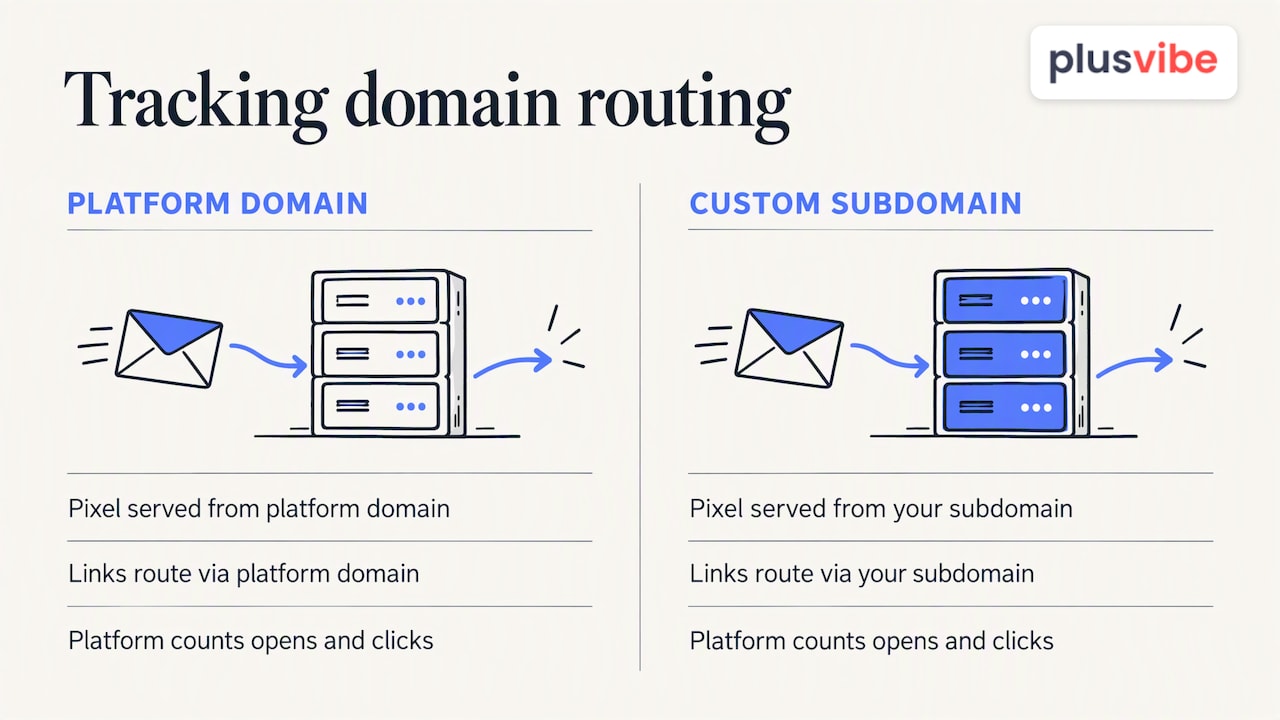
When you track opens and clicks, your sending platform changes the email before it goes out. It adds a tiny invisible image to record opens and rewrites each link so the click passes through a tracking server first. Amazon’s documentation describes this for its own service: it adds a one-pixel image to capture opens and replaces links with ones that route through a server it operates.
By default, that server lives on the platform’s domain. Every customer’s emails carry the same domain in their links. A custom tracking domain changes only that one thing: the pixel and the rewritten links are served from your own subdomain, while the platform still does the counting behind the scenes.
The idea is not specific to cold email. Klaviyo’s help center describes the same arrangement as dedicated click tracking, which shows your own domain on tracking links instead of the default one. Most serious sending tools offer a version of it, and the choices an email marketing platform for agencies must make about tracking and client domains are the same ones covered here.
What readers see
Hover over a link in an email and the destination shows in the corner of the window. With the default setup, a prospect sees a domain they have never heard of. With a custom domain, they see a subdomain of the company that sent the message. For one-to-one sales email, that small difference matters more than most formatting choices.
Why it matters for deliverability
Mailbox providers and spam filters look at the domains inside your message, not just the one in the From line. Userpilot’s setup guide explains that filters assess the root domain of email links when deciding whether to trust a message, and recommends a domain you control to reduce suspicious-link flags.
There are three practical reasons to set one up.
- No shared reputation. A default tracking domain is used by every customer on the platform. If some of them send aggressive campaigns, the link domain can collect a poor reputation that you did nothing to earn.
- Alignment. When the link domain matches your sending domain, the message looks coherent. A mismatch between the two is a common pattern in spam and phishing.
- Control. If something goes wrong, you can see it, change it, and retire the subdomain without touching your main domain.
One HubSpot resource on avoiding spam folders suggests a custom tracking subdomain can boost deliverability by up to 20%. Treat that as an upper bound from one vendor’s guide, not a promise. Results depend on your list quality, content, volume and authentication. A tracking domain removes one risk. It does not fix the others.
Choose the subdomain before you touch DNS
The name matters less than the pattern. A few rules save trouble later.
- Use a subdomain of the sending domain. If you send from
hello@getacme.com, track ontrack.getacme.comorgo.getacme.com. - Keep it plain. Short, ordinary words are fine. Avoid words that look like affiliate or redirect services.
- One per sending domain. If you run several domains, give each its own tracking subdomain rather than pointing them all at one.
- Do not use your primary company domain for cold outreach. The HubSpot kit above advises sending cold email from a separate domain related to your brand, so that a block does not affect the whole company. The tracking subdomain should live on that same secondary domain.
How many sending domains you need is its own question, and we cover it in cold email domains: how many do you really need.
A naming example
| Sending domain | Tracking subdomain | Why it works |
|---|---|---|
| getacme.com | track.getacme.com | Same root domain as the From address |
| tryacme.io | go.tryacme.io | Short, neutral, matches the sender |
| acme.com (primary) | not recommended for cold email | Puts the main brand’s reputation at risk |
Setup in five steps
The screens differ by platform, but the sequence is the same almost everywhere.
- Open your platform’s tracking domain setting. Look in campaign, domain or email settings. Enter the subdomain you chose, for example
track.getacme.com. - Copy the CNAME target. The platform shows a host (the
trackpart) and a value (its own tracking endpoint). Copy both exactly. - Add the CNAME at your DNS provider. Log in to wherever your nameservers live, which may be your registrar or a service like Cloudflare. Create a CNAME record with the host and value from step 2.
- Turn off proxying. If your DNS provider offers a proxy toggle, set this record to DNS only. More on this below.
- Verify and wait. Return to the platform and run the verification. DNS changes often propagate within minutes but can take longer. Once verified, the platform should issue an HTTPS certificate automatically.
Then send yourself a test email, hover over a link and confirm it shows your subdomain. Open the link in a browser and check that the padlock appears.
Check the details before you launch
- The host field should contain only the subdomain label in most DNS panels, not the full name. Some providers append the root domain automatically, which produces
track.getacme.com.getacme.comif you type the whole thing. - Do not add a trailing space or extra characters when pasting the value.
- Make sure no other record (an A record or a TXT record) already exists for the same subdomain. A CNAME cannot coexist with other records on the same name.
The mistakes that break tracking
Leaving the record proxied
The most common failure is a proxied record. Klaviyo’s guidance notes that leaving proxy settings on, such as the orange cloud in Cloudflare, breaks verification and automatic SSL issuance, which ends in failed setups and broken links. Set tracking CNAMEs to DNS only.
No HTTPS
Tracking links must load over HTTPS. If the certificate is missing or expires, browsers show warnings and some security tools block the link. Pick a platform that provisions and renews certificates for you, and test a live link after setup and again after a few weeks.
Using one domain for everything
If fifty sending domains all route clicks through the same tracking subdomain, you have built a shared footprint that spam filters can learn. The fix is simple: one tracking subdomain per sending domain.
Skipping authentication
A tracking domain does not authenticate your mail. SPF, DKIM and DMARC still do that job. If you are setting up DKIM too, our walkthrough on DKIM with CNAME or TXT records covers the verification step. For the full list of what to check before you send, use our email deliverability checklist.
Sending from a cold domain at full volume
A new domain with a fresh tracking subdomain has no history. Warm it up and ramp volume gradually. Our guide to deliverability best practices explains how.
Do you need tracking at all?
It is worth asking before you set anything up. Tracked links and pixels are extra machinery in a message that, in cold outreach, should look like a note from one person to another.
Some senders turn off open tracking entirely, because privacy features in some mail clients load images automatically and inflate open counts. Many keep click tracking only on the one link that matters, or send plain-text emails with no link in the first message and track replies instead.
A reasonable approach:
- Replies are the metric that matters. They do not need a tracking domain.
- If you track clicks, use a custom domain. A default shared domain is the riskier choice.
- If you track opens, treat the number as a rough signal. Do not make decisions on small differences.
For a broader look at the tools in this space, see our comparison of email tracking tools and the email tracker comparison.
Our perspective
We build infrastructure for cold email, and we see the same pattern often: teams spend hours on subject lines and then send from a shared link domain that undermines the work. Tracking is part of your sender identity. It belongs in the same setup pass as your sending domains, authentication and warm-up, not in a later cleanup.
Our view rests on how PlusVibe is designed. We run private, non-shared infrastructure, with isolated sending and dedicated connector IPs, because shared resources mean shared consequences. A custom tracking domain applies the same principle to links: whatever touches your reputation should be yours to control and to retire.
We also think senders should be skeptical of numbers. Open rates are noisy. Reply rates, positive replies and bounce rates tell you whether a campaign works. Monitor those, and check your domain’s standing regularly with a domain reputation checker and the steps in our blacklist guide.
If you remember one thing: set it up once, set it up per domain, test it with a real send, and then spend your attention on list quality and message.
— Yaro
Running tracking domains at scale
One domain is a five-minute job. Twenty or fifty is a different problem, and agencies feel it most. Each client needs its own sending domains, each sending domain needs its own tracking subdomain, and each needs DNS records, verification and certificate checks.
A few habits keep this manageable.
- Use a naming convention. The same label (
trackorgo) across all domains makes records easy to audit. - Keep a register. A simple sheet listing domain, tracking subdomain, DNS provider, date verified and client prevents orphaned records.
- Separate clients. Never share sending or tracking domains between two clients. One client’s bad campaign should not touch another.
- Audit on a schedule. Re-test a live link on each domain monthly. An expired certificate or a deleted record is easy to miss.
- Retire cleanly. When you drop a domain, remove the CNAME too, so no dangling record points to a service you no longer use.
Our automation features are built around this kind of multi-inbox, multi-domain workload.
Set up tracking with PlusVibe
If you would rather not manage the infrastructure by hand, PlusVibe gives you private email warm-up, isolated sending, inbox rotation and deliverability monitoring in one platform, with a free trial to start. Plans are listed on our plans page: Personal runs $37-$58 per month, Business $77-$220 per month, and Agency starts from $497 per month. Inboxes are available through Google Workspace at $4 per month per inbox or Microsoft 365 at $4.50 per month per inbox.
For teams that want the whole setup handled, our done-for-you email setup covers it for $1,500 per month.
FAQ
What is the difference between a custom tracking domain and a sending domain?
The sending domain is the one in your From address, and it is authenticated with SPF, DKIM and DMARC. The tracking domain is the one inside your links and open pixel. For best results, the tracking domain should be a subdomain of the sending domain.
Does a custom tracking domain guarantee inbox placement?
No. It removes the risk of a shared link domain and improves consistency between your links and your sender, but placement also depends on authentication, warm-up, list quality, volume and content. Think of it as one required piece, not a fix on its own.
How long does tracking domain setup take?
Adding the CNAME takes minutes. DNS propagation and certificate issuance usually finish quickly, though they can take longer depending on your DNS provider. If verification fails, check for a proxied record, a typo in the host or value, or a conflicting record on the same name.
Can I use my main company domain for tracking?
It is better not to for cold outreach. If a campaign draws spam complaints, the damage should fall on a secondary domain rather than the one your customers and employees use for everyday email.
Do I need a different tracking domain for each sending domain?
Yes, as a rule. Giving each sending domain its own tracking subdomain avoids a shared footprint, and keeps problems on one domain from spreading to others.
Sources
- Configuring custom domains to handle open and click tracking, Amazon SES
- How to set up dedicated click tracking, Klaviyo Help Center
- Setup and authenticate your email domain, Userpilot Knowledge Base
- 7 Ways to Avoid the Spam Folder, HubSpot resource kit