Timezone sending means scheduling each email for a chosen clock time in the recipient’s timezone, not yours. A message set for 9:00 a.m. lands at 9:00 a.m. in New York, Chicago and Los Angeles, in three waves. For cold outreach the method is simple: store a valid timezone for every lead, set a local send window, spread sends randomly inside it, and watch where the mail lands. The last part matters most, because a perfect send time does nothing if the message goes to spam.
Key Takeaways
- Timezone sending schedules a message for a set time in each recipient’s timezone, so the whole list sees it at a similar point in their day.
- The method is only as good as your data: a missing or invalid timezone sends the email at the wrong time. Clean the field before you launch.
- Use a window (for example 8:30 to 10:30 a.m. local) with randomized send times, not one exact minute for everyone.
- Treat daylight saving and odd offsets by storing named timezones such as America/Chicago, never fixed offsets.
- Local timing helps engagement, but placement decides whether anyone sees the email. Check both.
Table of Contents
- What timezone sending is, and when it fits
- Step 1: Get a reliable timezone for every lead
- Step 2: Choose the local window
- Step 3: Randomize inside the window
- Step 4: Handle the edge cases
- Timing does not fix placement
- Our perspective
- Run your timing tests on infrastructure built for placement
- FAQ
- Sources
What timezone sending is, and when it fits
Timezone sending schedules an email for a specific time in recipients’ time zones, so each person gets it at a chosen point in their own day. It is also called local-time sending. The alternative is to send the whole list at one moment in your own timezone, which works only when everyone lives in the same one.
For outbound, that difference is large. If you are in Austin and your prospects are spread from Boston to Seattle to London, a send at 9:00 a.m. Central reaches Boston at 10:00 a.m., Seattle at 7:00 a.m. and London in mid-afternoon. A cold email that arrives before the workday begins sits under overnight mail. One that arrives after hours gets read the next morning, if at all.
Local-time sending is not right for everything. Klaviyo’s guide cautions that it is unsuitable for time-sensitive content such as flash sales or imminent deadlines, because people in different zones receive the message at different absolute moments. Cold outreach rarely has that problem. Your email is not tied to a clock event, so each prospect can receive it at a good local hour. MailerLite makes the same point from the other side: it describes timezone sending as a fit for releases where each subscriber should receive the message at a chosen local clock time.
If you want the broader basics of how scheduled sending fits into an email program, this overview of email marketing covers the groundwork.

Step 1: Get a reliable timezone for every lead
Everything downstream depends on this field. Three sources are common, in order of reliability.
- A timezone you set yourself. Derive it from the lead’s city, state or country in your list, then write it as a named value.
- A timezone inferred from tracking data. HubSpot’s documentation says its scheduling uses the manually set Time Zone property first, then an IP-based timezone inferred from location data collected by its tracking. It adds that contacts imported from segments, or who never visited a website, likely lack that IP data and fall back to the account timezone.
- A fallback. Customer.io’s documentation describes the same ladder: an explicit IANA timezone on the person, then an automatically collected value, then a configured fallback.
Cold prospects have never visited your site, so inferred timezones are usually empty for them. That makes the first source your main one. A purchased or scraped list typically carries a city and state, or at least a country. Map those to a timezone before you upload.
Use named timezones, not offsets
The format matters. An IANA identifier is a name such as America/New_York or Europe/Berlin. Customer.io requires this format and gives America/New_York as its example. Named zones carry the daylight saving rules with them, while a fixed offset such as UTC-5 breaks twice a year.
The W3C’s guidance on time zones explains why: offsets depend on the date, daylight saving rules vary by zone, and some regions use half-hour or quarter-hour offsets. India runs on a half-hour offset and Nepal on a quarter-hour one. A “plus or minus whole hours” shortcut gets those contacts wrong, and in the US it gets Arizona wrong, since most of that state does not change its clocks.
Be careful with invalid values
A blank timezone and a wrong timezone are not the same problem. Customer.io warns that a non-empty but invalid value is handled differently from a missing one: the message goes out at the last date and time used across all timezones. Whatever tool you use, run a check before launch: filter the lead list for blanks, then for anything that is not a recognized named zone, and fix both.
A useful side effect: while you are cleaning location data, you can also clean the addresses. A bounce from a dead address hurts your sender reputation no matter what time you send. Our email verification catches invalid addresses before they reach a campaign.
Step 2: Choose the local window
No universal best hour exists, and anyone who gives you a single minute is guessing. What you can do is pick a sensible starting window and let your own replies decide.
A reasonable start for B2B prospects is the beginning of the workday, such as 8:30 to 10:30 a.m. local, with a second window in the early afternoon. We have written up the timing research in more depth in our guides on the best time to send cold emails and what the science says about send times. Use them to choose your first two or three candidate windows.
Then test them. Klaviyo’s Smart Send Time guide describes a clean method: exploratory tests randomly assign recipients across all 24 hours and deliver at each recipient’s local time, so an assignment of 10 a.m. means 10 a.m. for that person wherever they are. The same guide advises using broad, non-time-sensitive content for the test and avoiding major holidays or brand-important dates.
For cold outreach, you do not need all 24 hours. Test a few windows across business hours instead:
| Test cell | Local window | What it tells you |
|---|---|---|
| A | 7:30 to 9:00 a.m. | Does mail at the very start of the day get read first? |
| B | 9:30 to 11:00 a.m. | The mid-morning baseline |
| C | 1:00 to 2:30 p.m. | Does the post-lunch slot hold up? |
| D | 3:30 to 5:00 p.m. | Does end of day work for your audience? |
Keep the lead source, offer, copy and sender identical across the cells, and change only the window. Judge by replies, particularly positive ones, not opens. Open counts are a weak signal for cold mail, and measuring them can add tracking that does not help placement.
Step 3: Randomize inside the window
Setting every email to 9:00 a.m. sharp creates a spike. A thousand messages leaving one mailbox pool at the same minute looks mechanical, and it piles a burst of volume onto your sending infrastructure. A window with randomized times does two things: it spreads the load, and it looks like a person working through a list.
A practical way to randomize:
- Pick a window, not a time. “Send between 8:30 and 10:30 local” gives the scheduler room.
- Add a gap between sends. A variable delay from one message to the next, rather than a fixed one, avoids a regular rhythm.
- Spread across mailboxes. Rotating senders keeps any single inbox’s daily volume modest. Our infrastructure is built around that idea, with sending spread over many warmed inboxes.
- Cap the daily limit per mailbox. Randomizing time does not raise your safe daily volume. If you stack three timezones’ windows onto one mailbox, the day’s total still has to respect the limit.
Watch the overlap between zones
Local-time windows roll across the country. At 9:00 a.m. Eastern, it is 6:00 a.m. in California, so your Eastern batch finishes before the Pacific one begins. That actually helps, since it smooths volume across the day. The risk is the opposite: if you are sending one big list that is 70 percent Eastern, your volume is front-loaded into a few hours. Check the count per timezone before you launch and balance by adding mailboxes, not by pushing more through the same ones.
Keep sequences intact
A multi-step sequence needs the local window to apply at every step, not only the first email. If step one lands at 9:15 a.m. local, the follow-up three days later should also land in a local morning window, not at whatever the account’s timezone gives. When you build a sequence, set the step gaps in days and the send window in local hours, and read the preview of the first week before turning it on. Our guide to follow-up automation covers how to space the steps.
Step 4: Handle the edge cases
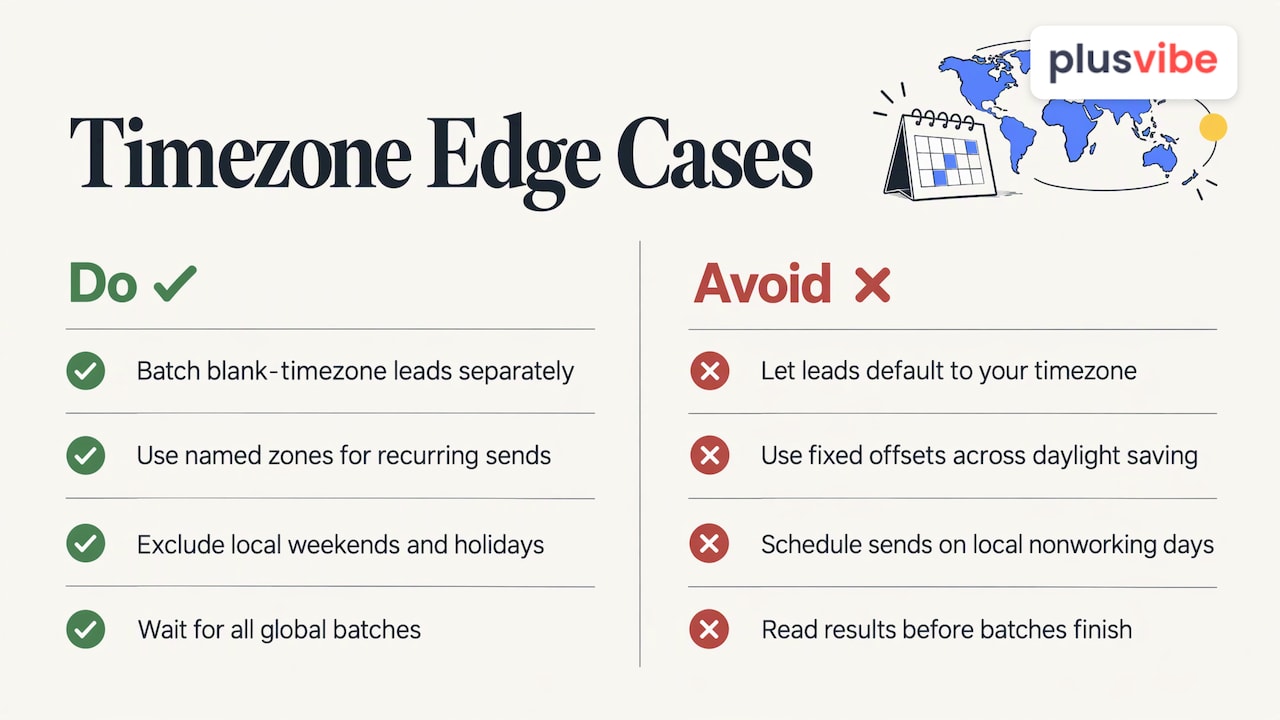
Unknown timezone. Decide a policy before you launch. A sensible one: send blank-timezone leads in a separate batch at a conservative mid-morning time in the timezone most likely for that list, or hold them back until you can fill the field. Do not let them default to your own timezone by accident.
Daylight saving changes. In the US, clocks change in spring and fall, and the change affects a recurring schedule. Because named zones carry the rules, a campaign set for 9:00 a.m. America/Chicago stays at 9:00 a.m. Chicago time through the change. A fixed offset would not. Be aware that international contacts change on different dates, so for a few weeks in spring and fall the gap between you and a European prospect shifts by an hour.
Weekends and holidays. Local time also means local calendars. A prospect in a country with a Friday-Saturday weekend, or on a national holiday, is not at the desk. Exclude those days from the send schedule for those regions.
Reporting. Status can read as in progress for a while. ContactMonkey’s help article notes that its timezone-sending status stays In Progress until all the global timezone batches complete. Expect a send that follows the sun to take a full day to finish, and do not read results until it has.
Timing does not fix placement
Here is the point that most timezone guides skip. You can hit every prospect at 9:00 a.m. their time and still get nothing, if the email goes to spam. Timing improves the odds that a message is read once it reaches the inbox. It does not get the message to the inbox.
So pair every timing test with a placement check. Run a seed test, which sends your real campaign email to a set of test inboxes at Gmail, Outlook and other providers and shows where each one lands. Then compare your windows against that result. If a window performs worse, you need to know whether people did not reply or never saw the mail.
This is where we built PlusVibe to help. Mailboxes warm up in a private pool whose peak warm-up bounce rate has never exceeded 0.1%, and seed tests show where your real campaign emails land, so you can see the result instead of trusting a score. Our deliverability page explains the approach, and the weekly routine in our 30-minute deliverability audit is a good habit to attach to any timing test.
Our perspective
Most advice on send time treats the clock as the lever. We think the inbox is decided before you hit send. Timing matters, and sending at a sensible local hour is respectful: nobody wants a pitch at 5 a.m. But a well-timed email that lands in spam wins nothing.
That is why we put placement first. Each agency client on our Agency plan gets its own sending server and dedicated IPs, so one client’s choices never touch another’s reputation. Warm-up runs in one closed pool for every customer, with bad senders removed and every inbox re-checked over time. And seed tests let you check where your real emails land at Gmail, Outlook and other providers.
Our rule for outreach is that it should be relevant, honest, respectful and measured. Sending in someone’s local morning is part of being respectful. Receipts over vibes: test your windows, test your placement, and keep what the data supports.
Yaro
Run your timing tests on infrastructure built for placement
If you send from many mailboxes across regions, the timing plan and the inbox plan belong together. PlusVibe plans start at $37/month, Business is $77/month for 150,000 emails, and Agency starts at $497/month for 500,000+ emails, with no fee per connected mailbox. You can start with a 14-day free trial, no credit card, and judge us on placement. See the plans for the full list, including done-for-you Google Workspace mailboxes at $4 per month per inbox.
If you want to settle the mailbox setup first, our done-for-you email setup is available at $1,500 per month.
FAQ
Does timezone sending improve cold email results?
It puts each message in front of the prospect at a workable local hour, which removes the worst mismatches such as pre-dawn or after-hours arrivals. How much it lifts replies depends on your audience, so test two or three local windows against each other and judge by replies. Placement has to be healthy for any timing gain to show up.
Should I send at the exact same local minute for everyone?
No. Use a window, such as 8:30 to 10:30 a.m. local, and randomize send times and gaps inside it. A fixed minute creates a volume spike and a mechanical pattern. A window spreads the load across your mailboxes.
What if I do not know a lead’s timezone?
Derive it from the city, state or country in your list and store it as a named zone like America/Denver. For leads you cannot place, send them in a separate batch at a conservative mid-morning time, or hold them until the field is filled. Avoid letting them default to your own timezone by accident.
How do I handle daylight saving time?
Store named timezones rather than fixed offsets, because named zones carry the date-specific rules. The W3C guidance explains why a fixed offset fails for recurring schedules. Expect the gap with some international contacts to shift for a few weeks when regions change clocks on different dates.
Sources
- Schedule emails based on your recipients’ time zones (HubSpot)
- Send messages in users’ time zones (Customer.io)
- Understanding Smart Send Time in Klaviyo
- Send-time optimization (MailerLite)
- Working with Time Zones (W3C)
- How to Schedule Emails with Timezone Sending (ContactMonkey)