.jpeg)
The safest way to run cold email alongside HubSpot is to keep HubSpot as your CRM and send the cold messages from a separate, purpose-built sending layer on dedicated domains, then sync replies, contacts and activity back into HubSpot. Connecting your main work inbox and blasting cold sequences from it works at small scale. It also puts your primary domain, your daily send limits and your sender reputation at risk.
This guide covers what HubSpot allows, the exact limits you will hit, the compliance setting most teams miss, and a practical setup that keeps your CRM clean without exposing your company domain.
Key takeaways
- HubSpot caps what a connected inbox can send: 350 emails a day for free Gmail and 1,000 a day for Google Workspace, Microsoft 365, Exchange or generic IMAP, counted over a rolling 24 hours.
- Sequences have their own ceiling: 500 a day for Professional seats and 1,000 a day for Enterprise seats, so they suit warm, one-to-one follow-up better than volume prospecting.
- Cold email on your main domain can drag down mail from your whole company. Separate sending domains protect it.
- Unsubscribe links are not added to one-to-one and sequence emails by default. Turn them on.
- The clean architecture: HubSpot holds contacts, deals and history, and a dedicated outreach platform sends, warms and monitors, syncing back to the CRM.
Table of Contents
- What “cold email integration” means with HubSpot
- What HubSpot is built for
- The limits you will actually hit
- Why your main domain is the real risk
- Option 1: Run cold sequences inside HubSpot
- The unsubscribe setting most teams miss
- Option 2: A dedicated outreach platform connected to HubSpot
- Choosing between the two approaches
- Our perspective
- Run outbound without risking your HubSpot domain
- Mistakes to avoid
- FAQ
- Sources
What “cold email integration” means with HubSpot
People searching this phrase usually mean one of two things.
- Sending cold email from inside HubSpot. You connect a Gmail or Outlook inbox, build a sequence and enroll prospects.
- Connecting an outreach tool to HubSpot. The outreach tool sends the emails. HubSpot receives the contacts, replies and activity so your reps see the full picture in the CRM.
The first is the quick start. The second is what most teams settle on once volume grows. The rest of this article explains why, and how to do each properly.
What HubSpot is built for
HubSpot’s email tooling is designed around people who know you or have a reason to expect your message: leads who filled out a form, customers, open deals. Its own email integration page describes syncing your inbox so you can log emails, launch sequences and track replies from the CRM. That is excellent for one-to-one sales engagement.
Cold outreach is a different job. You are writing to people who have not asked to hear from you, so reply rate, spam complaints and bounces decide whether your next email reaches an inbox at all. Those signals are tied to the domain and inbox you send from, which is why where you send matters as much as what you write.
The limits you will actually hit
Before you plan volume, know the ceilings.
| What | Limit | Notes |
|---|---|---|
| Connected free Gmail inbox | 350 emails/day | Rolling 24-hour window |
| Google Workspace, Microsoft 365, Exchange, IMAP | 1,000 emails/day | Rolling 24-hour window |
| Sequences, Professional seat | 500 emails/day | Initial and follow-ups count |
| Sequences, Enterprise seat | 1,000 emails/day | Initial and follow-ups count |
| Bulk enrollment | 3 emails per minute | Throttled by HubSpot |
The inbox figures come from HubSpot’s send limits for connected email accounts, and the sequence caps from its guide to enrolling contacts in a sequence.
Two details trip people up:
- The window is rolling. The limit does not reset at midnight. If you sent a big batch at 4 p.m., capacity returns gradually over the next 24 hours, which is why a campaign can pause unexpectedly on a morning you thought you had a fresh allowance.
- Follow-ups count. A sequence of four steps to 125 prospects uses your allowance across several days, not just the day of enrollment.
These numbers are ceilings, not targets. Cold senders should stay far below them per inbox. A sensible cold program spreads volume across many inboxes at modest daily numbers each, which is the opposite of pushing one inbox toward its limit.
Why your main domain is the real risk
The limits are an inconvenience. Reputation is the danger.
Google’s sender guidelines set expectations for anyone sending in volume to personal Gmail accounts. For senders at the 5,000-messages-a-day level, the user-reported spam rate should stay under 0.1% and never reach 0.3%. Most cold senders send far less than that per domain, but the lesson holds at any size: Gmail watches complaints closely, and a bad run does not stay contained to the campaign that caused it.

If you send cold email from your primary domain, the same domain that sends your invoices, proposals and replies to customers, poor engagement can push all of that mail toward spam. Recovering a damaged domain takes weeks, and you cannot simply switch your company name.
That is why teams doing real outbound volume use separate sending domains, close variations of the brand domain, each with its own inboxes, authentication and warm-up. If one gets into trouble, the main business is untouched. Our guide to email deliverability best practices goes deeper on authentication and monitoring, and the Gmail bulk sender rules explainer covers the current requirements.
Option 1: Run cold sequences inside HubSpot
This is reasonable when your volume is small, your prospect list is tight and the people are plausibly relevant to your offer. Think a founder emailing 20 hand-picked accounts a day.
If you go this route:
- Connect a dedicated inbox, not your personal one. HubSpot’s guide to connecting an individual work email walks through the process. Use an inbox on a secondary domain if you can.
- Warm the inbox first. A new inbox that jumps to dozens of messages a day looks like a spammer. Our warm-up guide explains how to ramp safely.
- Verify addresses before you enroll anyone. Bounces hurt reputation fast. A free email verification tool takes care of the obvious bad addresses before they reach a sequence.
- Keep volume low and targeted. Stay well under the caps above, and write each opening line for the person receiving it.
- Turn on unsubscribe links. See the next section.
The unsubscribe setting most teams miss
HubSpot does not add unsubscribe links to one-to-one emails and sequence emails automatically. HubSpot’s documentation on managing unsubscribe links for one-to-one emails explains how to add one, whether you send from a contact record or through a sequence.
Do it. Commercial email rules such as CAN-SPAM in the US require a working opt-out, and in practice a visible unsubscribe option gives unhappy recipients something to click other than the spam button. Fewer spam reports means better placement for the emails that follow. (CAN-SPAM applies to US commercial email; if you write to people in the EU or Canada, different rules apply, so check them with your legal counsel.)
Honor opt-outs everywhere. If someone unsubscribes in one place, suppress them in every tool that can email them.
Option 2: A dedicated outreach platform connected to HubSpot
Once you send hundreds of cold emails a day, or you manage outbound for several clients, the setup that holds up looks like this:
- HubSpot stays the system of record. Contacts, companies, deals, notes and pipeline stages live there.
- A cold email platform handles sending. It rotates across many inboxes on separate domains, warms them, throttles volume and watches deliverability.
- Data syncs both ways. New leads flow into the outreach platform from HubSpot lists, and replies, bounces and meetings flow back to the contact record.
This gives you three benefits that native sequences cannot: isolation of risk, volume spread across inboxes, and monitoring built around cold outreach rather than warm engagement.
PlusVibe connects campaign data with HubSpot, alongside Zapier, Slack, Gmail and Outlook. For the admin-side details, including authorization and keeping connected inboxes healthy, read our guide to HubSpot email integration for admins.
What to sync, and what not to
A good integration is selective. Pushing everything into the CRM creates noise and can trigger HubSpot workflows you did not intend.
| Sync to HubSpot | Keep in the outreach tool |
|---|---|
| Replies from real prospects | Warm-up traffic between inboxes |
| Positive-interest tags and meetings booked | Sending-inbox health and placement stats |
| Unsubscribes and hard bounces (as suppression flags) | Step-by-step sequence drafts and A/B tests |
| Verified contact details and enrichment fields | Raw scraped lists before verification |
Check that your sync does not enroll contacts into marketing workflows by accident, and that unsubscribes in the outreach tool update a property HubSpot can use to exclude those people.
Setting it up step by step
- Buy and configure sending domains. Use variations of your brand domain, with SPF, DKIM and DMARC set up on each. If you would rather not do this yourself, our done-for-you email setup handles it.
- Create inboxes and warm them. Allow a few weeks of gradual ramp-up before real campaigns. The warm-up service comparison explains what to look for.
- Prepare the list. Pull contacts from HubSpot or collect new prospects, then run email verification and add enrichment so each message can be personalized with real facts.
- Connect HubSpot. Authorize the integration, map fields (email, company, lifecycle stage, owner) and decide which events write back.
- Launch small. Start with a few dozen sends per inbox per day, watch bounces and replies for a week, then scale by adding inboxes rather than raising per-inbox volume.
- Review weekly. Pause any inbox whose bounce rate or placement drops, and retire domains that stay unhealthy.
Choosing between the two approaches
Use this as a quick decision guide.
| Situation | Better fit |
|---|---|
| Under about 20 hand-written cold emails a day, one rep | HubSpot sequences from a secondary-domain inbox |
| Warm leads, existing customers, inbound follow-up | HubSpot sequences |
| Several reps, hundreds of cold emails daily | Dedicated outreach platform plus HubSpot sync |
| Agency running campaigns for multiple clients | Dedicated outreach platform, separate infrastructure per client |
| You depend on your main domain for customer mail | Dedicated platform on separate domains, no exceptions |
If you are weighing categories of tools, roundups of email platforms for agencies can help you see how marketing-focused suites differ from tools built for high-volume outbound. Our own overview of cold email service providers covers the outbound side.
Our perspective
We see the same pattern again and again. A team starts with HubSpot sequences because the CRM is already there. Replies come in, so they add more prospects. A few weeks later, open rates fall, replies dry up and someone notices that even customer emails are landing in spam. The cause is rarely the copy. It is that cold volume went through the one domain the business cannot afford to damage.
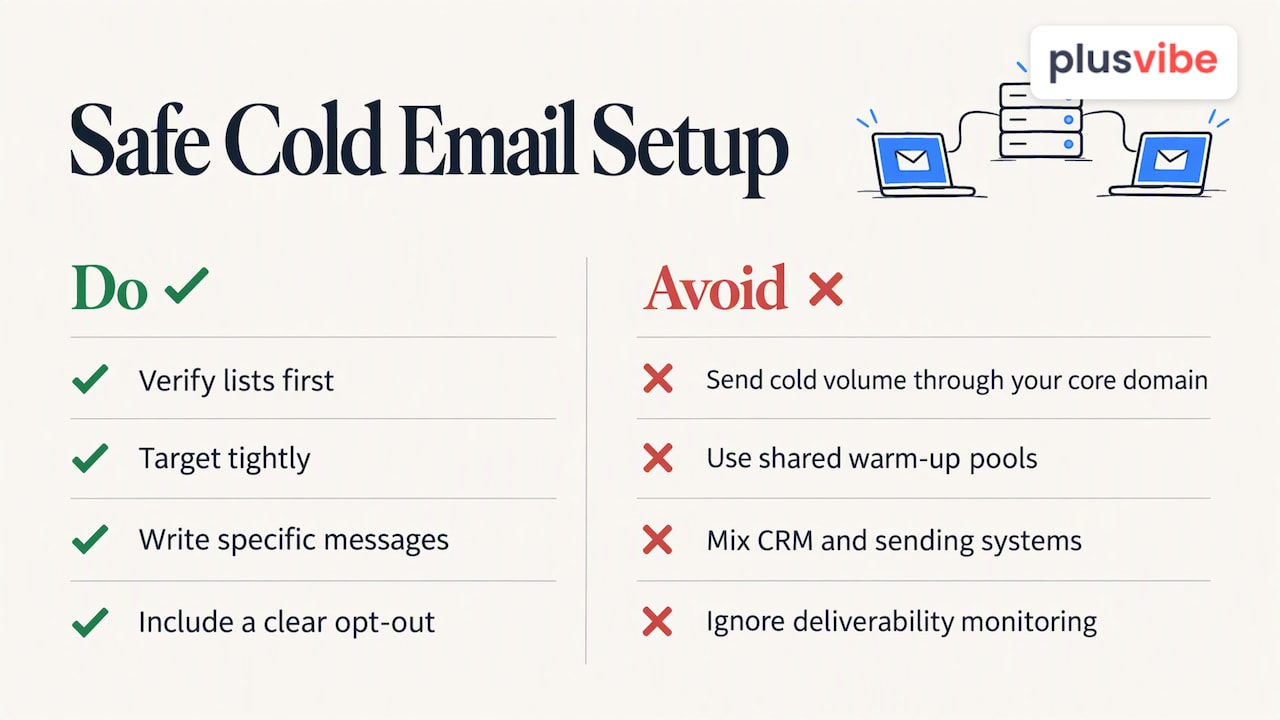
Our view is simple: the CRM and the sending engine should be different systems doing different jobs. HubSpot is excellent at remembering who your prospects are and what has happened with them. A cold email platform should be built around the opposite concern, which is protecting inbox placement. That means private warm-up rather than shared pools, isolated sending infrastructure, inbox rotation, and deliverability monitoring you can actually see.
We also think teams should be honest about their lists. No infrastructure rescues a message sent to the wrong person. Verify first, target tightly, write something specific, and include a clear way to opt out. Do those four things and the integration becomes a reliable pipeline into your CRM instead of a risk to it. For the strategy side, see our cold outreach strategy guide.
— Yaro
Run outbound without risking your HubSpot domain
PlusVibe is a cold email platform with private warm-up, isolated sending infrastructure, inbox rotation, email verification, AI-powered prospect enrichment and a HubSpot integration. The Personal plan costs 37-58 USD per month, Business is 77-220 USD per month, and Agency starts from 497 USD per month. Google Workspace inboxes are 4 USD per month per inbox, and Microsoft 365 inboxes are 4.5 USD per month per inbox. There is a free trial, so you can test the setup before committing. See the plans, or let us set up your email infrastructure for you.
Mistakes to avoid
- Treating the daily limit as a goal. Sending 1,000 a day from one inbox is a quick way to burn it. Spread volume out.
- Skipping warm-up. New inboxes need a gradual ramp before campaigns.
- Letting sync create duplicates. Match contacts on email address and set a clear rule for which system wins on conflicting fields.
- Forgetting suppression. An unsubscribed contact in one tool must be suppressed in the other.
- Ignoring bounces. Verify lists and remove hard bounces promptly. Our deliverability glossary entry explains the metrics worth tracking.
- Writing for everyone. A generic message to a broad list generates complaints. Narrow the audience and personalize.
FAQ
Can I send cold email from HubSpot?
Technically you can connect an inbox and enroll contacts in sequences. HubSpot’s tools are built for contacts who expect to hear from you, though, and sequences are capped at 500 emails a day on Professional seats and 1,000 on Enterprise. For anything beyond small, targeted outreach, use separate domains or a dedicated sending platform.
How many emails can I send from HubSpot per day?
A connected free Gmail inbox can send 350 a day, and Google Workspace, Microsoft 365, Exchange and IMAP inboxes can send 1,000 a day. These limits run over a rolling 24 hours, not a calendar day. Sequence limits apply on top of that.
Does HubSpot add an unsubscribe link to sequence emails?
Not by default. You need to change the settings so one-to-one and sequence emails include an unsubscribe link, which supports legal compliance and lowers spam complaints.
Will cold email on my main domain hurt my regular email?
It can. Complaints and bounces affect the reputation of the domain, so customer and internal mail can suffer too. Using separate sending domains for cold outreach keeps that risk away from your main one.
Do I still need HubSpot if I use a cold email platform?
Yes, in most cases. HubSpot remains the home for contacts, deals and pipeline, while the outreach platform sends and monitors. The integration passes replies and activity back so reps work from one record.
Sources
- Sending limits for connected email accounts, HubSpot Knowledge Base
- Enroll contacts in a sequence, HubSpot Knowledge Base
- Manage unsubscribe links for one-to-one emails, HubSpot Knowledge Base
- Connect an individual work email, HubSpot Knowledge Base
- Email Integration, HubSpot
- Email sender guidelines FAQ, Gmail Help