You improve IP reputation by sending only mail that recipients want, authenticating every message, growing volume slowly and steadily, and keeping each sender’s traffic on infrastructure that no one else’s mistakes can touch. For a team sending cold email at volume, the last part matters most: a shared or mixed IP inherits the habits of everyone on it. That is why we build PlusVibe around private sending infrastructure, a closed warm-up pool and placement tests that show where your real emails land.
This guide explains what IP reputation is, how it differs from domain reputation, which habits move it, how to recover when it drops, and how to confirm that your changes worked.
Key Takeaways
- IP reputation is the trust mailbox providers place in the address your mail is sent from. Domain reputation is the trust in who sent it, and in 2026 you need both clean.
- Authentication, list hygiene, low complaint rates and steady volume are the habits that build reputation. Sudden spikes damage it, even on an established sender.
- Separating infrastructure by client or by mail type keeps one bad campaign from dragging down the rest.
- If reputation drops, stop sending, find the cause, then ramp back up gradually.
- Verify improvement with placement tests and per-provider metrics, not with a single score.
Table of Contents
- What IP reputation is and why outbound senders feel it first
- IP reputation vs. domain reputation
- Habits that raise IP reputation
- Warming up a new IP or sending domain
- Separate infrastructure so one problem stays one problem
- Diagnosing and recovering from a reputation drop
- Verify that your changes worked
- A worked example
- What we do about it at PlusVibe
- Our view: reputation is built before you hit send
- FAQ
- Sources
What IP reputation is and why outbound senders feel it first
IP reputation is the trust inbox providers place in a sending IP address. Providers weigh factors such as IP age and location, sending history, blocklist presence and PTR records when they decide whether a message reaches the inbox or the spam folder. (A PTR record is a reverse DNS entry that maps your IP back to a hostname, so receivers can see the address is set up properly.) Complaints damage that trust quickly.
Reputation is not a fixed grade. Spamhaus explains that modern reputation combines IP and domain signals with recipient engagement, and that mailbox providers recalculate it rapidly as users react to your mail. A bad week can show up in placement within days.
Cold outreach is exposed because the recipients did not ask to hear from you. Replies and clicks are fewer, and a handful of spam complaints weighs more on a campaign of 2,000 emails than on a newsletter that people subscribed to. Amazon’s guidance on email reputation notes that mailbox providers can look at sending history, authentication, engagement, complaints and spam-filter determinations for both domains and IPs. Most of those inputs have nothing to do with how clever your copy is. They are about how your sending program is built.
IP reputation vs. domain reputation
The short version: IP reputation is about where a message was sent from, and domain reputation is about who sent it. Because a domain stays with the sender while an IP can be swapped fairly easily, receivers put more weight on domain reputation.
In practice the two work as layers:
| IP reputation | Domain reputation | |
|---|---|---|
| What it tracks | The address the mail leaves from | The domain in your From address and signatures |
| Who shares the risk | Everyone on a shared IP | Only you, but it follows you across tools |
| What a problem looks like | Blocks or throttling before content is read | Spam-folder placement, falling engagement |
| Fix | Stop, clean, ramp slowly, or move to a clean dedicated IP | Fix authentication, lists and complaints, then rebuild over weeks |
Proofpoint describes the interplay this way: a strong domain reputation cannot fully offset a compromised IP, and a pristine IP cannot rescue a domain with low engagement or failed authentication. So “improve IP reputation” is never only about the IP. If you fix the address and keep mailing a bad list from a burned domain, you will land in spam again.
For cold outbound, this also means you should not treat the primary company domain as disposable or as your main sending domain. Reputation damage on it spreads to every email the business sends. Our guide to checking a domain’s reputation walks through the domain side.
Habits that raise IP reputation
Authenticate every message
SPF, DKIM and DMARC are DNS records that prove your mail comes from an authorized source and has not been altered. Twilio’s reputation guidance lists authentication alongside opt-in recipients and consistent volume as the base of a healthy reputation.
The requirements are no longer optional at scale. Microsoft requires SPF, DKIM and DMARC from domains sending 5,000 or more emails a day to its consumer services (Outlook.com, Hotmail and Live). Even if you send far less, passing authentication is the cheapest reputation gain available. Our SPF, DKIM and DMARC guide covers the records one by one.
Clean the list before you send
Invalid addresses bounce, and bounces tell providers you do not know your recipients. Spamhaus names spam-trap hits, complaint volumes, engagement and invalid-address bounce management among the signals that count. Twilio adds that continued mail to unengaged addresses risks blocks, complaints and spam traps.
For cold lists, that means:
- Verify every address before it enters a sequence. Our email verification checks addresses ahead of sending, and the free verification tool is a way to try it on a small batch.
- Remove hard bounces immediately and never re-add them.
- Stop following up on contacts who show no engagement after your planned sequence ends.
- Honor opt-outs at once. Under the US CAN-SPAM rule, an opt-out cannot require a fee, extra information or more than a reply email or a single webpage visit.
Keep volume steady
Providers learn your pattern. Twilio recommends consistent volume after warm-up, with unusually large sends increased over days or weeks and then tapered back to baseline. Spamhaus warns that sudden volume changes and bursty streams can degrade even an established reputation at the major free-mail providers, and says increases should depend on how earlier sends performed.
The practical rule: a campaign that doubles your daily volume overnight is a risk, however good the list. If you need to scale, our guide on ramping up sending without hurting deliverability lays out the increments.
Earn engagement, not just delivery
Replies, clicks and mail that is not deleted unread all feed the picture. Spamhaus’s view is that senders should optimize for engagement rather than batch-and-blast volume. In cold outreach that translates to tight targeting, a first line that is about the recipient, a short message, and an easy way to say no.
Warming up a new IP or sending domain
A new IP has no history, and providers treat the unknown cautiously. Mailgun recommends starting a new IP at a low rate and increasing it gradually based on mailbox-provider feedback. Twilio SendGrid’s warm-up guide suggests starting with your most engaged recipients and widening to recently engaged ones as the IP warms, and says warm-up may take up to 60 days, with many senders finishing in about 30.
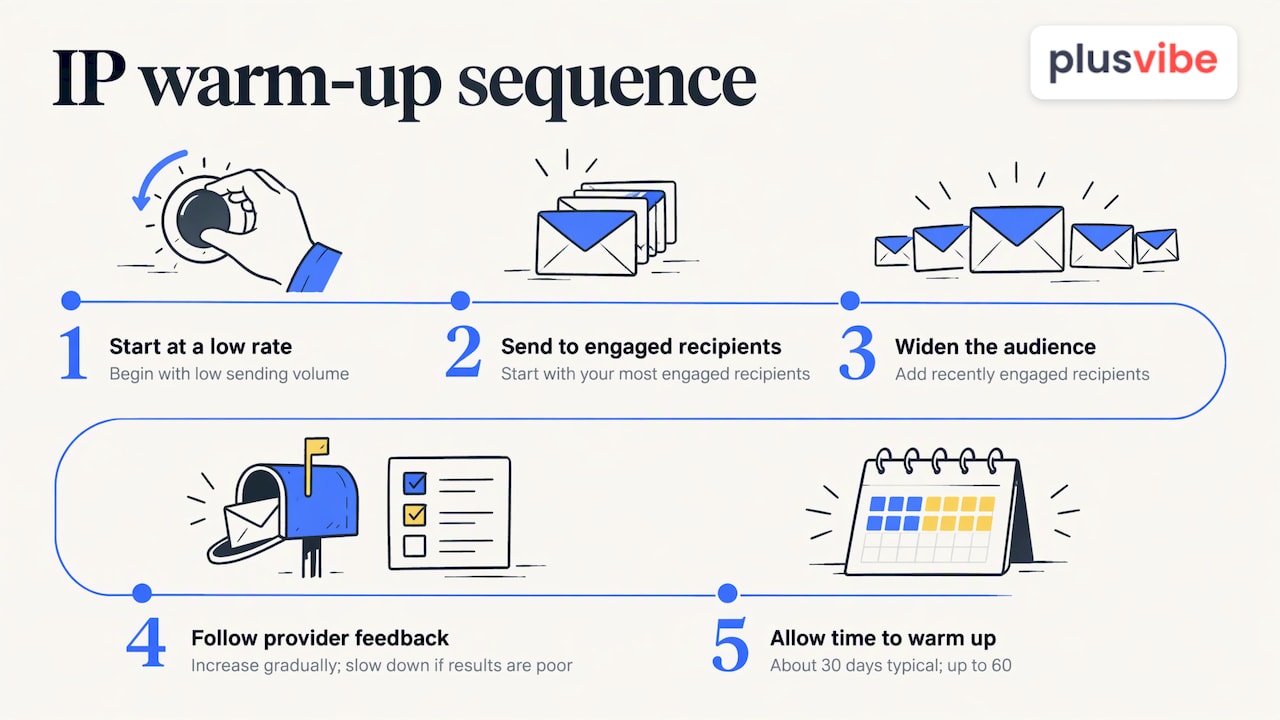
If results are poor, slow down rather than push through. The same guide advises patience and a slower ramp when a new IP underperforms.
Cold email adds a wrinkle: most outbound teams send from many mailboxes on many domains, so warm-up happens at the mailbox and domain level too. A walkthrough of warming up a sending domain shows the same principle: begin small, build a pattern of positive interactions, and increase only when signals stay healthy.
Here is where we think the approach should differ from do-it-yourself warm-up. Our warm-up runs in one closed pool shared by every PlusVibe customer: a mix of Google, Microsoft and quality SMTP inboxes, with bad senders removed and every inbox re-checked over time. Its peak warm-up bounce rate has never exceeded 0.1%. There is no premium pool to upsell. You can see how it works on the warm-up page.
Separate infrastructure so one problem stays one problem
Shared infrastructure is a shared fate. If the IP or server you send from also carries someone else’s aggressive campaign, their complaints become your complaints.
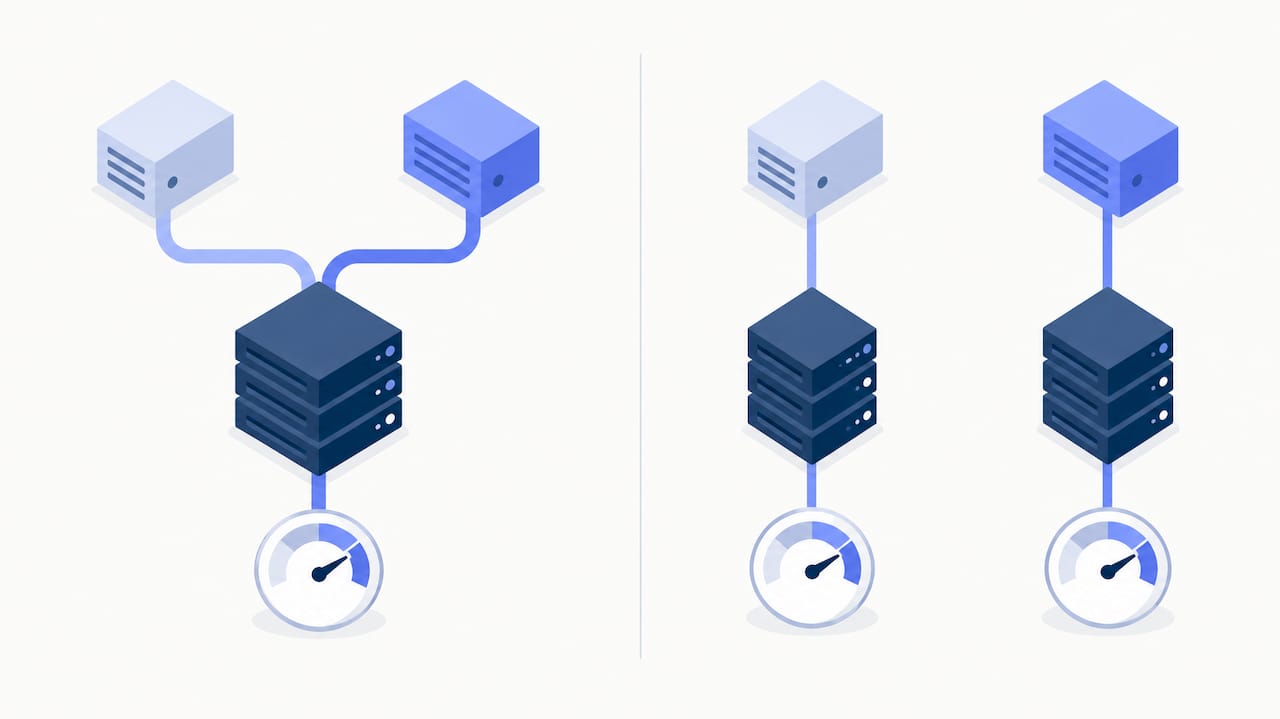
Separation is standard advice for good reason. Mailgun suggests considering separate IPs for bulk and transactional mail, since bulk traffic can delay transactional messages and affect their reputation. It also notes, as its own recommendation rather than a universal threshold, that senders above 50,000 messages per week should consider dedicated IPs.
For agencies the same logic applies per client. A client with a sloppy list should never be able to lower deliverability for the client next door. On the Agency plan, each client gets its own sending server and dedicated IPs, so one client’s mistake never touches another’s reputation. Done-for-you Google Workspace, Microsoft 365 and Azure mailboxes are also available, which spares you the DNS and mailbox setup that new infrastructure requires.
At the domain level, the equivalent is to keep cold outreach on dedicated sending domains, separate from the domain your business uses for customer and transactional mail, so a problem with outreach never reaches the mail your customers depend on.
Diagnosing and recovering from a reputation drop
Signs of decline are fairly consistent. Amazon lists low inbox rates, throttling, blocking and poor results from external reputation tools as signals, and recommends responding promptly and stopping sends when high-risk degradation persists.
A recovery routine that works for outbound teams:
- Pause the affected sending. Continuing to send into a damaged reputation deepens the damage.
- Find the source. Check bounces, complaints and provider status codes at the account, domain and IP level, as Amazon recommends. Compare providers: a drop only at Outlook points somewhere different than a drop everywhere.
- Check authentication. Confirm SPF, DKIM and DMARC still pass after any DNS or tool changes.
- Look at the list. Was a new, unverified or old segment added right before the drop? Remove it.
- Check blocklists. A listing is useful information, but treat it as one input and fix the cause before you request removal.
- Restart small. Send to your most engaged contacts first, then ramp up in steps, as in the warm-up section above.
The deliverability checklist and the weekly audit routine turn these steps into a repeatable 30-minute habit.
Verify that your changes worked
A reputation score on a dashboard is a proxy. What you care about is where your emails actually land. Track delivery, bounce, complaint and reply rates per provider week over week, watch for blocklist listings, and test placement with seed inboxes: test addresses at Gmail, Outlook and other providers that show whether a message arrived in the inbox, promotions or spam.
This is the part we built for people who want receipts. PlusVibe’s seed tests show where your real campaign emails land at Gmail, Outlook and other providers, so you can compare placement before and after a change instead of trusting a number. Our piece on deliverability monitoring explains how to catch drops early, and the deliverability page shows the tooling.
A worked example
Say an agency sends 3,000 emails a day for one client from a shared setup, and Outlook placement falls from mostly inbox to mostly spam over a week.
- Day 1: pause the Outlook-bound sequences, run a placement test, and confirm SPF, DKIM and DMARC pass.
- Day 2: pull bounce and complaint data by provider. The new list segment added last week has a 6% hard bounce rate, so remove it and verify the rest.
- Days 3 to 7: resume at a fraction of the earlier volume, to the most engaged contacts, and re-test placement every couple of days.
- Weeks 2 to 4: raise volume in steps only while placement holds, following the ramp-up guide.
The figures here are an illustration, not a benchmark. The pattern is the point: isolate, clean, restart small, measure.
What we do about it at PlusVibe
If your outreach depends on the inbox, infrastructure and measurement decide how much risk you carry. PlusVibe plans start at $37/month, Business is $77/month for 150,000 emails, and Agency starts at $497/month for 500,000+ emails, with no fee per connected mailbox. The Agency plan includes the per-client sending servers and dedicated IPs described above. Email placement tests are also available on their own, from $19/month on the Starter plan. Done-for-you Google Workspace mailboxes are $4 per month per inbox and Microsoft 365 mailboxes $4.50 per month per inbox.
You can start a 14-day free trial with no credit card and judge us on placement. See the plans for details.
If you would rather not configure mailboxes and DNS yourself, the done-for-you email setup is available at $1,500 per month.
Our view: reputation is built before you hit send
Most cold email tools compete on how much you can send. We think that is the wrong contest. The inbox decision is made before the message goes out: by the infrastructure it leaves from, the pool that warmed the mailbox, the list it is addressed to and the rhythm of your volume.
That is why we separate clients onto their own servers and IPs on the Agency plan, why every customer shares one closed warm-up pool with bad senders removed, and why we show seed-test placement for your real campaigns. We would rather you check the result than take our word for it.
Reputation also rewards the same code we hold ourselves to: relevant, honest, respectful and measured outreach. Clean lists, a clear way to opt out and steady volume are not constraints on growth. They are what lets you send tens or hundreds of thousands of emails a month without burning your domains.
Yaro
FAQ
How long does it take to improve IP reputation?
It depends on how damaged the reputation is and how consistently you send afterward. For a new IP, Twilio SendGrid says warm-up may last up to 60 days, with many senders finishing in about 30. Recovery from a drop follows the same logic: steady, engaged sending, ramped up in steps.
Is IP reputation or domain reputation more important?
Both count, but receivers lean harder on domain reputation because it stays with the sender while IPs can change. A blocked IP can still stop delivery before the domain is even evaluated, so you need both clean. Treat them as two layers of the same check.
Do I need a dedicated IP for cold email?
Not always. Mailgun’s documentation says a shared IP may suit senders below 5,000 messages per day and suggests considering dedicated IPs above 50,000 per week, though these are its own recommendations. Agencies benefit from isolation at any size, because it stops one client’s problems from reaching another.
Can I fix a bad IP reputation by changing my copy?
Copy alone rarely fixes it. Amazon points out that most reputation inputs are unrelated to the visible message body: authentication, complaints, engagement and sending practices matter more. Fix those first, then refine the message.
How do I know my reputation has improved?
Look for fewer bounces and complaints, better per-provider engagement and, above all, better placement in seed tests at Gmail, Outlook and other providers. Compare results over several weeks rather than from one send.
Sources
- What is IP reputation? (Postmark)
- How does email reputation work? (Spamhaus)
- The Four Pillars of Managing Email Reputation (AWS)
- What Is IP Reputation? (Proofpoint)
- Establish and maintain reputation (Twilio)
- IP Addresses and Sending Volume (Mailgun)
- Twilio SendGrid’s Email Guide to IP Warm Up
- 16 CFR Part 316, CAN-SPAM Rule (eCFR)
- Microsoft Enforces SPF, DKIM, DMARC for High-Volume Senders (dmarcian)
- Warming up a sending domain