.jpeg)
For reliable outreach, collect profiles with a prospect-collection tool, enrich and infer emails, verify them over SMTP, dedupe, import to your CRM, and send from isolated, warmed-up infrastructure. That pipeline wins because it protects accuracy, sender reputation, and your ability to scale. We built PlusVibe to cover those stages in one place, and the sections below show how each step works.
Key Takeaways
Using a structured pipeline of collection, enrichment, verification, and segmentation ensures higher email deliverability and protects sender reputation when prospecting via LinkedIn.
| Point | Details |
|---|---|
| Choose the right tool for volume | Solo sellers need extensions, while teams or agencies should consider managed platforms or custom scripts. |
| Verify email addresses thoroughly | Combine pattern inference, enrichment, and SMTP verification to reduce bounce rates and improve list quality. |
| Scale gradually and monitor KPIs | Increase outreach volume slowly, watching bounce, spam, and engagement rates to protect reputation. |
| Protect your LinkedIn account and comply with laws | Maintain steady activity, cap daily requests, and follow GDPR and local regulations for data handling. |
| Use PlusVibe for integrated prospecting and outreach | PlusVibe streamlines collection, enrichment, verification, and sending with built-in deliverability controls. |
Table of Contents
- Which tools can extract emails from LinkedIn?
- How does LinkedIn email discovery actually work?
- How do you protect your LinkedIn account and stay compliant?
- What is the step-by-step workflow for a verified contact list?
- How do you connect scraped lists to your CRM and scale safely?
- How do you choose the right approach for your team?
- Why we put data quality ahead of volume
- Run the whole workflow in one platform with PlusVibe
- FAQ
- Sources
Which tools can extract emails from LinkedIn?
Several approaches cover LinkedIn email scraping setups. Your monthly volume, budget, and engineering resources decide which one fits.
- Chrome extension collectors: These capture the name, title, company, and profile URL while you browse a profile or a search results page. They suit low-volume, manual prospecting, such as a founder building a list of target accounts in a focused work session.
- Managed SaaS and cloud platforms: These run collection in the background, queue the work, enrich the records, and push them to your CRM or outreach tool through native integrations. They fit mid-to-high volume teams that want predictable output without maintaining code.
- APIs and developer scripts: An engineering team gets full control over collection logic, throttling, and data storage. The price is maintenance: when page structures change, your scripts break, and you own every compliance decision.
- Hybrid flows: You collect manually or with an extension, then hand the records to a cloud service for enrichment and verification. Many teams land here because it separates the part that touches LinkedIn from the part that determines data quality.
Open-source projects show what these approaches look like in practice. The data-scrape LinkedIn email scraper documents email-pattern prediction, bulk extraction from search results, company-domain extraction, deduplication, and built-in verification. Reading a project like that is a fast way to see which features a serious tool needs before you pick one.
Convenience versus scale
An extension is the fastest to start and the slowest to scale. You click, it captures, and you are limited by your own hours. Cloud platforms invert that: setup takes longer, but output grows with the plan you choose rather than with your workload.
Platform-detection risk
Every approach that touches LinkedIn pages carries some detection risk. Rapid, bursty activity looks different from a person browsing, and the higher your volume, the more that matters. We cover throttling in the safety section below, but the practical point for tool selection is simple: the more automated the collection, the more you should favor tools that pace requests and let you cap daily activity.
Where Sales Navigator fits
Saved searches narrow a list before any collection starts, which means fewer irrelevant profiles reach your enrichment step. If you plan to build lists this way, our guide to boosting search performance with LinkedIn Sales Navigator walks through targeting before you scrape. A tighter starting list is cheaper to enrich and verify, and it keeps your outreach relevant.
Matching the approach to your situation
Start by asking how many contacts you need per month and who will maintain the setup. A solo seller needing a few dozen contacts rarely needs more than an extension plus a free verifier. An agency running campaigns for several clients usually needs a cloud platform with team seats and integrations. A company with an engineering team and unusual data requirements may justify custom scripts. Whatever you choose, keep the stages separate in your head: collection finds people, enrichment finds addresses, verification confirms them. Treating these as one step is how teams end up with large lists that bounce.
How does LinkedIn email discovery actually work?
LinkedIn profile pages do not hand you an email address. Most scrapers collect what is visible on a public profile: name, headline or title, current company, location, and the profile URL. Contact details are usually hidden unless the person chose to share them with a connection. So the email has to come from somewhere else.
Tools generally take the profile URL plus the person’s name and employer, then use several routes to arrive at a professional address:
- Pattern inference: Once the company domain is known, the tool generates likely permutations such as first.last@company.com, flast@company.com, or first@company.com, and tests which one the company appears to use.
- Enrichment databases: The tool cross-references the name and company against external datasets of previously found business emails, which raises confidence when a match exists.
- SMTP-level verification: The tool contacts the receiving mail server and checks whether it accepts mail for that address, without sending a message.
Why unverified addresses cause problems
A guessed address that was never checked is a coin flip. Some domains accept all mail and hide invalid addresses until a bounce comes back later. Others use catch-all configurations that make every guess look valid. The result of skipping verification is a list that looks complete and performs badly: high bounce rates, damaged sender reputation, and emails landing in spam even for the valid contacts on the list.
The same open-source project mentioned earlier illustrates the point by pairing pattern prediction with verification and export steps rather than shipping guesses directly. Practitioners consistently describe lead-data quality as more valuable than raw volume, and the mechanics explain why: every bounce counts against the domain you send from.
Confidence layers
Think of each address as carrying a confidence level that rises with every independent signal:
- A pattern guess alone is low confidence.
- A pattern guess confirmed by an enrichment match is medium confidence.
- A pattern guess confirmed by enrichment and accepted by SMTP verification is the level you should import into a campaign.
- Addresses flagged as risky or catch-all deserve a separate segment or a small test send, not a full-volume launch.
Our own enrichment tooling supports this process, and the same principle holds regardless of which product you use. If you want to see other lookup approaches side by side, our roundup of email address lookup tools covers the options, and our guide on how to find someone’s email goes deeper on enrichment and verification techniques for cleaning a list.
What the legal source says about the data itself
Treat scraped fields as personal data. The EDPB’s Guidelines 1/2024 on legitimate interest address the factors a controller must weigh when relying on that legal basis, including where the data came from and how it affects the people involved.
Statistic note: The EDPB guidelines on Article 6(1)(f) describe legitimate interest as requiring a rigorous balancing test, not an automatic basis, which means the source and expectations around scraped contact data must be assessed before you send anything.
How do you protect your LinkedIn account and stay compliant?
Safety has two parts: keeping your LinkedIn account in good standing and meeting your data protection duties. Handle both before you scale, not after your first warning.
Account safety
Automated access can lead to throttling, restrictions, or bans. LinkedIn’s terms govern how you may use the platform, and you should read them before running anything at volume. Practical habits that reduce risk:
- Keep activity at a steady, human-like pace and avoid sudden bursts after quiet periods.
- Cap daily collection rather than running tools around the clock.
- Use a tool that paces requests for you instead of firing them as fast as the page loads.
- Stop and investigate if you see warnings, forced logouts, or repeated verification prompts.
- Never collect from an account you cannot afford to lose; treat the account as an asset with real business value.
GDPR and legitimate interest
If you contact people in the EU, GDPR applies. Many B2B senders rely on legitimate interest, but that basis is not automatic. The EDPB’s Guidelines 1/2024 explain that controllers need a rigorous balancing test that considers what data subjects would reasonably expect and what safeguards are in place. In practice that means documenting why you contacted someone, why the message is relevant to their role, and what you did to limit the impact on them.
ePrivacy and national differences
Direct marketing rules do not match across Europe. A reply to the EDPB consultation notes that national implementations of the ePrivacy Directive can differ, and that some member states, France for example, treat B2B direct marketing as allowable on legitimate interest, while others can require consent. A campaign that is fine in one country may need a different basis in the next, so check the local regulator for each market you target.
Operational mitigations
Good habits shrink your exposure whatever the legal basis:
- Store only the fields you need for outreach, not full profile dumps.
- Include a clear way to opt out in every message and honor requests quickly.
- Keep a suppression list so people who opted out never reappear after a re-import.
- Set a retention period and a process to delete or erase records on request.
- Record your balancing test and the source of each contact list.
Pro Tip: Keep a one-page record for each campaign listing the data source, your legitimate-interest reasoning, the opt-out method, and the deletion date. It takes little time to prepare and can save effort if anyone asks questions later.
When to involve counsel
Bring in a privacy professional or legal counsel when you run cross-border campaigns, handle large volumes, target regulated industries, or are unsure which national rules apply. This article is general guidance, not legal advice, and local laws change. For anything beyond a small, domestic test, a short review costs far less than a complaint.
What is the step-by-step workflow for a verified contact list?
This is the pipeline we recommend, in order. Each step protects the one after it.
- Collect: Gather profile URLs and core fields (name, title, company, profile link) with your chosen extension or platform. Define your ideal customer first so you do not collect people you will never email.
- Infer and enrich: Identify the company domain, generate likely address patterns, and cross-check them against enrichment lookups to raise confidence.
- Verify: Run SMTP checks and a third-party verification pass to flag invalid, risky, and catch-all addresses. Remove anything that fails.
- Dedupe and segment: Remove duplicates, then segment by fit and intent, such as role, company size, or industry, before anything is imported.
- Import and send carefully: Load the list into your CRM or outreach tool, start with a small test cohort, and send from isolated, warmed-up infrastructure while watching bounce and spam complaint rates.
Why the order matters
Verification before import keeps bad addresses out of your sending history entirely. Deduplication before sending prevents the same person receiving three messages from different sequences, which is a fast way to earn complaints. Segmenting before import lets you write relevant copy instead of one generic message for everyone.
Deliverability protections
Verified data is only half the equation. The infrastructure you send from matters just as much:
- Warm-up: New inboxes need gradual, realistic activity before sending campaigns, so mailbox providers learn to trust them.
- Isolation: Dedicated sending domains or IPs keep one campaign’s problems from damaging your other mail.
- Suppression lists: Bounced, unsubscribed, and complained-about addresses must never be mailed again.
- Small test cohorts: A first send to a small group of verified contacts can help you assess your setup, copy, and data before sending to the rest.
You can run a quick check on small batches with our free email verification tool, and our full verification tooling handles larger lists.
After the send
Once verified prospects start replying, keep the relationship going rather than dropping them into a dead end. Not every contact is ready to buy on the first message, and a lead nurturing guide from Baby Love Growth is a useful read on turning early interest into conversions through follow-up.
Pro Tip: Do not judge your list by an initial batch of sends. Judge it by the bounce rate and complaint rate on your first small cohort, and fix the data before you add volume.
How do you connect scraped lists to your CRM and scale safely?
Once you have a verified list, the question becomes how it flows into the tools you actually work in, and how to grow volume without breaking what works.
Integration patterns
Teams typically choose among a few paths:
- CSV import: Simple and universal, ideal for early tests and one-off lists.
- Zapier-style automation: Moves records between tools when a trigger fires, good for small teams without developers.
- Native connectors: Built-in links to CRMs and outreach platforms reduce manual steps and errors.
- API syncs: Custom, continuous data flow for teams with engineering support and specific requirements.
Whatever path you pick, make verification part of the flow rather than a manual afterthought, so unverified records cannot reach a live campaign.
Rate limits and pacing
Both LinkedIn and email providers limit how fast you can act. Build throttling and retry logic into any automation so a failed request does not trigger a flood of repeats. Steady pacing protects your LinkedIn account on the collection side and your sender reputation on the sending side.
Deliverability controls at scale
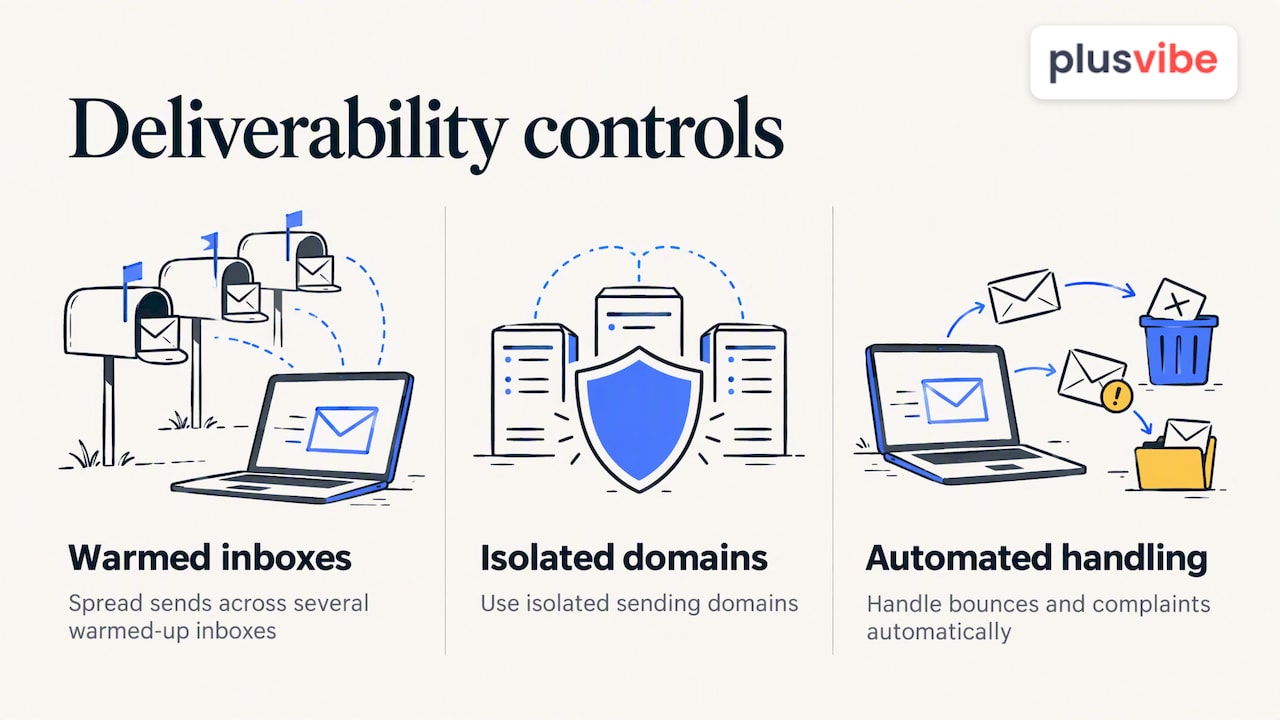
As volume grows, a single inbox cannot carry the load without hurting its reputation. Spreading sends across several warmed-up inboxes, using isolated sending domains, and automating bounce and complaint handling keeps problems small. Our automation features support this process, but the principle applies to any stack.
KPIs to watch
Track these at the campaign level, not just in aggregate:
- Bounce rate, which reveals data quality problems first.
- Spam complaint rate, which signals relevance or targeting problems.
- Open and reply rates, which show whether inbox placement and messaging work.
- Campaign health trends over time, since a slow decline often warns of a reputation issue before a sudden failure.
Scale in steps
Test, validate, then grow. Move from a small cohort to a larger one only after bounce and complaint rates stay low, and raise volume gradually instead of doubling overnight. A campaign that grows by steady, checked increments is far easier to diagnose than one that suddenly jumps in volume.
How do you choose the right approach for your team?
Use this checklist to pick a path before you spend money on tools.
- Monthly volume: A few dozen contacts points to an extension; hundreds or thousands point to a managed platform.
- Technical resources: No developer means avoid custom scripts; a dedicated engineer makes APIs viable.
- Compliance burden: Cross-border or regulated campaigns need tools with strong data controls and clear records.
- Verification accuracy needs: If bounces are costly, require layered verification rather than a single check.
- Integration needs: List the CRM and outreach tools you use and confirm native support.
- Deliverability focus: High-volume senders need warm-up, isolation, and monitoring built in.
- Budget: Count scraping, verification, and sending costs together, not just the headline subscription.
Scenario mapping
A solo founder building a small list does best with an extension, a free verification tool, and a single warmed-up inbox. An agency serving multiple clients is better served by a managed SaaS platform with team access and integrations. A product company with unusual data needs and engineering time may choose APIs and custom logic, accepting the maintenance load.
Questions to ask before you commit
Put these to any vendor, or answer them internally if you build:
- How long is collected data retained, and can it be deleted on request?
- Which verification methods are used, and are risky or catch-all results flagged separately?
- Can you control IPs and sending domains, or are they shared with other customers?
- What warm-up options exist, and how is activity paced?
- How does the tool pace requests to reduce account risk?
Your next step
If you chose the extension route, install one and run a small test list through a free verifier. If you chose managed SaaS, trial a platform with your real target list and check bounce rates on a small cohort. If you chose the developer route, start with a pattern-prediction and verification prototype, then add throttling and compliance records before any real send.
Why we put data quality ahead of volume
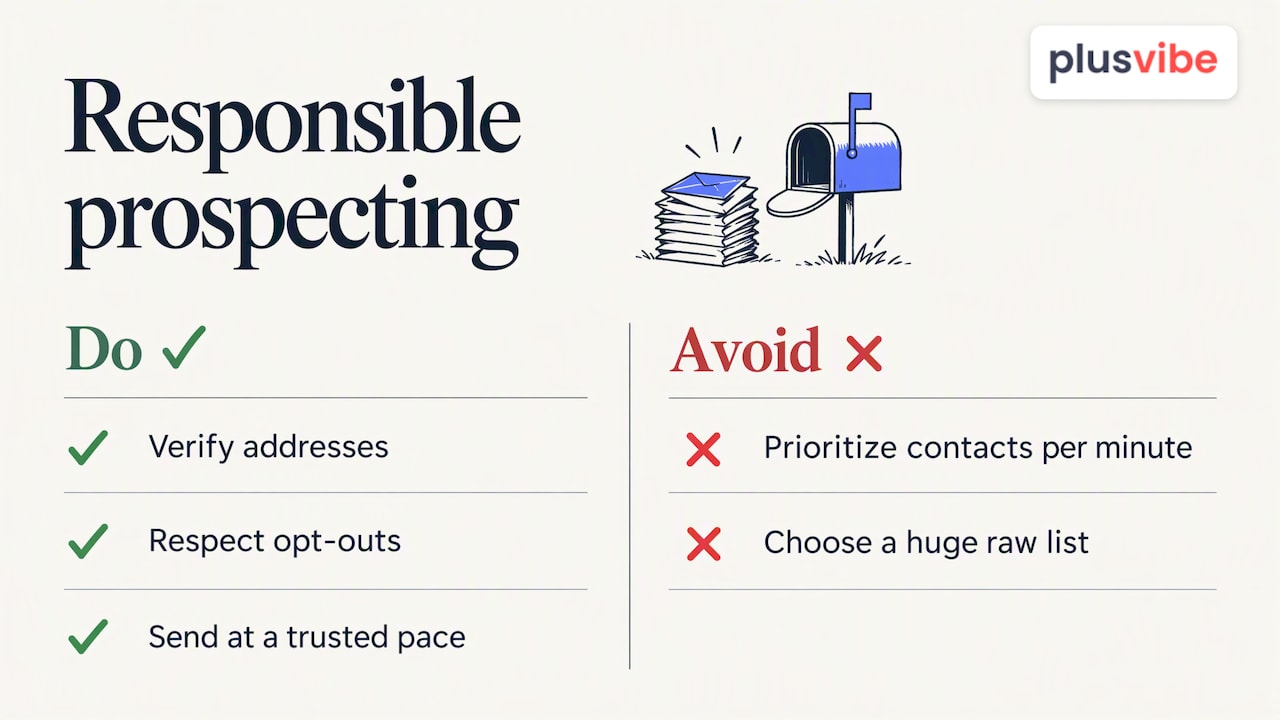
We think the industry has the incentives backwards. Most tools advertise how many contacts they can pull per minute, but the number that decides whether outbound works is how many of those addresses reach a real inbox without hurting the domain behind them. A smaller, verified, well-segmented list can be more useful than a huge raw one, and it is kinder to the people receiving the message.
That is why verification and warm-up are core to how we work, not add-ons. Responsible prospecting means checking addresses, respecting opt-outs, and sending at a pace mailbox providers trust. If you want to practice that approach, our free prospecting tools and educational resources are open to you, and you do not need to be a customer to use them.
— Yaro
Run the whole workflow in one platform with PlusVibe
If you would rather not stitch four tools together, we built PlusVibe to cover the stages in this guide from a single account, with deliverability controls included. Teams that choose it get less hand-off friction, fewer places for unverified data to slip through, and one place to watch campaign health.
Here is what we support across the workflow:
- Prospect collection: Our Chrome extension collects prospects from LinkedIn and other sources.
- Enrichment: AI-powered enrichment helps improve the accuracy of inferred addresses.
- Verification: Our email verification helps verify email addresses.
- Private warm-up and isolated sending: Warm-up runs on private infrastructure, with isolated sending to protect your reputation.
- Integrations: Connections to HubSpot, Zapier, Slack, Gmail, and Outlook move data into the tools you already use.
An integrated flow keeps verified data separate from raw scrapes, and it keeps sending infrastructure tied to the data that feeds it. That means fewer bounces to clean up and less manual work as you scale.
You can start with a free trial and see how the workflow feels with your own target list. When you are ready to compare options, see our plans to find the fit for an individual, an agency, or a larger organization, or try the free email verification tool on a small batch first.
FAQ
Can you scrape information from LinkedIn?
Technically, tools can collect publicly visible profile fields such as name, title, company, and profile URL. Whether you should depends on LinkedIn’s terms and on data protection law where your contacts live, so review both before collecting at scale. The EDPB’s Guidelines 1/2024 are a good starting point for the legal side.
What is the 4-1-1 rule on LinkedIn?
The 4-1-1 rule is a content-sharing guideline: for every self-promotional post, share one relevant piece of other people’s content and four pieces of useful, non-promotional material. It is about posting etiquette and engagement, not about extracting contact data. It helps you build credibility before you reach out.
What is an email scraper?
An email scraper is software that collects or infers email addresses from web pages, profiles, or databases. The better ones pair collection with pattern prediction and verification so the addresses they return are actually deliverable. Raw, unverified output tends to bounce.
Can you get someone’s email from their LinkedIn profile?
Sometimes, but usually not directly. Most profiles hide email addresses, so tools use the name, employer, and company domain to infer an address, then confirm it through enrichment lookups or SMTP checks. Always verify before sending.
Sources
- Guidelines 1/2024 on processing of personal data based on Article 6(1)(f) GDPR
- data-scrape/linkedin-email-scraper