Managing client campaigns well comes down to five habits: a written brief per campaign, a separate workspace per client, a fixed launch workflow with named owners, short and predictable reporting, and protected sending infrastructure if email is one of your channels. Do those five things and the work stops living in people’s heads. This guide shows how to set each one up, with a checklist you can copy and a reporting structure you can reuse across accounts.
Key Takeaways
- Write a one-page brief for every campaign before work starts: one primary objective, one or two audiences, KPI targets and an owner for each deliverable.
- Give every client a separate workspace, but keep one cross-client view so you can see which account needs attention today.
- Turn launch into stages with review gates and a pre-send checklist, so approvals are traceable and nothing goes out half-checked.
- Report on a rhythm (weekly bullets, monthly analysis) and always end with one decision someone owns.
- For outbound email, deliverability and compliance are part of campaign management, not an afterthought.
Table of Contents
- Start every campaign with a written brief
- Organize clients so accounts never blur together
- Run a launch workflow with stages and gates
- Communicate progress and set expectations
- Spot the campaigns that need attention
- Protect deliverability when you scale outbound email
- Check compliance for every market you contact
- Our perspective
- Run client outbound on PlusVibe
- FAQ
- Sources
Start every campaign with a written brief
Most client campaign trouble starts before launch, with an objective nobody wrote down. A brief fixes that. Keep it to one page and make it the document you return to when a client asks, three weeks in, why the plan changed.
A workable brief records the scope, timing and constraints, then a single measurable primary objective tied to a business outcome, with its desired action, target metric and tolerance. One campaign brief template also asks for the audience and exclusions, the offer, the channels, and the assets and owners required. KPIs, their measurement sources, targets, reporting cadence and an escalation trigger are set before approval.
Two details are worth copying:
- Separate the objective from the KPIs. A campaign brief guide treats the objective as the goal and KPIs as how you track it, with targets set before launch and actuals recorded next to them during delivery.
- Limit the audiences. A 2026 brief guide recommends no more than two audiences per campaign, because every extra audience tends to need different channels and creative.
On wording, the WHO’s monitoring, evaluation and learning manual says objectives should be SMART and focused on outcomes or impact rather than describing activities. “Send 2,000 emails” is an activity. “Book 15 qualified demos from mid-market finance leaders” is an outcome.
A brief you can reuse
| Field | What goes in it |
|---|---|
| Primary objective | One outcome, one target number, one deadline |
| Audience and exclusions | Up to two segments, plus who must not be contacted |
| Offer and channels | What you are asking for and where |
| KPIs | Two or three, with the data source and reporting cadence |
| Owners | One person per deliverable, plus a reviewer |
| Escalation trigger | The number that makes you call the client |
Organize clients so accounts never blur together
Once you run more than a handful of clients, the question is not what to do but what to look at first. Two structures solve most of it.
One workspace per client, one view across all. Agency workflow guidance advises client workspace isolation, with each client getting their own space or folder in a consistent structure. Another agency platform’s documentation describes the same idea: separate accounts so clients cannot see one another’s data, files and notes, plus a management view across all of them. The same logic applies to your sending accounts, lists and reply inboxes if you run outbound email.
Tasks with one owner each. A multi-client workflow guide suggests breaking every campaign into tasks that each have one owner, a deadline, a status and a visible blocked state. “The design team” is not an owner. A named person is.
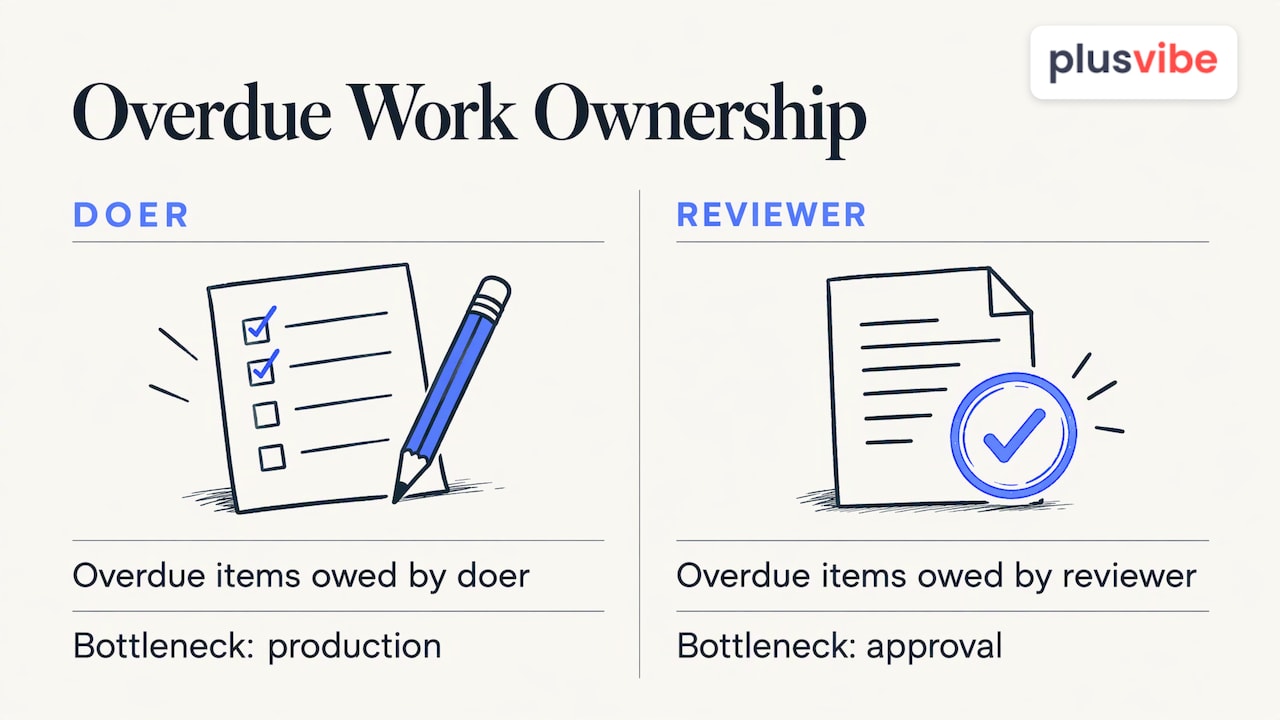
It also helps to know who the delay belongs to. One client task system splits overdue work into items owed by the doer and items owed by the reviewer, which shows quickly whether the bottleneck is production or approval. You can do the same with two columns in a spreadsheet.
Build templates by deliverable and by campaign type
Templates are what make a 10-client agency behave like a 3-client one. The ClickUp guide above recommends a task template per deliverable type (an email sequence, a social campaign, a landing page), each with a subtask checklist, default assignee roles, required inputs and output specifications.
A case study of an agency running eight campaign types landed on eight separate project templates, one per format, each with its own phases, roles and client-approval gates. The Pedowitz Group describes the same thing as running “campaign factories, not one-offs”: shared build recipes for common campaign types, with client-facing pods adapting communication style.
Start with your two most common campaign types. Template those first.
Run a launch workflow with stages and gates
A consistent launch is a sequence of stages, each with an exit condition.
- Brief approved. The one-pager above is signed off by the client.
- Production. Copy, design and build, each with an owner.
- Internal review. QA against the checklist.
- Client review. A fixed approval window.
- Scheduled. Everything is loaded and checked.
- Live, then reporting milestone.
Orangescrum’s launch workflow uses similar stages (briefed, production, review, approved, scheduled, live), one project per campaign, planning backward from the launch date, and a workload check before dates are committed. It also treats review as a formal stage, with feedback kept on the task rather than in scattered email threads.
Tie approval windows to the launch date. CoSchedule’s guide gives examples such as 48 hours for creative drafts and 72 hours for landing pages. Pick your own windows, put them in the client agreement, and enforce them.
The point of an approval gate is traceability more than speed. In the case study above, the benefit was that no one could argue about whether a client had signed off, because the next phase could not start without it.
The pre-send checklist
Separate roles for copy, design, QA and final approval work best, with a standard pre-send checklist covering links, alt text, typos, merge tags and branding. For cold email, add:
- Every merge field populated, with a fallback for blanks.
- Sending inboxes warmed and within daily limits.
- Verified addresses only.
- Unsubscribe and sender identity present (see the compliance section below).
- The exclusion list from the brief applied.
Communicate progress and set expectations
Clients rarely leave because of one bad number. They leave because they were surprised. Predictable communication prevents most surprises.
Weekly: a short update of three to five bullets covering completed work, pending items, blockers and upcoming dates. Monthly: a review of performance, learnings, adjustments and approvals needed. This agency guide recommends exactly that cadence, with ad hoc escalation for anything urgent. A reporting guide adds a quarterly strategic review.
Structure each report as a decision document
A good monthly report answers three questions: what happened, why it likely happened, and what should change next. The same guide argues that interpretation protects the relationship when results are mixed.
A structure that works:
- Executive summary, starting with the agreed goal restated.
- Campaign overview.
- Breakdown by campaign or segment.
- Audience insights.
- Recommendations and next steps.
A client reporting guide suggests repeating the goal at the top of every report, using two or three metrics, automating data collection but not judgment, and logging recommendations so you can check later whether they worked. Another framework adds that each material claim should state its reporting period, comparison period, data source and metric definition, and that every report should close with one owned next decision.
For email-specific metrics, see our guides to email campaign performance metrics and email marketing reporting. For vocabulary you can share with clients, the glossary entry on marketing metrics is a quick reference.
Spot the campaigns that need attention
A cross-client view only helps if you know what to scan for. Use three signals.
- Distance from target. Compare actuals with the targets in the brief. Anything outside the tolerance you set is flagged.
- Blocked or overdue tasks. Look at who owes the next step.
- Quality signals. For outbound email, these are bounce rate, reply rate and placement, not just sends.
The WHO manual above recommends measuring before, during and after a campaign and comparing KPIs against baseline data, then applying what you learn. In practice that means capturing a baseline at onboarding, checking it weekly, and writing down what you changed.
Don’t rely on a single engagement number. Amplitude’s analytics guide says to connect results to business outcomes with metrics such as ROAS, customer lifetime value, acquisition cost, retention and churn. A cheap lead that never becomes a customer is not a win. If you want to turn each cycle’s results into the next plan, this piece on how to plan digital campaigns for organic growth shows one way to carry learnings forward.
Protect deliverability when you scale outbound email
If cold email is one of the channels you run for clients, a campaign that lands in spam is a failed campaign no matter how good the copy was. Scaling makes it worse, because one client’s bad list can damage the reputation of infrastructure shared with others.
The habits that protect you:
- Keep each client’s sending isolated. Separate domains and inboxes per client mean one account’s problems stay contained.
- Warm up before you ramp. New inboxes need gradual volume. Read about warm email before you set daily limits.
- Verify every list. Bounces hurt reputation quickly, so verify addresses before sending.
- Rotate and cap. Spread volume across several inboxes instead of pushing one past its limit.
- Monitor continuously. Watch placement and bounces weekly, and pause a campaign when numbers drift.
Personalization also affects results and complaint rates, so build it into the template. See how personalization and enrichment work in PlusVibe, and our overview of deliverability.
Check compliance for every market you contact
Compliance belongs in the brief, as a line item per market.
In the United States, commercial email falls under the CAN-SPAM Act. The FTC’s compliance guide lists the core rules: no false or misleading header information, no deceptive subject lines, a clear disclosure that the message is an ad, and a valid physical postal address. Recipients must also be given a way to opt out, and you must honor it. Rules differ in other countries, and many require consent before you send, so confirm the law for each region on the client’s target list with the client’s counsel before launch.
Also keep an eye on the sender requirements of the mailbox providers you send to, since they can change. Add a “rules checked” line with a date to each brief.
Our perspective
Agencies rarely fail at strategy. They fail at the middle: forty inboxes, six clients, and no clear answer to “which account is about to have a problem?”
We built PlusVibe around that middle. Private, non-shared infrastructure keeps one client’s sending reputation from bleeding into another’s. Managed warm-up and deliverability controls are there so you spend your week on campaigns instead of firefighting placement. And we try to keep the platform simple enough that a new account manager can run a campaign on day one.
Our advice: treat infrastructure as part of the client deliverable. Write it into the brief, report on it monthly, and give every client its own isolated setup. Clients notice results, and results start with inbox placement.
Yaro
Run client outbound on PlusVibe
If you manage cold email for clients, we built PlusVibe for that job: private email warm-up, isolated sending infrastructure, inbox rotation, deliverability monitoring, verification, sequencing and analytics in one place. Our Agency plan starts from $497 per month, and Personal and Business plans start at $37 and $77 per month for smaller setups. See every option on the plans page.
If you would rather not configure inboxes yourself, our done-for-you email setup is available at $1,500 per month, and agencies that want their own branded experience can look at the white label mobile app.
FAQ
How many client campaigns can one person manage?
It depends on campaign type and on how much is templated. With briefs, templates and a single cross-client view, one person can handle far more than with ad hoc work. Check workload before committing dates, as the launch workflow above recommends, and cap each owner’s active campaigns.
What should a client campaign report include?
Start with the agreed goal, then give two or three metrics, a short explanation of why they moved, and one recommended next decision with an owner. Add the reporting period, comparison period and data source so the numbers can be checked.
How often should I update clients?
Send a short weekly update of three to five bullets, hold a monthly performance review, and add a quarterly strategy review if the contract is long term. Escalate urgent issues immediately instead of waiting for the next scheduled update.
How do I keep one client’s email problems from affecting another?
Give each client separate domains, inboxes and lists, and warm them up independently. Isolated sending infrastructure means a spike in bounces on one account does not touch the others.
Sources
- Marketing Campaign Brief SOP Template
- Marketing campaign brief
- Marketing Campaign Brief Template 2026
- THE MEL MANUAL, WHO (2021)
- How to Build an Agency Workflow That Scales
- Agency Project Management Software
- How to Manage Multiple Client Campaigns Without Chaos
- Client Task OS
- Inside an Agency Running 8 Campaign Types on One System
- How do agencies structure MOPS to support client campaigns?
- Campaign Launch Workflow for Marketing Teams
- How To Manage Client Campaigns Across Multiple Channels
- The Email Marketing for Agencies Guide
- How to Manage Client Expectations: Agency Guide (2026)
- Campaign Results Reporting
- Client reporting for agencies: the complete guide
- Client Reporting for Agencies: A Source-Checked Framework
- What is Marketing Campaign Analytics?
- How to plan digital campaigns that drive organic growth
- CAN-SPAM Act: A Compliance Guide for Business, FTC