To manage client inboxes well, give every mailbox a written purpose and an owner, route mail into the same folders for every client, and make sure each conversation has exactly one person responsible for the next reply. Tools help, but the system comes first. This guide walks through that system step by step, for agencies, consultants and sales teams who handle correspondence for several clients at once, including the replies that come back from outbound campaigns.
Key Takeaways
- Write a one-page map of every client mailbox: address, purpose, primary owner, backup owner and response target.
- Use one folder structure across all clients so anyone on the team can file or find a message in seconds.
- Every thread gets exactly one owner at a time. Two owners is the same as none.
- Triage on a fixed schedule, twice a day for most teams, instead of checking constantly.
- For outbound campaigns, keep each client’s sending infrastructure and replies separate so one client’s problem never touches another’s.
Table of Contents
- Start with a client inbox map
- Build one folder system for every client
- Assign one owner to every conversation
- Triage on a schedule
- Managing client inboxes for outbound campaigns
- Protect client privacy and access
- Mistakes that cause missed replies
- Our perspective
- Run client outreach inboxes with PlusVibe
- FAQ
- Sources
Start with a client inbox map
Most missed replies do not come from laziness. They come from nobody knowing whose job a mailbox is. Before you change any settings, list everything.
An agency workflow guide from Mailbird recommends a one-page “client inbox map” with these columns: client, mailbox or address, purpose, primary owner, backup owner, response target, and whether the mailbox feeds your unified inbox. Another guide, from KIWI, suggests the same idea: list the work addresses you use, what each is for and who reviews it, then connect only the accounts you actually intend to handle.
A simple version looks like this:
| Client | Mailbox | Purpose | Primary owner | Backup | Response target |
|---|---|---|---|---|---|
| Client A | support@clienta.com | Customer questions | Dana | Marcus | Same business day |
| Client A | outreach replies | Replies to cold campaigns | Marcus | Dana | 2 hours in business hours |
| Client B | hello@clientb.com | General inquiries | Priya | Dana | Next business day |
The backup column matters most. Vacations, sick days and role changes are when threads die. Review the map whenever a client signs, leaves or changes scope.
Give each engagement its own address
If you are an independent consultant, a separate address per client keeps work traceable. One consultant-focused guide on Hashnode recommends a unique alias per engagement, with filters that label and route each alias into its own folder, and a “send mail as” setting so your reply leaves from the same address the client used. That last step avoids the confusing moment when a client writes to one address and hears back from another.
Build one folder system for every client
Consistency beats cleverness. When every mailbox uses the same folders, a new teammate can work any client’s inbox on day one.
Mailbird’s agency guide proposes a numbered set: 00-Action, 10-Waiting, 20-Approvals, 30-Reference and 90-Archive. The point of repeating it on every client mailbox is that any teammate can file a message in a few seconds and the whole team describes the pipeline in the same words.
The numbering is not magic. The principle is to separate:
- What needs you now (action)
- What you are waiting on (waiting, approvals)
- What you may need to look up later (reference)
- What is finished (archive)
If you are a solo professional with many clients, a different layout may suit you. FolderSuggest describes a client-first structure, with one top-level folder per client and subfolders such as proposals, deliverables, invoices and correspondence, as a fit for consultants and accountants. A project-first structure suits agencies where one client runs several parallel projects. Pick one and stick to it.
If Gmail is your client, our walkthrough on creating folders in Gmail covers the labels and filters you need.
Keep the rules simple at first
A unified inbox with a few rules beats an elaborate system nobody follows. Zenind’s guide on multiple business accounts suggests starting small: send messages from key clients to a priority folder, move newsletters out of the main inbox, flag words such as invoice, refund, deadline or urgent, and route internal mail elsewhere. It also warns against overengineering on day one. Add rules only when you see the same manual sorting happen a third time.
Assign one owner to every conversation
Shared inboxes fail in a predictable way: several people see a message, and each assumes someone else will answer. Either nobody replies or two people reply with different answers.
Featurebase’s team inbox playbook states the rule plainly: each conversation needs exactly one owner at any moment, and two owners are the same as zero. It suggests an owner within five minutes of a customer email arriving. For small teams of two to five people, round-robin auto-assignment works; larger teams should route by topic or skill.
If you do not have a shared inbox tool, Mailbird’s agency guide offers two low-tech options:
- Triage-owner rotation: one person owns the shared inbox for the day and assigns everything.
- Folder assignment: each teammate has a subfolder under 00-Action and must move an email there before drafting a reply.
Both stop double replies, which is the most embarrassing client-facing mistake a team can make.
Handoffs need context
Changing an assignee is not a handoff by itself. The documentation for the Cust shared inbox notes that assignment identifies the owner but does not lock the conversation, and advises telling the receiving teammate what is needed, what has been promised and by when. Put the promise in writing. “I told them Thursday” is the line that otherwise lives only in one person’s head.
Internal notes help here too. Featurebase calls notes inside the thread, instead of reply-all or side chats, the biggest workflow upgrade for many teams moving to a real shared inbox. It also suggests a minimal status set of Open, Snoozed and Closed, with an optional priority flag.
Triage on a schedule
Checking mail all day feels responsive and wrecks focus. A fixed rhythm gives clients predictable answers and gives your team uninterrupted work.
Glidebase’s advice for small agencies is that the client inbox owner is responsible for making sure nothing from that client goes unanswered, with triage twice a day, for example mid-morning and mid-afternoon. At each pass the owner reviews every open thread and decides whether to reply, create a task or close it.
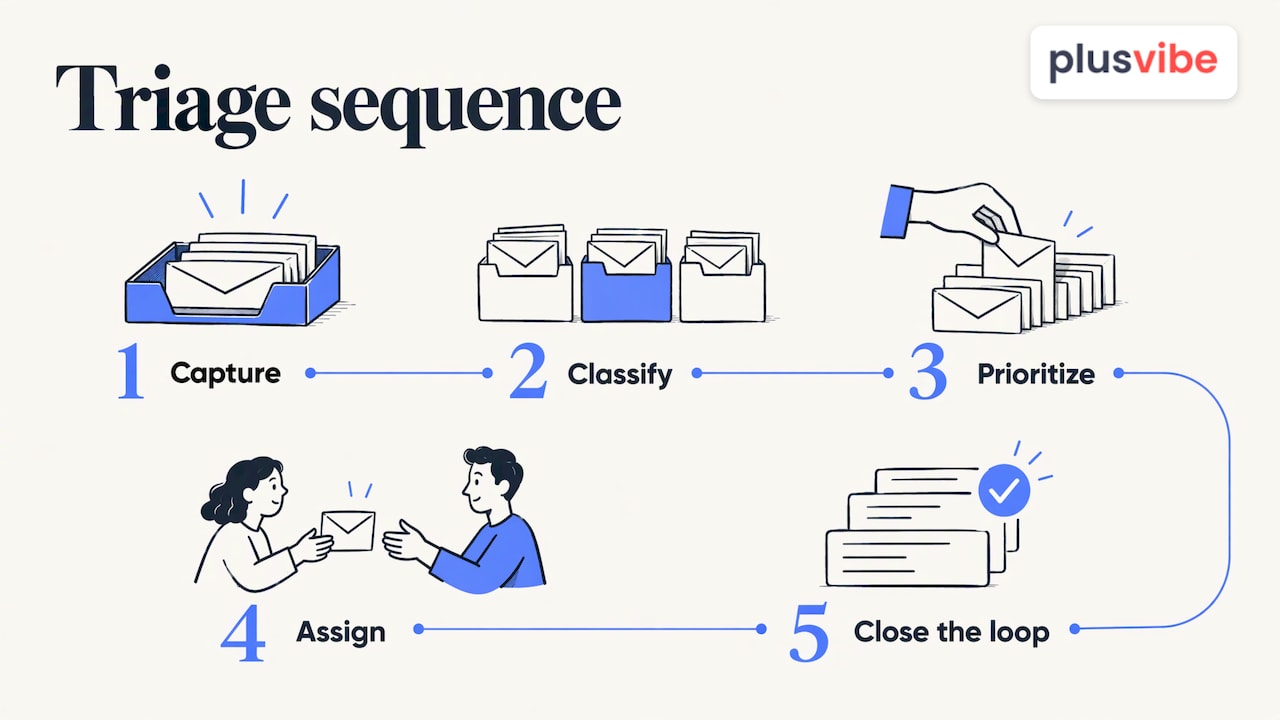
A simple triage pass has five moves: capture, classify, prioritize, assign, close the loop. TimeToReply’s triage guide points out that assignment is where messages most often fall through the cracks, sitting in a queue while the response clock runs.
Classify by what the sender wants
InboxPilot suggests a practical exercise: take your last 100 emails, write what each sender wanted in five words or fewer, and group them into six to ten categories named after the request, not after internal teams. Give each category an owner. For an agency, the categories might be “approve this,” “change this,” “invoice question,” “new request” and “meeting booking.”
Label urgency and consequence
MailTwine recommends giving each message a status (Act now, Waiting, Review, No action) and a priority (High, Normal, Low) based on both urgency and consequence. A late reply to an approval that blocks a launch beats a loud message about something trivial. Routing should follow the work required, not only the sender or subject line.
Set response targets and a late rule
A target without a consequence is a wish. Keeping.com’s shared inbox guide recommends one target for first response and another for resolution, then defining what happens when either runs late, such as alerting the owner and tagging the conversation so it is visible. Write the targets into your client inbox map.
Managing client inboxes for outbound campaigns
If your agency runs cold outreach for clients, you manage two kinds of inboxes: the ones sending campaigns and the ones receiving replies. They need different handling.
Separate infrastructure per client
Never send one client’s campaigns from another client’s domains or inboxes. A deliverability problem for one client should stay with that client. In practice that means dedicated domains and sending mailboxes per client, and a clear record of which inbox belongs to whom. Our piece on when to add a second domain versus a second inbox explains how to decide as volume grows.
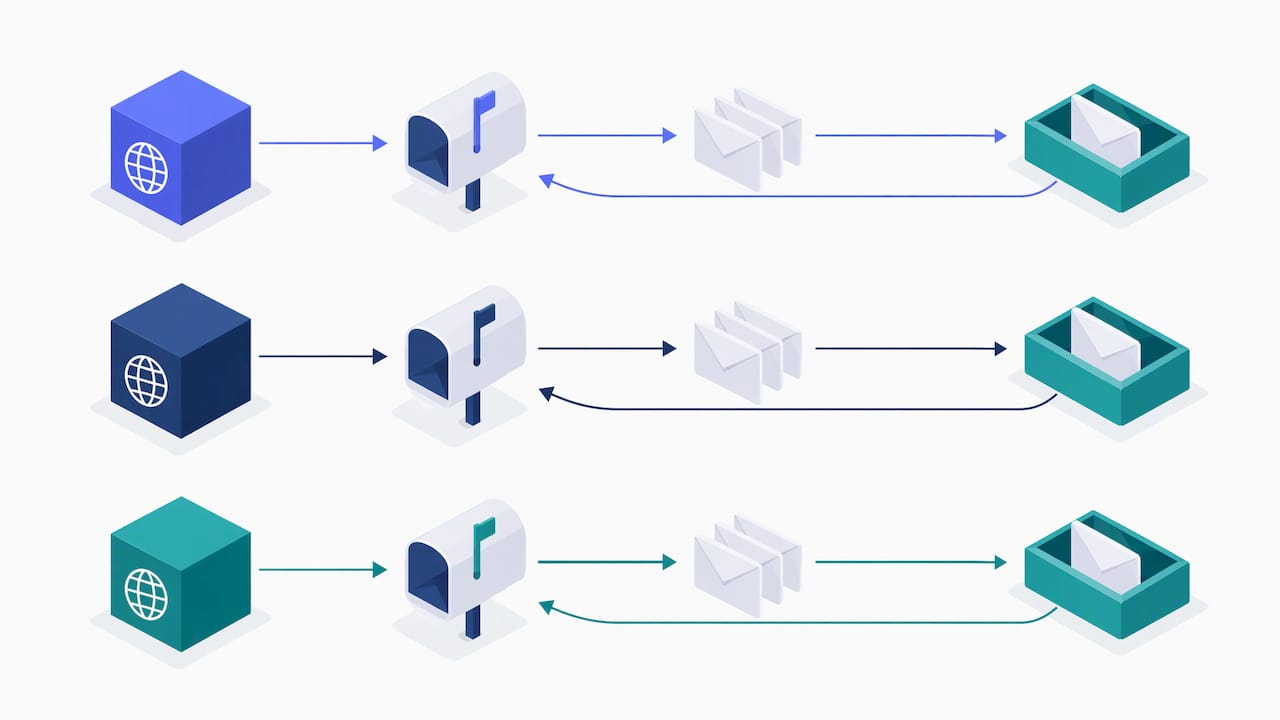
Setup should also keep the visible sender and the reply destination straight, so no response lands somewhere nobody watches. Reply-to versus From setup is a small setting with a large effect on lost deals.
Route replies like any other inbox
Replies to campaigns deserve the same ownership rules as client service mail, and often a tighter response target, because interest cools quickly. Funnel replies from all sending inboxes into one place, categorize them (interested, not now, wrong person, unsubscribe, out of office) and assign each positive reply to a person. We lay out triage rules for a unified inbox in more detail. For high volume, you can also consider where automation fits; this overview of use cases for a reply agent covers when it helps.
Follow-up is the other half. Many positive replies need a second message to turn into a meeting, and our templates for cold email follow-ups and good follow-up emails give you a starting point. To pick the structure of your answers, see these email format examples for replying to leads.
Standardize your client setup
Agencies that onboard many clients benefit from a repeatable checklist: which domains, how many mailboxes, which sequencing connection, where replies go, who owns them. If you are comparing the broader tool landscape for that workflow, this roundup of email platforms for agencies is a good place to start building a repeatable client email workflow.
Test the whole chain before a client goes live: send a message in, confirm it lands in the right folder, confirm the owner is notified and confirm the reply goes out from the right address. Mailbird’s guide lists end-to-end testing as the last step before onboarding any new client mailbox.
Protect client privacy and access
Client email contains contracts, pricing and personal data. Treat access as part of the system, not an afterthought.
- Least access: give teammates only the mailboxes they work on. The inbox map’s owner and backup columns tell you who needs what.
- Individual logins: avoid shared passwords. Use delegated access or a shared inbox tool so you can see who did what.
- Offboarding: when someone leaves or a client ends the engagement, remove access the same day and update the map.
- Separate data: keep each client’s leads and replies out of the other clients’ workspaces.
For regulated clients, follow the contract and the data protection rules that apply to them, and ask the client’s legal or compliance contact what is required.
Mistakes that cause missed replies
Most problems trace back to a handful of habits:
- No named owner. The shared inbox is everyone’s job, so it is no one’s.
- Too many folders. If filing takes thought, people stop filing. Zenind’s warning against overengineering applies.
- Using the inbox as a to-do list. Mailbird’s sales guide suggests the inbox should hold only messages that need a human response, with one action per email: reply, snooze, move or archive.
- Snoozing without a date. A snoozed thread leaves the open queue. If it has no return date, it disappears.
- Mixing client infrastructure. One client’s bounce rate should never become another’s problem.
- No backup. Every mailbox needs a second person who knows where things stand.
Our perspective
Agencies rarely lose clients over a single bad campaign. They lose them over slow, tangled communication: a reply that sat for three days, a message answered twice, a sending domain that got burned because it was shared.
That is why we built PlusVibe around separation and visibility. Private warm-up, isolated sending infrastructure and inbox rotation are designed so each client’s reputation is protected on its own. Deliverability monitoring is meant to show you trouble before a client does. And when you manage many sending inboxes, a simple platform matters more than a feature-heavy one, because the person triaging replies at 4 p.m. needs to see what is waiting and who owns it.
Our advice: write the inbox map first, then let the tools enforce it.
Yaro
Run client outreach inboxes with PlusVibe
If your clients’ inboxes include outbound campaigns, PlusVibe gives you private email warm-up, isolated sending infrastructure, inbox rotation, deliverability monitoring, sequencing and analytics in one platform. It supports individual users, agencies and organizations managing many sending inboxes, and it comes with a free trial.
Published plans: Personal is $37 to $58 per month, Business is $77 to $220 per month, and Agency starts from $497 per month. Google Workspace inboxes are available at $4 per inbox per month and Microsoft 365 at $4.50 per inbox per month. If you would rather not configure it yourself, there is a done-for-you email setup. See the plans and pricing to find the fit for your client load.
FAQ
What is the best way to manage multiple client inboxes?
Start with a written inbox map listing each mailbox, its purpose, owner, backup and response target. Then use the same folder structure everywhere, bring accounts into a unified inbox and review on a fixed schedule. The map and the schedule do more than any single tool.
Should every client get a separate email address?
Yes, in most cases. A dedicated address or alias per client makes filtering, routing and handover simple, and lets you reply from the address the client used. For outbound campaigns, dedicated domains and sending inboxes per client also keep deliverability issues contained.
How do we stop two people replying to the same email?
Assign one owner per conversation and make that visible before anyone drafts. In a shared inbox tool, use the assign function. Without one, rotate a daily triage owner or have each person move an email into their own folder before replying.
How often should we check client inboxes?
Twice a day suits many teams, with a named owner reviewing every open thread each time. Add a faster response target only for mailboxes where speed matters, such as replies to outbound campaigns.
Sources
- Email Workflow Setup for Agencies
- Organize client email inboxes with clear ownership
- Email Management for Consultants
- Email Management for Professionals with Many Clients
- How to Manage Multiple Business Email Accounts with a Unified Inbox
- Team Inbox Management: A Modern Playbook for Teams
- Inbox documentation
- How Small Agencies Should Handle Client Email
- Email triage for customer-facing teams
- Email Triage for Business Inboxes
- How to Triage Important Account Emails and Track Follow-Ups
- Email Workflow Management for Shared Inboxes
- Email platforms for marketing agencies