Zapier is the connective layer of a cold email stack, not the sending engine. It moves leads into your outreach platform, pushes replies into your CRM and alerts your team in Slack, while the platform itself handles sequencing, warm-up and inbox health. Used that way, Zapier removes the copy-paste work without putting your sender reputation at risk. Used as the thing that sends your cold emails, it creates problems you will not enjoy fixing.
This guide shows what to automate, what to keep inside your outreach platform, how to build and test a Zap safely, and how to keep costs and compliance under control.
Key Takeaways
- Zapier connects tools through triggers (an event, such as a new lead or a reply) and actions (what happens next, such as a CRM update or a Slack message).
- Keep sequencing, personalization, warm-up and sending inside a dedicated outreach platform. Use Zapier for lead intake, enrichment, CRM sync and team alerts.
- Test every Zap step before turning it on, and disable the final action while testing so no prospect receives a broken email.
- Watch your task count: filters and early exits keep costs predictable as volume grows.
- Email by Zapier is built for notifications, not for bulk prospecting. Send cold email from your own authenticated inboxes.
Table of Contents
- What Zapier does in a cold email workflow
- What belongs in your outreach platform, not in Zapier
- Five Zapier workflows worth building
- How to build, test and troubleshoot a Zap
- Task limits, plans and costs to check before you scale
- Protecting deliverability and staying compliant
- Where PlusVibe fits
- FAQ
- Sources
What Zapier does in a cold email workflow
A Zap is a small automation with two parts. The trigger is an event in one app. The action is what Zapier does in another app because of that event. Zapier describes cold email automation as connecting sales tools so prospects move through outreach workflows without manual work: triggers represent things like new leads or email replies, and actions run follow-ups, CRM updates or team notifications.
In practice, that gives you three jobs Zapier does well:
- Moving data in. A new row in a spreadsheet or a form submission becomes a lead in your outreach platform.
- Moving data out. A reply or a bounce becomes a CRM update, a task or a message to the right rep.
- Moving data around. Enrichment, verification and formatting happen between the moment a lead appears and the moment it enters a sequence.
Notice what is missing: writing the email, choosing when it goes out, rotating inboxes and protecting reputation. Those belong elsewhere.
What belongs in your outreach platform, not in Zapier
The cleanest mental model is that the outreach platform receives leads and reports engagement, and Zapier connects it to everything else. Here is how we split the work.
| Job | Where it should live | Why |
|---|---|---|
| Sequencing and follow-up timing | Outreach platform | Steps, delays and stop-on-reply logic need to know the state of every thread |
| Personalization variables | Outreach platform | Fields are merged at send time, with previews before launch |
| Inbox warm-up and rotation | Outreach platform | These depend on sending infrastructure, not on events between apps |
| SPF, DKIM and DMARC | Domain and infrastructure setup | Authentication is configured at the DNS and mailbox level, not in a Zap |
| Lead intake from forms and sheets | Zapier | Simple trigger, simple action |
| CRM sync and Slack alerts | Zapier | Moves outcome data to the tools your team already uses |
| Reporting rows in a sheet | Zapier | Logs events for analysis outside the platform |
If you want the underlying setup right first, our guide to cold email infrastructure covers domains, mailboxes and authentication, and how to warm up a new inbox or domain covers the ramp that comes before any campaign.
Five Zapier workflows worth building
These are patterns, not copy-and-paste templates. The exact trigger names depend on the apps you connect, so open the trigger list for your platform inside Zapier and pick the closest match.
1. Spreadsheet or form row to campaign lead
The trigger is a new row in your lead sheet or a new form submission. The action creates the lead in your outreach platform and assigns it to a campaign. Zapier lists this lead capture pattern as a core use of cold email automation, alongside enrichment before the lead enters the pipeline.
Add a filter right after the trigger. If the email cell is empty or the company field is missing, stop the Zap. A lead with blank merge fields is how “Hi ,” ends up in a prospect’s inbox.
2. Verify before you enroll
Bounces hurt sender reputation, so put verification between intake and sequencing. The Zap looks like this: new lead, verify the email address, filter on a valid result, then add to the campaign. Invalid addresses go to a separate sheet for review instead of into a sequence.
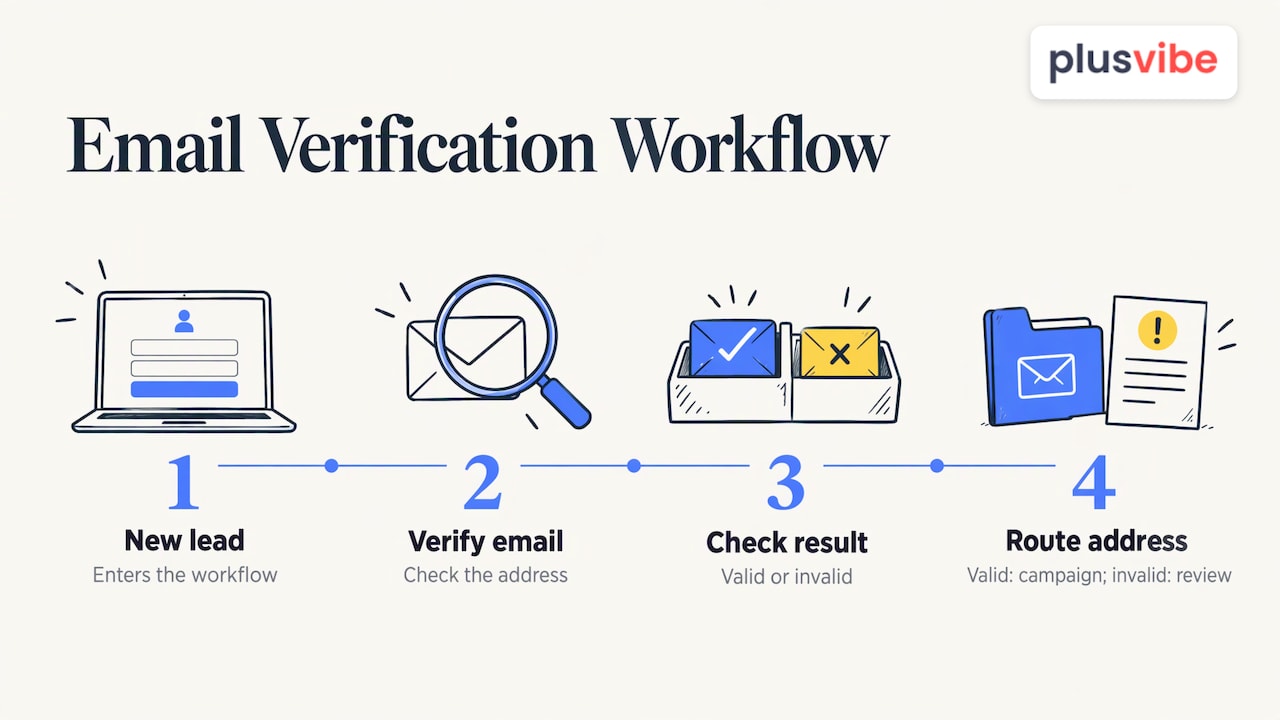
If you do not want to build this step by hand, our email verification tools check addresses inside the platform, and you can try the free email verification tool on a small list first. Our glossary entry on what email verification is explains what the check actually covers.
3. Reply to CRM update
When a prospect replies, the trigger fires on the reply event in your outreach platform. Useful actions to chain after it:
- Update the contact’s status in your CRM, for example from a cold outreach stage to an engaged stage.
- Log the reply text and a link to the campaign in the contact’s notes.
- Create a follow-up task for the assigned rep.
- Make sure the contact is no longer in any active sequence, so nobody gets a follow-up after they have answered.
That last point matters most. Most platforms stop a sequence on reply by default, but if you also enroll leads from another source, a Zap that checks for existing activity prevents duplicate outreach. If HubSpot is your CRM, read our walkthrough on setting up a HubSpot cold email integration safely before you wire the sync.
4. Instant Slack alerts for positive replies
Speed to reply decides many conversations. Add a filter to the reply Zap so only replies that look interested (a label or tag set in your platform) go to Slack, with the prospect’s name, company and a link to the thread. Out-of-office messages and unsubscribe requests should route elsewhere, or nowhere.
5. Event log in a sheet
A lightweight reporting Zap appends a row to a spreadsheet each time a campaign event fires: timestamp, recipient, campaign name and event type. It gives you a raw record you can pivot by campaign or week without exporting reports by hand. Because every event is a task, use this only for the events you will actually analyze, such as replies and bounces.
For more recipes outside cold email, we collected six in our post on Zapier email automation, and our automation page shows what we handle natively so you need fewer Zaps.
How to build, test and troubleshoot a Zap
The order below keeps accidents away from your prospects.
- Choose the trigger event and connect the account. Zapier’s trigger setup guide walks through picking the event, connecting the app, filling in required fields and testing the trigger so you know it pulls the right data.
- Pull a real sample record. Use a record that looks like your actual leads, including awkward ones: long company names, missing last names, unusual characters.
- Add the filter before any action. Put your stop conditions as early as possible.
- Map fields deliberately. Check each mapped field against the destination app, not just whether the test passed.
- Test each step as you go. Zapier recommends testing every step, comparing the test record’s fields and values with the app, and reading error messages in the Data out tab when a test fails.
- Turn off the final action while testing. If the last step creates a lead in a live campaign or sends a message, leave it off, or point it at a test account, until the earlier steps are verified.
- Switch on, then watch the first runs. Open the Zap history after the first few real events and confirm the records look right in the destination.
When something fails, the cause is usually small. Zapier’s troubleshooting guide notes that mismatched field types, such as a fixed text value mapped into a date field, can produce errors. Fix the mapping, retest the step and replay the failed run.
A quick habit that saves trouble: name every Zap with the trigger, the destination and the date you built it. When there are twenty of them, you will be glad.
Our view on Zapier and cold email
We built PlusVibe around a simple belief: the sending side of cold email should be private, controlled and boring, so that the rest of your workflow can be flexible. That is why our platform keeps warm-up, inbox rotation, isolated sending infrastructure and deliverability monitoring in one place, with private infrastructure that is not shared with other senders.
Zapier fits on the edge of that system. Let it carry leads in and outcomes out, and let the platform own the part that touches your reputation. Teams that do this tend to have fewer moving parts to debug, because there is one source of truth for what was sent and what came back.
Our integrations with tools like HubSpot, Slack, Gmail and Outlook are designed so that many of the syncs people reach for Zapier to do are already one click away. Where you need something custom, Zapier closes the gap without forcing you to move your sending out of a controlled environment.
Yaro
Task limits, plans and costs to check before you scale
Every step that runs after the trigger can use tasks, and tasks are what your Zapier plan limits. Zapier’s pricing page shows a Free plan with 100 tasks per month and paid Professional plans starting at $19.99 per month, with multi-step Zaps on paid plans and pay-per-task billing available for overage. Confirm the current figures there before you budget, since plans change.
Two recent changes help cold email workflows in particular:
- On current plans, Filter, Formatter and Paths steps no longer count toward task limits, so a filter at the top of your Zap is effectively free insurance.
- If you add an AI step, for example to classify replies, AI steps are priced by model tier from June 15, 2026. Standard, Advanced and Premium tiers use different numbers of tasks per run.
A worked example makes the point. Say your platform fires a Zap for every sent email, every open, every click and every reply. A campaign of 2,000 prospects with a three-step sequence can generate thousands of events a month before replies even start, and each one runs your steps. If you only need replies and bounces, trigger on those two and the count falls sharply.
A few habits keep usage predictable:
- Trigger on outcomes (replies, bounces, meetings), not on activity (sends, opens).
- Put filters first and use them to exit early.
- Batch low-value logging into a daily summary instead of a per-event row.
- Review the task history monthly and retire Zaps nobody uses.
If you are deciding how many automations to run and whether the volume justifies a different automation approach, this breakdown of Zap volume and task planning is a good companion to the pricing page. And our post on marketing automation best practices covers keeping automations maintainable as they multiply.
Protecting deliverability and staying compliant
This is where most Zapier cold email setups go wrong, so be precise about what Zapier can and cannot do.
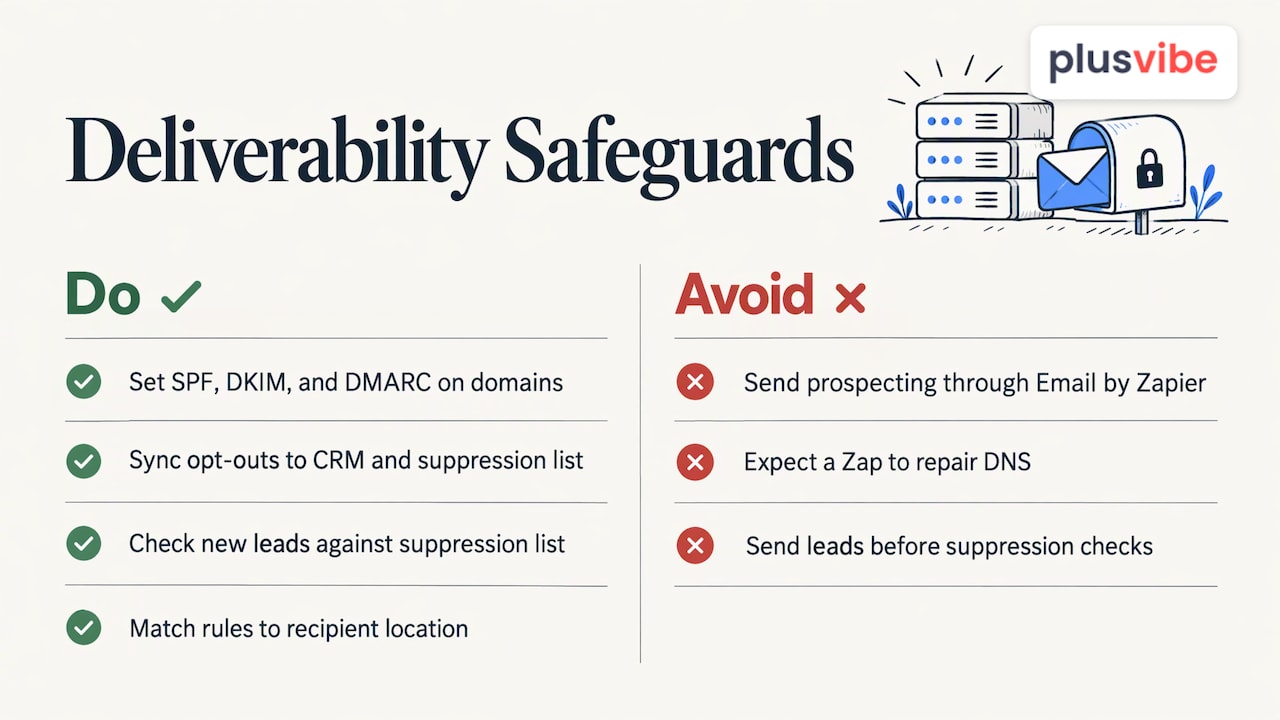
Do not send your outbound campaigns through Email by Zapier. Zapier’s documentation on sending email says paid plans are limited to 10 emails per account per hour, and that SMTP sends through your own mail server instead. Email by Zapier also includes a “Stop these emails” link that recipients can use to unsubscribe, and the link cannot be removed to comply with CAN-SPAM. That makes it a fit for internal notifications and transactional messages, not for prospecting at volume.
Keep authentication at the infrastructure level. SPF, DKIM and DMARC are set on your domains and mailboxes. A Zap can alert you when a deliverability metric drops or a bounce rate spikes, which is a good use, but it cannot fix a broken DNS record. Our post on cold email infrastructure shows the setup order.
Keep suppression in sync. If a prospect unsubscribes or replies asking to stop, that status must reach every tool that might email them. Build a Zap that writes opt-outs to your CRM and to a shared suppression list, and make sure new leads are checked against it before they enter a campaign.
Know the rules for your recipients. Email rules depend on where the recipient is, not where you are. The CAN-SPAM Act applies to commercial email in the US, and other regions have their own requirements. Our cold email compliance checklist gives teams a practical starting point, and a lawyer who knows your target markets should confirm anything specific to your situation.
For a broader look at the discipline behind all this, our guide to cold email automation explains how to raise response rates without raising risk.
Where PlusVibe fits
If you want Zapier on the edges and a controlled sending core, that is what we built PlusVibe to be. The platform covers private email warm-up, isolated sending infrastructure, inbox rotation, deliverability monitoring, AI-powered prospect enrichment, email verification, sequencing and analytics, and it connects to tools like HubSpot, Slack, Gmail, Outlook and Zapier.
Plans are published on our plans page: Personal runs $37-$58 per month, Business $77-$220 per month, and Agency starts from $497 per month. Google Workspace inboxes are $4 per month per inbox and Microsoft 365 inboxes are $4.50 per month per inbox. If you would rather not set up domains and mailboxes yourself, our done-for-you email setup is available at $1,500 per month. You can start with a free trial and connect your first Zap the same day. For prospecting upstream of the sequence, see how to automate prospecting.
FAQ
Can Zapier send cold emails?
Technically yes, through Email by Zapier or an SMTP step, but it is not designed for prospecting at volume. Paid plans allow 10 emails per account per hour through Email by Zapier, and every message carries an unsubscribe link. Send campaigns from a dedicated outreach platform and use Zapier for the connections around it.
Which Zapier triggers are most useful for cold email?
Triggers on outcomes are the most valuable: a new reply, a bounce, an unsubscribe or a meeting booked. On the intake side, a new spreadsheet row or form submission works well. Avoid triggering on every send or open unless you need that data, because each event can use tasks.
How do I avoid emailing prospects by mistake while testing a Zap?
Test each step with sample data, leave the final action off until earlier steps check out, and use a test account or test campaign for the first live runs. Compare the mapped fields with the destination app, and read the Data out tab if a step fails.
How many Zapier tasks will a cold email workflow use?
It depends on how many events you trigger on and how many steps follow each one. Filter, Formatter and Paths steps do not count toward task limits on current plans, so filter early. Check the Zapier pricing page for your plan’s current allowance.
Sources
- Cold Email Outreach Automations and AI Workflows, Zapier
- Set up your Zap trigger, Zapier Help
- Test Zap steps, Zapier Help
- How to troubleshoot Zaps, Zapier
- Plans and Pricing, Zapier
- Zapier plan improvements, Zapier Help
- AI by Zapier model-based pricing, Zapier Help
- Send emails in Zap workflows, Zapier Help
- Zap volume and task planning, Let’s Build My App