To reduce your email bounce rate, verify every address before it enters a sequence, remove hard bounces the moment they happen, authenticate your sending domains, and ramp volume slowly on warmed inboxes. Most senders treat a bounce as a cleanup chore. Mailbox providers treat it as a verdict on how well you maintain your list, and that verdict follows every later send from the same domain. At PlusVibe we build around this: verify first, warm up in a private pool, and check placement with seed tests.
This guide is for sales teams, agencies and founders who send outbound email at volume. It covers what bounces mean, the numbers worth holding yourself to, a step-by-step routine, and what to do when a campaign has already gone wrong.
Key Takeaways
- Aim for a hard bounce rate well under 2%. Many senders are flagged above that line, and above 5% to 10% you risk throttling or suspension.
- Hard bounces are permanent: remove them immediately. Soft bounces are temporary: remove them only if they keep failing.
- Most bounces come from the list, not the message: stale data, typos, purchased addresses and catch-all guesses.
- Verification before sending, authentication (SPF, DKIM, DMARC) and slow volume ramps prevent the large majority of avoidable bounces.
- If a campaign spikes, pause everything, suppress every bounced address, find the source of the bad data, and restart small.
Table of Contents
- What an email bounce actually is
- Why your emails are bouncing
- What bounce rate is acceptable
- How to reduce your email bounce rate, step by step
- What to do when a campaign has already bounced heavily
- Why we built PlusVibe around the inbox
- Our view: bounce rate is a list problem you solve before sending
- FAQ
- Sources
What an email bounce actually is
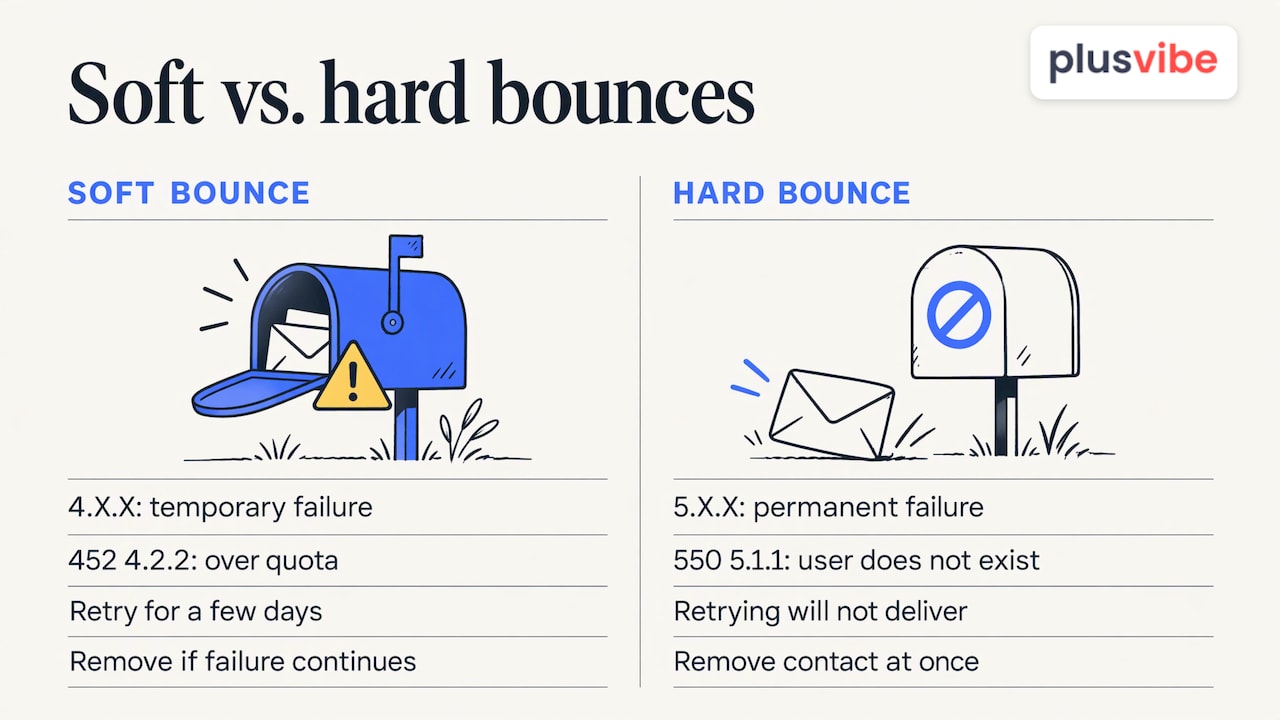
A bounce is a message that could not be delivered, the email version of a letter returned to sender. Mailchimp’s guide splits bounces into two families, and the difference decides what you do next.
Hard bounce. A permanent failure: the address is invalid, the domain does not exist, authentication failed or the address is blocked. It will never deliver however often you retry, so the contact should be removed at once.
Soft bounce. A temporary problem: a full inbox, an oversized message, a server that is down or a spam-filter flag. Platforms usually retry for a few days, and the address needs removal only if it keeps failing.
The error code tells you which one you have. Postmark’s bounce guide explains that codes starting with 4.X.X signal a temporary soft bounce and codes starting with 5.X.X a permanent hard bounce. Gmail’s “452 4.2.2 over quota” is a classic soft bounce, and “550 5.1.1 user does not exist” is a classic hard one. The same guide warns that resending to a hard-bounced recipient without investigating the cause can hurt your sender reputation.
Some platforms add categories of their own. HubSpot’s documentation, for example, describes a pending bounce that is retried for up to 72 hours before it counts as soft. If you want the cold-outreach angle on the same split, we cover it in our hard bounce vs. soft bounce article.
Why your emails are bouncing
If you are asking why your emails are bouncing, start with the bounce message itself. Gmail Help tells senders to open the “Delivery Status Notification (Failure)” email and match its error text to a cause: a recipient address that does not exist, a spam flag, a sending limit reached, a full inbox or a HELO/EHLO error. In Microsoft 365, the equivalent is a nondelivery report, which carries the error code, suggested fixes and technical details for administrators.
Behind those messages, Iterable’s troubleshooting guide lists the usual suspects:
- Poor list hygiene and bad data
- Raising send volume too fast, for example on a new domain
- Domain or IP reputation problems and blocklisting
- Authentication errors such as broken DNS records
- Content problems
- Recurring soft bounces that signal an address is no longer valid
For cold outreach, the first item dominates. Outbound lists age quickly: people change jobs, companies rebrand and domains lapse. Add scraped data, purchased lists and guessed addresses on catch-all domains (domains that accept any address and sort it out later), and you have a steady supply of hard bounces before you have written a single subject line.
A quick way to diagnose the pattern
Look at your bounces in groups rather than one by one:
- By code. Mostly 550 5.1.1 “user unknown” replies mean an address-quality problem. Authentication or policy rejections mean a setup problem.
- By recipient domain. A spike at one provider, such as Outlook, points to a reputation or policy issue there rather than bad data.
- By list source. If one import or scraper run produces most of the failures, that source is contaminated.
- By sending inbox. If bounces cluster on one mailbox or domain, the problem is that sender’s reputation or setup.
This four-way split also tells you whether to fix data, DNS or sending practice, and it keeps you from changing three things at once.
What bounce rate is acceptable
The bounce rate is bounced emails divided by emails sent. The figures below come from different sources and are guidelines, not a legal limit, but they agree on the shape: stay low, and treat 2% as the line you do not cross.
| Level | What it means | Source |
|---|---|---|
| Hard bounce under 0.5% | Healthy per-campaign target | Mailflow Authority |
| Hard bounce under 2% | Level to maintain for good reputation (with delivery above 95% and complaints below 0.1%) | Cloudflare Email Service docs |
| Total bounce 5% to 10% | Many email platforms suspend accounts in this range | Mailflow Authority |
| Over 10% | Campaigns may be auto-halted or marketing tools suspended | Nutshell, Faire |
Two habits keep these numbers useful. First, track the trend over several sends rather than judging a single one. Second, measure per sending domain and per client. A blended average hides the one inbox that is quietly dragging a domain down. If you run campaigns for several clients, that is a strong argument for keeping each client’s sending infrastructure separate, which is how our Agency plan is set up: each client gets its own sending server and dedicated IPs, so one client’s list problem stays with that client.
How to reduce your email bounce rate, step by step
Here is the routine, in the order it works best. Each step shows where it goes wrong and where we take work off your hands.
Step 1: Verify every address before it enters a sequence
Verification checks that an address can receive mail without sending to it. It catches typos, dead domains and mailboxes that no longer exist, which are exactly the addresses that produce hard bounces.
Where it goes wrong: verifying once and then letting the list sit. B2B data decays, and a list that was clean in spring is not clean in autumn. Re-verify anything you have not mailed in a while, and always verify imports from scrapers, exports and events. A MedLegal AI engineering team wrote up a bounce incident in which skipping per-email verification to save about $24 turned out to be a poor trade when verification cost $0.008 per email.
PlusVibe includes email verification and lead enrichment in the same platform where you build campaigns, so a list does not have to travel between tools before it is sent. You can read how it works on our verification page or try the free email verification tool on a handful of addresses.
Step 2: Treat risky addresses differently
Not every address is simply good or bad. Role addresses (info@, sales@), catch-all domains and previous unsubscribers carry more risk. Keep role addresses and unsubscribers out of cold sequences, and send to catch-all domains in small batches so a poor segment cannot move your overall rate. Our guide to email list cleaning goes through the categories one by one, and the eight-step list hygiene guide turns them into a routine.
Step 3: Remove hard bounces automatically after every send
A hard bounce that stays on the list will bounce again, and each repeat teaches mailbox providers that you do not maintain your list. Suppress hard-bounced addresses everywhere, not just in the campaign that produced them, so they cannot sneak back through a later import. Check that your suppression list also contains unsubscribes and past bounces from any tool you used before.
Step 4: Authenticate your domains
SPF, DKIM and DMARC are DNS records that prove a message really comes from your domain. Missing or broken records produce hard bounces on their own, with perfectly good addresses. Gmail, Yahoo and Microsoft enforce authentication for large senders: Microsoft announced enforcement from May 5, 2025 for domains sending more than 5,000 emails a day to Outlook addresses, and non-compliant mail is rerouted to junk or rejected. Cold senders often spread volume across many domains, so a single misconfigured one is easy to miss. Check each one after setup and again after any DNS change.
If you would rather not configure this by hand, we offer done-for-you Google Workspace, Microsoft 365 and Azure mailboxes, and a done-for-you email setup service.
Step 5: Warm up inboxes, then ramp slowly
A new inbox that sends 200 emails on day one looks like a spammer. Warm-up builds a pattern of normal sending and replies before campaigns start. Early stages are the most fragile: the MedLegal AI team found that one bad day within the first 14 days of a 42-day warm-up cost more reputation than three bad days after day 30. Treat the first two weeks as the period when a bad list does the most damage, and send only to your best-verified contacts then.
Our warm-up runs in one closed pool shared by all PlusVibe customers: a mix of Google, Microsoft and quality SMTP inboxes, with bad senders removed and every inbox re-checked over time. Its peak warm-up bounce rate has never exceeded 0.1%. There is no premium pool to pay extra for.
Step 6: Segment by engagement
Abandoned mailboxes cluster in contacts who have never opened or clicked. Separate recently engaged contacts from dormant ones, send to the engaged group first, and re-verify the dormant group before touching it. A first send to a dormant segment can spike higher than usual, which is one more reason to look at trends rather than single sends. For a repeatable audit, our 30-minute weekly deliverability audit fits this check into one slot.
Step 7: Build clean growth in from the start
The cheapest bounce is the one you never create. Whether addresses come from signup forms or from your own research, validate them at the point of entry and keep a suppression list. If your outbound sits next to inbound lead capture, this guide on growing an email list covers collecting subscribers in ways that keep invalid addresses out.
Step 8: Monitor placement, not only bounces
A low bounce rate does not prove that your emails reach the inbox, because a message can be accepted and still land in spam. Seed tests send your real campaign to test inboxes at Gmail, Outlook and other providers and show where each one lands, so you are not relying on a dashboard score. PlusVibe has this built in, and the standalone Email Placement Test plans start at $19 per month. Our write-up on deliverability monitoring explains how to catch drops early.
What to do when a campaign has already bounced heavily
If your rate is above 2%, or a single send has produced a wave of failures, act in this order:
- Pause the campaign, follow-ups and automated retries. Continuing to send creates more negative signals, and a hard bounce means something must change before delivery can succeed.
- Export the results and separate hard from soft bounces. Look for patterns by address, domain and list segment, and read the server responses.
- Suppress every hard-bounced address and anything outdated, incorrect or unsubscribed. Write them to a master suppression file, not just a campaign flag.
- Find the source. If one import caused it, quarantine that source. A SendGrid bounce case study describes a 65% hard-bounce send, after which the team killed the campaign, paused non-transactional sending for 48 hours and purged 2,582 matching rows from the master list. It also notes that Gmail’s rolling 30-day bounce window was filled by that one bad event, so expect the effect to linger.
- Verify what remains, then check SPF, DKIM, DMARC and blocklists. Our guide to checking sender reputation shows what to look at.
- Restart small. Send to your most engaged, freshly verified contacts, watch the results and raise volume gradually.
For a platform-side view, if a marketing tool auto-halts you at a 10% bounce rate, you will need to clean up before it lets you send again, so it pays to act well before that point.
Why we built PlusVibe around the inbox
High-volume senders can use PlusVibe to send hundreds of thousands of emails a month without burning domains. Private infrastructure keeps client reputations apart, the private warm-up pool conditions inboxes, verification cleans lists, and seed tests show where emails land. Plans start at $37 per month, Business is $77 per month for 150,000 emails, and Agency starts at $497 per month for 500,000+ emails. There is no fee per connected mailbox. You can start the 14-day free trial without a credit card and look at placement on your own campaigns. See the plans for what each tier includes.
If you send only a couple of hundred emails a month, a simpler tool will serve you fine. The routine above matters most once volume makes a bad week expensive.
Our view: bounce rate is a list problem you solve before sending
Teams usually come to us after a bounce spike. They have a good offer and a bad list, and the domain pays for it. The painful part is that the damage was decided before anyone hit send.
That is why we think about deliverability as a chain: clean data, authenticated and isolated infrastructure, warmed inboxes, then volume. If any link is weak, the others cannot compensate. A private warm-up pool and dedicated IPs for each agency client exist so that one client’s mistake never touches another’s reputation.
We also believe in receipts over vibes. A dashboard score is not a result. Seed tests that show where your actual campaign emails land at Gmail and Outlook are a result. Judge us on placement.
Cold outreach is honest work when it follows a code: relevant, honest, respectful and measured. Low bounce rates are what that code looks like in the numbers.
Yaro
FAQ
What is a good email bounce rate?
Keep the hard bounce rate under 2%, and aim lower. Cloudflare’s docs put the target at a hard bounce rate below 2%, delivery above 95% and complaints below 0.1%. Mailflow Authority suggests keeping hard bounces under 0.5% per campaign for a comfortable margin.
Should I delete soft bounces?
Not right away. A soft bounce is temporary, and the sending platform normally retries over a few days. Remove the address if it keeps failing across several sends, because repeated soft bounces suggest the address is no longer valid. Hard bounces go immediately.
Why is my bounce rate high on a new domain?
New domains have no reputation, so errors weigh more heavily. The usual causes are sending too much too soon, an unverified list and incomplete authentication. Warm the inbox first, send small batches to verified contacts, and raise volume gradually while watching the trend.
Can I still send to a bounced address later?
Not a hard-bounced one. Postmark warns that resending without investigating the cause can hurt your reputation. If you believe the address is valid, find out why it failed, for example a typo or a temporary server fault, fix that and re-verify before trying again.
Sources
- Hard Bounce vs. Soft Bounce: What’s the Difference? (Mailchimp)
- Email bounces: why they happen and how to handle them (Postmark)
- Email bounce types (HubSpot)
- Fix bounced or rejected emails (Gmail Help)
- Email nondelivery reports and SMTP errors in Exchange Online (Microsoft Learn)
- Troubleshooting Email Deliverability (Iterable)
- Email Bounce Rate Thresholds (Mailflow Authority)
- Email deliverability (Cloudflare Email Service docs)
- Troubleshoot high bounce rates (Nutshell)
- Why aren’t my email campaigns sending? (Faire Help Center)
- The SendGrid bounce spike recovery case study (MedLegal AI)
- Microsoft Outlook’s requirements for high-volume senders
- How to grow an email list