Zapier is a great way to run the plumbing of cold email: it moves new leads from a form, sheet or CRM into your outreach tool, logs replies and alerts your team. It is not a cold email sender. Its own Email by Zapier app is capped at a handful of messages, so the right setup uses Zapier as the connector and a dedicated sending platform as the engine. This guide shows how to build that workflow, where it breaks and how to keep your domains healthy.
Key Takeaways
- Zapier orchestrates: it triggers, enriches, routes and syncs. A real outreach platform should do the sending, warm-up and inbox rotation.
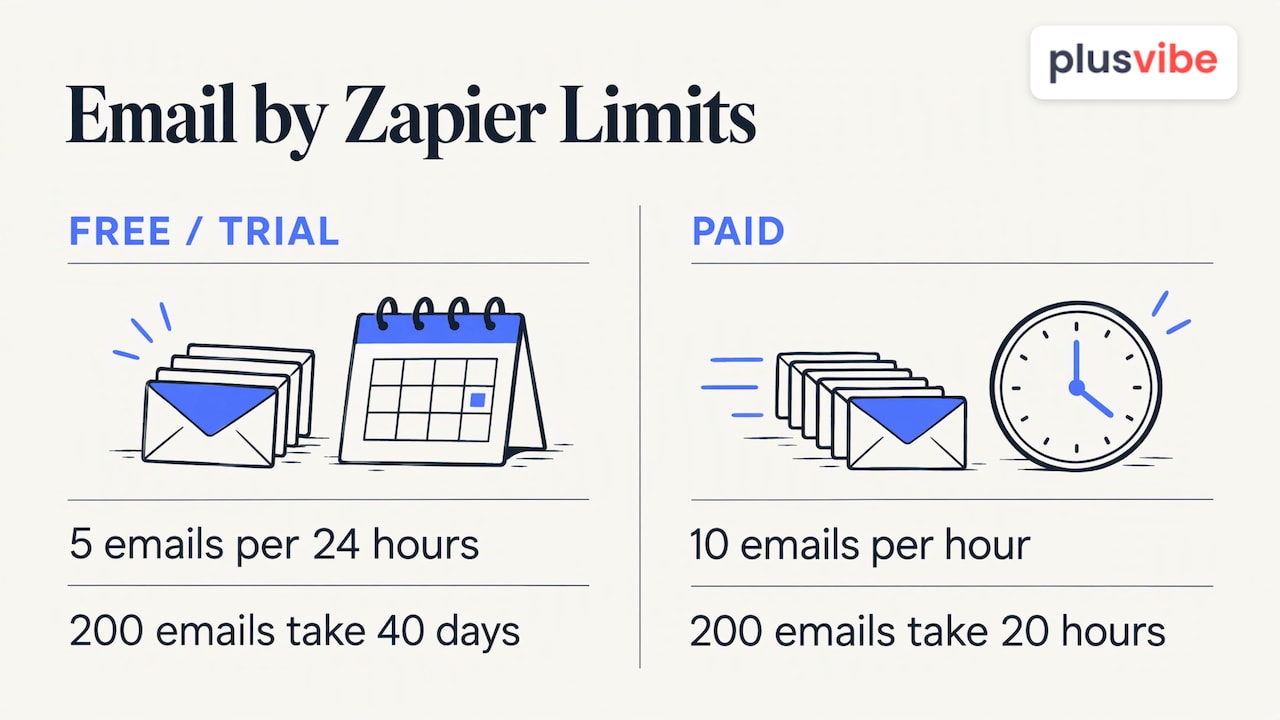
- Email by Zapier allows 5 emails per 24 hours on Free and Trial plans and 10 emails per hour on paid plans, so it is not built for volume.
- A solid Zap follows one pattern: new lead trigger, clean and filter the data, add the contact to a campaign, then update the source record.
- Automation multiplies mistakes. Verify emails, cap daily volume and watch spam rates before you switch a Zap on at scale.
- Test each step before going live, because action tests in Zapier are live and can create or change real records.
Table of Contents
- What Zapier Does in a Cold Email Workflow (and What It Doesn’t)
- Why Email by Zapier Isn’t Your Cold Email Sender
- Choosing Your Stack: Orchestrator, Data and Sending Tools
- How to Build a Zap That Moves New Prospects Into a Campaign
- Triggers and Actions Worth Using for Replies and Bounces
- Protect Deliverability While You Automate
- Stay on the Right Side of Consent Rules
- Test, Monitor and Troubleshoot Your Zap
- Our Perspective
- Put the Sending Layer Behind Your Zaps
- FAQ
- Sources
What Zapier Does in a Cold Email Workflow (and What It Doesn’t)
Think of Zapier as the dispatcher, not the driver. Zapier’s own cold email automation page describes it as connecting lead sources and CRMs to outreach platforms, handling enrichment, sequence enrollment and reply routing. It does not act as a mass sender or as a data provider.
In practice, that gives you four jobs Zapier handles well:
- Capturing prospects. A new row in Google Sheets, a Google Form submission or a Facebook Lead Ads lead can start a Zap. Zapier’s cold email marketing workflows list these as supported lead sources.
- Enrichment and validation. Before a contact reaches a campaign, the Zap can look up company details and check the address.
- Routing. Source, company or segment decides which table, sequence or owner receives the contact.
- Syncing and alerting. Replies and bounces update the CRM record (HubSpot, Salesforce and Pipedrive are the common examples in Zapier’s workflows) and ping a Slack channel.
And three jobs it does not do for you: warming up inboxes, rotating sending accounts and monitoring placement. Those belong to the sending layer. If you want the sending layer and the connector to work together, PlusVibe has its own automation features and native integrations, so Zapier only has to cover what sits outside the platform.
Why Email by Zapier Isn’t Your Cold Email Sender
A common mistake is to read “Email by Zapier” and assume it can send your sequence. Zapier’s help documentation on sending emails in Zaps states the limits plainly: 5 emails per 24 hours on Free or Trial plans and 10 emails per hour on paid plans.
Do the math for a modest campaign. Sending 200 first-touch emails a day on a paid plan would take 20 hours at the maximum rate, before a single follow-up. On a Free plan you would need 40 days.
There is a second issue. The same documentation says the app automatically appends a “Stop these emails” unsubscribe link to comply with CAN-SPAM. That is useful for notifications and light transactional messages, but it changes the look of a personal one-to-one cold email and gives you no control over sender reputation.
What the app is good for is internal messaging: an alert to your sales manager when a hot lead replies, or a summary of new prospects added this week. Use it for that, and send prospect-facing mail from a platform built for it.
Choosing Your Stack: Orchestrator, Data and Sending Tools
A cold email workflow has three layers, and the weakest one decides your results.
| Layer | Job | What to look for |
|---|---|---|
| Data source | Where prospects come from: forms, sheets, CRM, LinkedIn collection, lead scraping | Accurate contacts, clear origin, easy export |
| Orchestrator | Moves data between apps (Zapier) | Reliable triggers, filters, error replay |
| Sending platform | Warm-up, sequencing, inbox rotation, bounce handling, reply management | Private infrastructure, deliverability controls, analytics |
One GTM practitioner makes the same point in a comparison of automation platforms: the orchestrator gives you flexibility, but data quality and sending tools decide what lands in the inbox. Pick Zapier for convenience, then spend your real effort on the other two layers.
If your list is thin, fix that first. Outreach only works when there are good prospects to reach, and proven ways to grow an email list feed the top of the same workflow you are about to automate.
How to Build a Zap That Moves New Prospects Into a Campaign
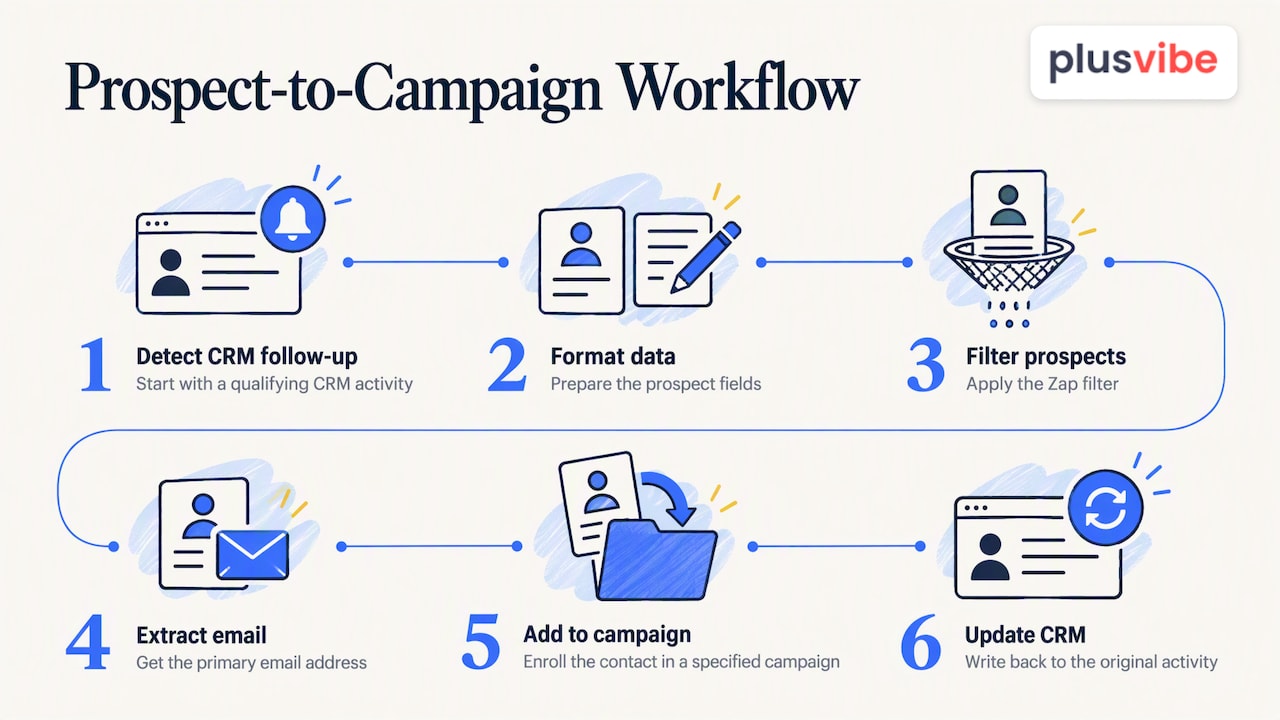
Zapier’s documented examples share one skeleton. Its CRM follow-up to outreach campaign template runs: detect a qualifying CRM follow-up, format the data, filter it, extract the primary email address, add the contact to a specified outreach campaign and update the original CRM activity. You can reuse that pattern with any lead source.
Step 1: Pick a trigger
Use a clear “new” event: a new row in a sheet, a new form response, a deal moving to a stage, or a new contact tagged “outbound”. Avoid triggers that fire on every edit, or one prospect will enter your campaign five times.
Step 2: Clean the data
Add a Formatter step to trim spaces, lowercase the email and split full names into first and last. Personalization breaks quickly when a first name arrives as “JOHN SMITH”.
Step 3: Filter out what should not be contacted
A Filter step should stop the Zap when the email is empty, the domain is a free webmail address (if you target companies), the contact already replied or the record is marked do-not-contact. Filters are your cheapest deliverability protection.
Step 4: Verify the address
Run the email through verification before it gets near a campaign. Invalid addresses create bounces, and bounces hurt the sending domain. Only addresses that pass should continue.
Step 5: Add the contact to a campaign
Send the prospect to your outreach platform with their custom fields: first name, company, the reason you are reaching out. Route by segment so a founder in fintech lands in a different sequence than an agency owner.
Step 6: Write back to the source
Update the CRM record with the campaign name and date. Without this step, a teammate will happily email the same person from another tool.
Triggers and Actions Worth Using for Replies and Bounces
Once campaigns run, Zapier earns its keep on the back end. Zapier lists new leads, campaign replies and bounce alerts as useful triggers, with CRM record updates and Slack reply alerts as typical actions (source). A practical set:
- Reply received → Slack alert. Post the prospect name, company and the first lines of the reply to a sales channel so someone answers within minutes.
- Reply received → update CRM stage. Move the deal to “conversation started” and assign an owner.
- Bounce → mark contact invalid. Flag the record and suppress it from every future list.
- Unsubscribe → do-not-contact field. Write the opt-out to every system, not just the one that received it.
- Positive reply → create task. Give the owner a follow-up task with a due date.
The unsubscribe automation matters most. A contact who opted out in one tool and gets emailed from another is the fastest route to a spam complaint.
For more ready-made flows beyond cold outreach, our own roundup of Zapier email automation recipes covers sales, marketing and operations use cases.
Protect Deliverability While You Automate
Automation removes the friction that normally limits how many emails you send. That is the danger. A Zap with a bad filter can push thousands of poorly targeted messages through in an afternoon.
Know the sender rules
Mailbox providers publish thresholds, and they apply to high-volume senders:
- Microsoft requires senders of 5,000 or more messages to its consumer email services from the same From domain to pass SPF and DKIM checks and publish DMARC, according to its Outlook.com error guidance.
- For Gmail, Google Postmaster Tools is the way to see your spam rate. The guidance is to stay under 0.1% and never approach 0.3%.
Most cold senders spread volume across many inboxes and stay far below 5,000 a day per domain, but the spam-rate guidance applies to everyone who wants to reach the inbox.
Build guardrails into the Zap
- Cap intake. Use a Delay or a batching step so only a set number of new prospects enter a campaign per day.
- Verify first. Never skip the validation step to save a few cents per contact.
- Separate domains. Send from secondary domains and protect your main one.
- Monitor placement. Check inbox placement and spam rates weekly. Our guide on catching deliverability drops early explains the signals, and the email deliverability best practices cover authentication and volume ramp-up.
Stay on the Right Side of Consent Rules
Automation does not change your legal duties. In the United States, CAN-SPAM is the baseline, and it includes a working opt-out, which is why Email by Zapier appends an unsubscribe link automatically. Honor every opt-out across all your tools, as described above.
If you email people in the UK, the rules differ by recipient. The ICO explains that under PECR, marketing email to individuals, sole traders and some partnerships needs consent or the soft opt-in, while limited companies and other businesses face no PECR consent requirement, with legitimate interests or consent as likely lawful bases under data protection law (ICO guidance). Because your Zap may pull mixed lists, add a field that records the type of recipient and filter on it. If you target EU contacts or run large campaigns, ask a privacy lawyer to review your process.
Test, Monitor and Troubleshoot Your Zap
A broken Zap rarely announces itself. Build testing into the routine.
Before launch. Zapier’s guidance on testing Zap steps says to test every trigger and action as you build and compare returned fields with what the source and destination apps show. Remember that action tests are live: they can create or modify real records. Point the test at a dummy campaign and a test CRM contact, not your live list. You can also test email deliverability with a seed test before the first real send.
After launch. Zapier’s troubleshooting guide separates errored, safely halted, on-hold, handled-error and scheduled runs. Its advice: open the failed step’s HTTP log, fix the cause, replay failed tasks and turn on Autoreplay for transient failures.
A simple weekly checklist:
- Scan Zap history for errors and halted runs.
- Compare the number of leads captured with the number added to campaigns. A gap means a filter or step is dropping contacts.
- Review bounce and spam rates in your sending platform.
- Spot-check five contacts end to end: source, campaign, CRM.
Our Perspective
We built PlusVibe around one belief: the sending layer is where cold email is won or lost. Zapier is excellent at moving data, and we’re happy when teams use it, but a connector can’t fix a damaged domain.
That’s why we focus on private warm-up, isolated sending infrastructure, dedicated connector IPs and inbox rotation. These controls are designed to reduce spam placement and bounces before your Zap ever hands over a prospect.
Our advice is to keep your stack simple. One data source, one orchestrator, one sending platform with clear controls. Add automation only where a human is repeating the same click. When the foundation is private and transparent, automation makes you faster instead of making your mistakes bigger.
Yaro
Put the Sending Layer Behind Your Zaps
If Zapier is feeding your pipeline, PlusVibe is the place for those prospects to land. You get sequencing, private email warm-up, inbox rotation, deliverability monitoring, AI-powered enrichment and email verification in one platform, plus integrations with tools such as HubSpot, Slack, Gmail and Outlook.
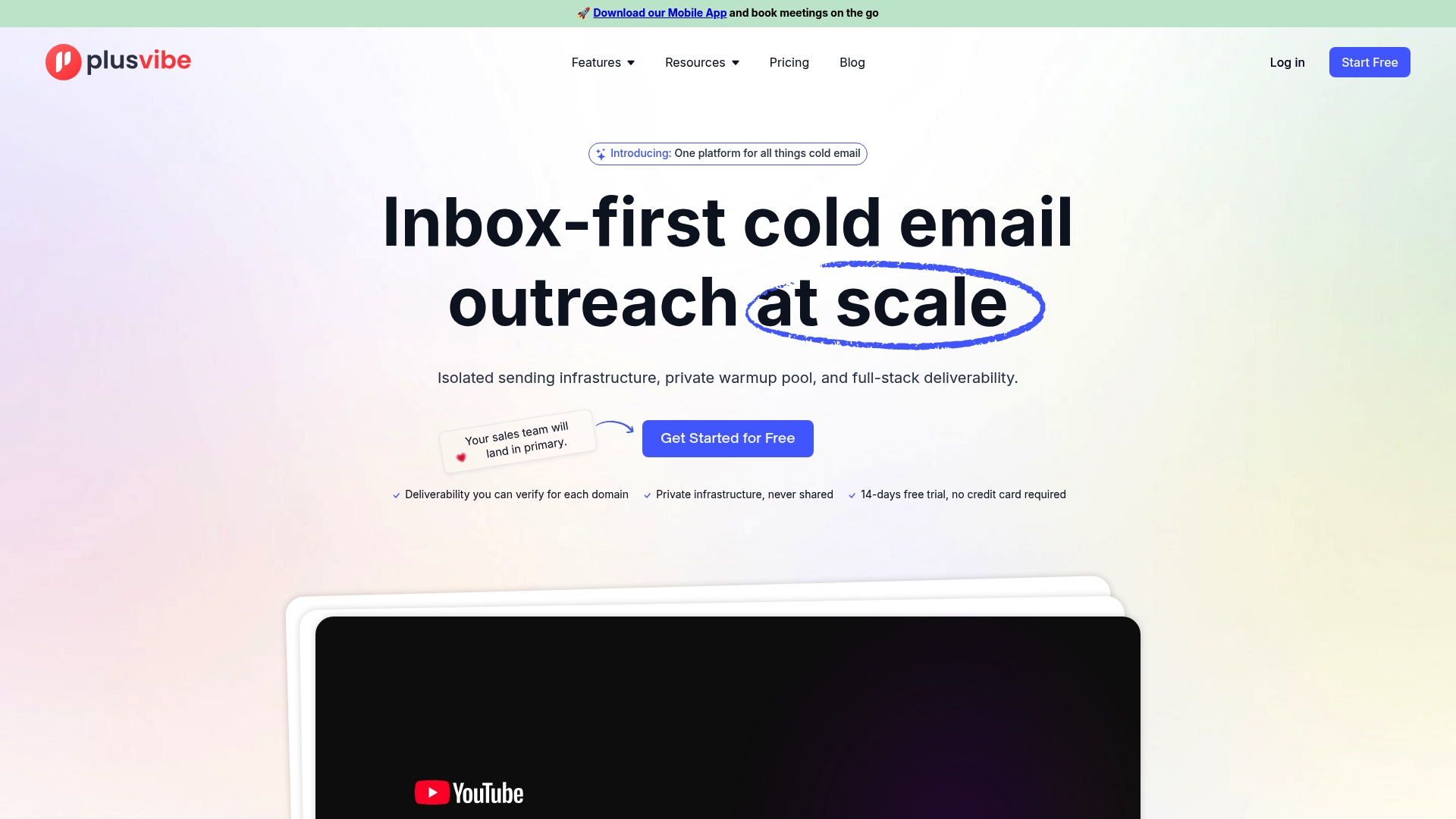
Plans for individuals run from $37 to $58 per month (Personal) and $77 to $220 per month (Business), and agencies can start at $497 per month. Mailboxes can be added from $4 per month per Google Workspace inbox or $4.50 per month per Microsoft 365 inbox. You can start with a free trial and compare options on the plans page. If you would rather not configure domains and inboxes yourself, see our done-for-you email setup, listed at $1,500 per month.
FAQ
Can Zapier send cold emails?
Technically yes, through Email by Zapier, but only in tiny volumes: 5 emails per 24 hours on Free and Trial plans and 10 per hour on paid plans. It also appends an unsubscribe link automatically. For real campaigns, use Zapier to feed an outreach platform that handles sending.
What is the best trigger for a cold email Zap?
A clean “new” event works best: a new row in a sheet, a new form submission or a new CRM contact with an outbound tag. Add a filter right after it so incomplete or duplicate records never reach a campaign.
How do I stop duplicate prospects from entering a campaign?
Search your CRM or sheet for the email address before the add-to-campaign step, and filter out any match. Then write the campaign name back to the record after enrolling, so the next Zap run sees it.
Will automation hurt my deliverability?
Not by itself. Problems come from unverified addresses, sudden volume jumps and ignored opt-outs. Verify emails, cap daily intake, keep spam rates under 0.1% in Google Postmaster Tools and monitor placement every week.
Do I need a paid Zapier plan for cold email workflows?
That depends on how many tasks your workflow uses and which apps you connect. Check Zapier’s current plan page for task limits, then size the plan to your lead volume rather than your email volume, since the sending happens elsewhere.
Sources
- Cold Email Outreach Automations & AI Workflows | Zapier
- Cold Email Marketing Automations & AI Workflows | Zapier
- Add CRM follow-ups into targeted outreach campaign | Zapier
- Send emails in Zap workflows | Zapier Help
- Test Zap steps | Zapier Help
- How to troubleshoot errors in Zap workflows | Zapier Help
- Fix NDR error 550 5.7.515 in Outlook.com | Microsoft Support
- Google/Yahoo 2024 Deliverability Guidelines | ActionKit
- Sending direct marketing: Choosing your lawful basis | ICO
- n8n vs Make vs Zapier: Which Scales Best for GTM? | AtomGTM
- How to grow an email list: Proven strategies for 2026